
Open Source Alternatives to PhotoRoom
Photo Border Maker is a browser-based alternative for users who need this focused result without installing a proprietary desktop app or entering a larger hosted workflow.
This research compares that workflow with PhotoRoom while keeping the outbound source link at the bottom after the analysis.
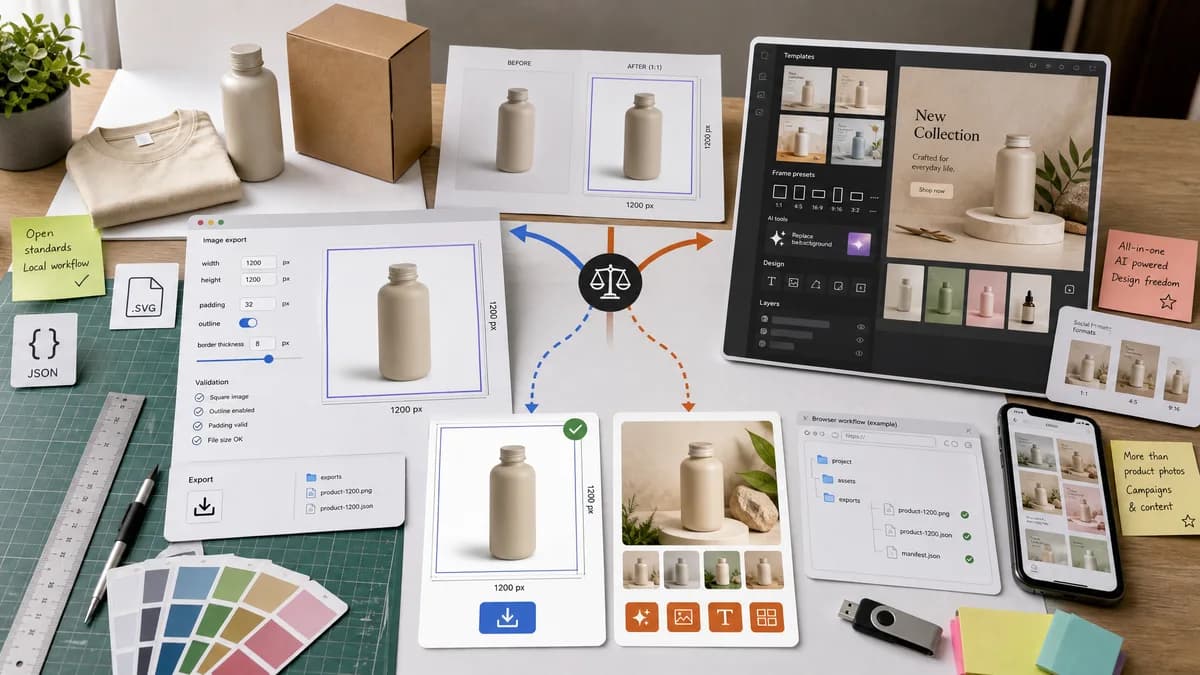
Why Photo Border Maker fits
TextFaker offers clean border, outline, and padding controls for product photos and listings with explicit output dimensions and validation.
What PhotoRoom offers
PhotoRoom supports mobile and web design workflows, frames, outlines, templates, and AI backgrounds for product and promotional images.
Open alternative signals
AI features
Photo Border MakerNo AI required for deterministic border rendering.
PhotoRoomAI backgrounds, product templates, and layer editing.
Exact output
Photo Border MakerReports border, canvas, crop, and export fields.
PhotoRoomFrame and outline controls are part of a product design editor.
Privacy
Photo Border MakerLocal image operation for supported files.
PhotoRoomPhotoRoom app/web service workflow.
Marketplace use
Photo Border MakerCan validate square canvas, minimum pixels, and safe padding for listings.
PhotoRoomStrong product photography and ecommerce design tools.
Decision guide
Private product image padding, marketplace border consistency, and exact file outputs.
AI background generation, product templates, batch product-image editing, and commercial creative workflows.
Side-by-side open source alternative comparison
| Decision point | Photo Border Maker | PhotoRoom | Takeaway |
|---|---|---|---|
| Product photos | Our workflowConsistent borders and padding for marketplace images. | Proprietary workflowAI product-photo editor with templates and backgrounds. | PhotoRoom is stronger for product scene creation; TextFaker is stronger for exact local padding. |
| Determinism | Our workflowBorder math and output properties are explicit. | Proprietary workflowMany creative outcomes are template or AI driven. | TextFaker keeps the first version deterministic. |
| Mobile | Our workflowNo-install mobile browser workflow. | Proprietary workflowNative mobile app workflow documented by PhotoRoom. | Both serve mobile users, but TextFaker minimizes steps. |
| Privacy | Our workflowSource photo remains local for core rendering. | Proprietary workflowService workflow around design projects and AI features. | Local operation is compelling for product drafts and client images. |
| Validation | Our workflowCan check square output, transparent background, border thickness, and file size. | Proprietary workflowEditor preview is primary. | Marketplace-ready checks make the tool practical. |
| Scope | Our workflowBorder maker only. | Proprietary workflowFull product photo creation platform. | Do not overpromise feature parity. |
Detailed research
Demand Angle
Product-image tools often include frames and outlines because ecommerce and social assets need consistent padding and subject separation.
- Include marketplace-style presets: square canvas, transparent PNG, white background, and equal padding.
- Show when a subject crop would violate a selected safe margin if the tool later adds object detection.
Implementation Notes
For the first version, avoid AI background or automatic subject extraction. Keep operations based on the whole image rectangle unless a user manually selects crop coordinates.
- Expose manual crop x, y, width, and height.
- Validate output square, minimum dimensions, and file type.
Testing
A fixture product image can be padded to 2000 x 2000 with a 100 px border and verified by dimensions and sampled corner pixels.
Positioning
The comparison clearly say PhotoRoom is better for full AI product-photo workflows.
Research notes
- PhotoRoom help describes adding a frame to a design on iPhone, iPad, and Android.
- PhotoRoom official outline pages describe selecting a product or object layer and enabling outline controls.
- This comparison is useful for ecommerce users who need clean border consistency but not AI backgrounds.
Official source
The proprietary product link is included once here for source checking after the alternative analysis.
Official PhotoRoom source