
Open Source Alternatives to PicMonkey
Photo Border Maker is a browser-based alternative for users who need this focused result without installing a proprietary desktop app or entering a larger hosted workflow.
This research compares that workflow with PicMonkey while keeping the outbound source link at the bottom after the analysis.
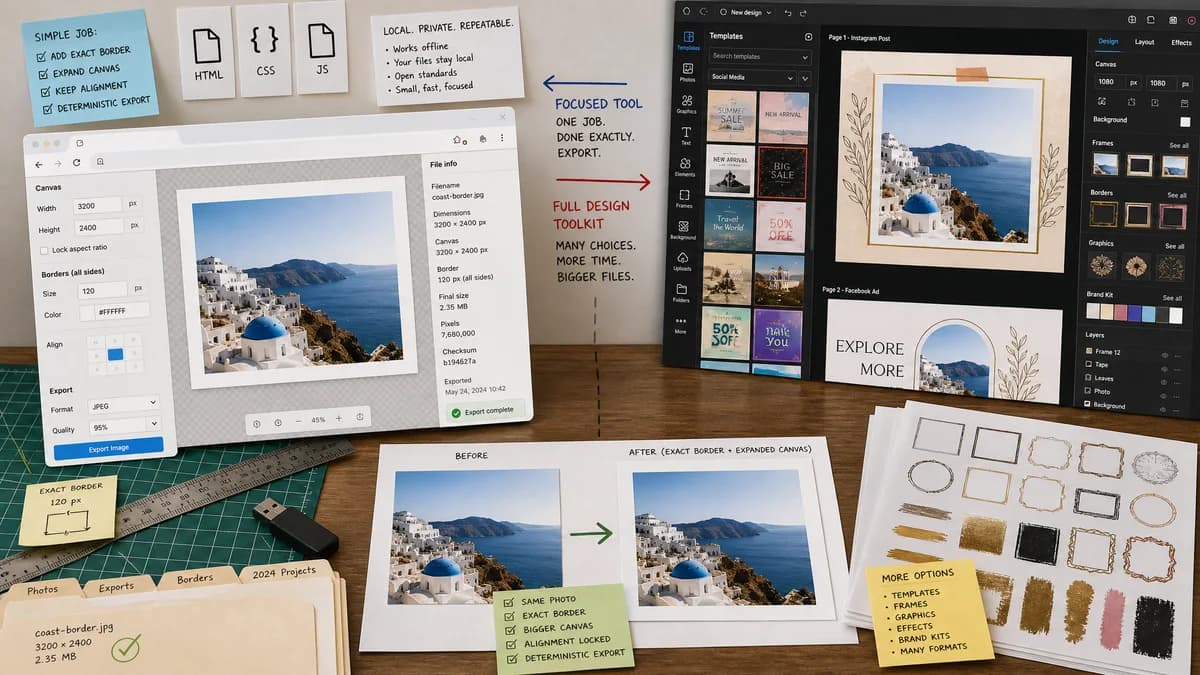
Why Photo Border Maker fits
TextFaker covers exact border and canvas expansion operations with local preview and deterministic export metadata.
What PicMonkey offers
PicMonkey is a photo editing and design platform for social graphics, ads, logos, covers, and other creative outputs, with tools such as frames, outlines, and border graphics.
Open alternative signals
Scope
Photo Border MakerDedicated image border maker.
PicMonkeyPhoto editor and graphic design maker.
Precision
Photo Border MakerNumeric border sizes and output validation.
PicMonkeyVisual editor tools and design assets.
Local workflow
Photo Border MakerBrowser-local rendering for supported images.
PicMonkeyHosted design software.
Output checks
Photo Border MakerMIME, dimensions, border pixels, crop box, and file size reported.
PicMonkeyDownload from editor after manual design work.
Decision guide
Simple exact borders, print-safe margins, private local export, and repeatable settings.
Creative graphics, brand assets, social layouts, and decorative frame design.
Side-by-side open source alternative comparison
| Decision point | Photo Border Maker | PicMonkey | Takeaway |
|---|---|---|---|
| Task fit | Our workflowOptimized for adding borders to a photo file. | Proprietary workflowOptimized for many design and branding tasks. | TextFaker is faster for the narrow job. |
| Creative library | Our workflowLimited deterministic presets. | Proprietary workflowBroader frame, outline, and graphic assets. | PicMonkey remains better for designed compositions. |
| Testing | Our workflowAutomated tests verify border geometry and output metadata. | Proprietary workflowResults are judged mainly in an editor preview. | TextFaker emphasizes reliable, inspectable output. |
| Our workflowCan calculate print size from pixels and DPI and flag safe-zone issues. | Proprietary workflowGeneral design editor. | Print checks are a useful utility feature. | |
| Privacy | Our workflowNo source upload for the core operation. | Proprietary workflowCloud design workflow. | Local processing is a core distinction. |
| Mobile | Our workflowSmall control set suitable for mobile browser use. | Proprietary workflowFull editor with more navigation. | Single-purpose mobile usability matters. |
Detailed research
Demand Angle
PicMonkey has long been used for photo borders and social graphics. A TextFaker alternative can target the simpler subtask with clearer output data.
- Add border presets for thumbnails, listings, social posts, and common print sizes.
- Use a copyable result summary for support teams and repeat workflows.
Implementation Notes
Avoid building a design editor. Implement canvas expansion, color fill, optional rounded corners, and export format conversion.
- Keep the preview responsive with downscaled rendering but export from the full-resolution source.
- Expose whether preview scale differs from export scale.
Validation
Support deterministic warnings such as output exceeds browser canvas limit or selected border makes image smaller than safe-zone requirement.
- Tests cover browser canvas limits where practical.
Positioning
Frame the comparison as focused utility versus full creative editor.
Research notes
- PicMonkey's official site positions the product as photo editing and graphic design software for social and brand visuals.
- PicMonkey blog content describes outline controls with color and thickness settings and frame assets such as rectangular border clip art.
- Third-party tutorials and user discussions frequently cite PicMonkey for adding white borders to photos and thumbnails, indicating historical demand around this workflow.
Official source
The proprietary product link is included once here for source checking after the alternative analysis.
Official PicMonkey source