
Photo Collage Maker vs Adobe Express
Photo Collage Maker is the baseline in this comparison: Create a precise photo collage in your browser with grid layouts, crop controls, spacing, background color, and verified downloadable image output.
Adobe Express offers a free collage generator with uploads, layout exploration, templates, editing tools, and social output options.
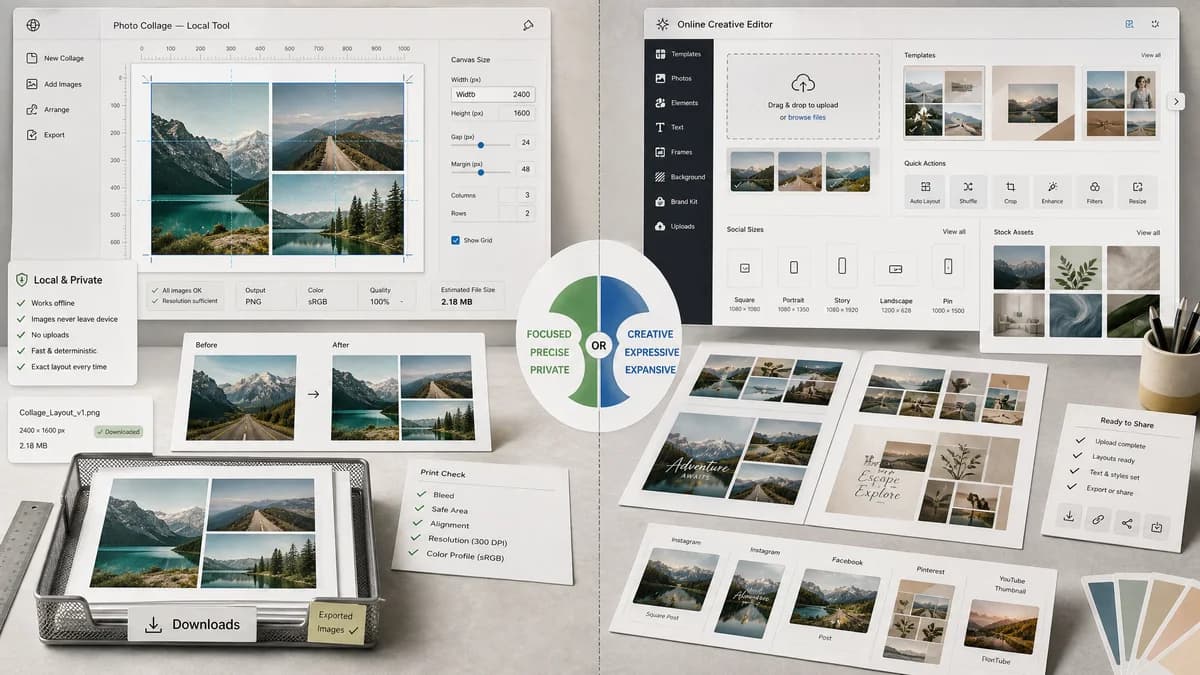
Quick verdict
Choose TextFaker for private local processing and deterministic layout validation. Choose Adobe Express for a creative editor with Adobe templates, stock assets, and design polish.
How Photo Collage Maker fits
TextFaker provides a simpler local collage tool with exact numeric controls and downloadable outputs, designed for repeatable utility tasks rather than broad creative editing.
How Adobe Express fits
Adobe Express is a polished editor backed by Adobe's broader content platform. It supports upload, collage creation, layout shuffling, text, frames, and social design workflows.
Side-by-side comparison
| Decision point | Photo Collage Maker | Adobe Express | Takeaway |
|---|---|---|---|
| Collage setup | Our workflowManual, predictable layout presets and exact numeric controls. | Competitor workflowUpload images and explore shuffled or template-based layouts. | TextFaker is better for repeatability; Adobe Express is better for creative exploration. |
| Local processing | Our workflowShould render and export entirely in the browser. | Competitor workflowRuns as an online Adobe service with cloud-account-oriented features. | TextFaker can make privacy a first-class feature. |
| Editing scope | Our workflowFocuses on collage assembly, fit, spacing, background, dimensions, and export. | Competitor workflowIncludes image enhancement, filters, text, frames, and broader design tools. | Adobe Express has more creative editing breadth. |
| Output validation | Our workflowCan expose a validation panel for required image count, canvas size, empty cells, and output type. | Competitor workflowOfficial documentation focuses on creation steps, not verifiable output metadata. | TextFaker can align with automated tool tests. |
| Mobile workflow | Our workflowCan use compact steppers, segmented fit controls, and touch-friendly image order changes. | Competitor workflowOffers web and app workflows with a larger editor surface. | TextFaker can be lighter for quick phone use. |
| Best use case | Our workflowPrivate grids for family photos, product comparisons, image contact sheets, and social presets. | Competitor workflowDesigned social graphics, marketing collateral, and stylized photo compositions. | The tools can coexist for different levels of design intent. |
Use Photo Collage Maker when
- Local photo handling
- Precise grid and crop reporting
- Simple exports with testable MIME and dimensions
- Users who do not need a full creative suite
Use Adobe Express when
- Adobe ecosystem users
- Template-led social and marketing designs
- Collages that need text, effects, frames, or stock photos
- Users who prefer guided creative tools
Detailed comparison
Demand Signal
Adobe maintains both marketing and help pages for collage creation, which indicates a mainstream quick-action use case. The help page documents a simple upload and collage flow, including layout exploration.
- Users want a quick route from selected photos to one combined image.
- Layout shuffling implies demand for low-effort arrangement, but not necessarily deterministic repeatability.
Differentiation
TextFaker can avoid Adobe Express's broad editor complexity by making every setting explicit and testable: image order, cell assignment, fit mode, gutters, output dimensions, and final file metadata.
- Add a copyable JSON-style layout summary in the UI.
- Show validation warnings before export.
Implementation Notes
A deterministic renderer should calculate source rectangles from intrinsic image dimensions and destination rectangles from the selected grid. This creates stable crop-box data for tests and for users who care whether faces or products were cut off.
- Support cover, contain with matte background, and no-crop modes.
- Store crop boxes as x, y, width, height in source pixels.
Risks
Adobe Express is much stronger for templates and visual polish. TextFaker should not overreach into decorative design features unless they remain deterministic.
- Keep the first version focused on grids, contact sheets, and social presets.
- Avoid AI or aesthetic layout claims that automated tests cannot verify.
Research notes
- Adobe official sources confirm collage maker and collage editor workflows.
- Adobe's layout shuffle suggests a useful contrast with deterministic layout output.
- TextFaker should emphasize local rendering and measurable results rather than creative-suite breadth.
Official source
The only outbound competitor link on this page is placed here for source checking after the comparison.
Official Adobe Express source