
Photo Collage Maker vs Canva
Photo Collage Maker is the baseline in this comparison: Create a precise photo collage in your browser with grid layouts, crop controls, spacing, background color, and verified downloadable image output.
Canva is a broad design platform with collage templates, grids, uploads, design elements, and device downloads.
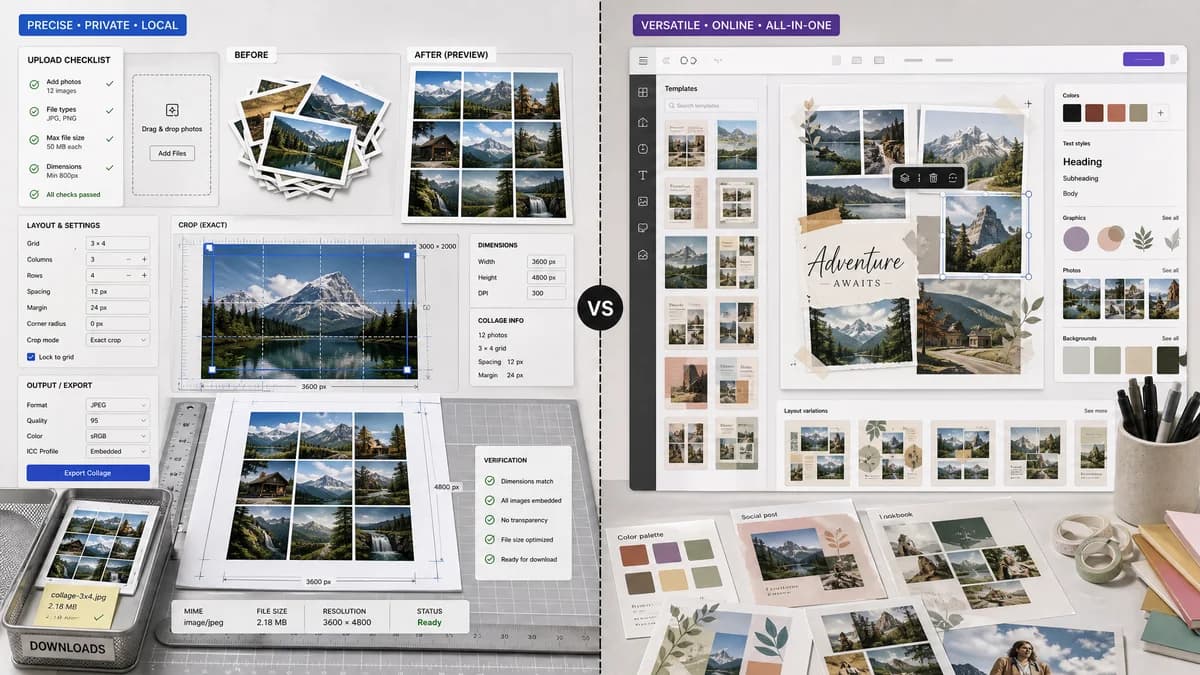
Quick verdict
Choose TextFaker when the job is to make a precise, private, testable collage quickly. Choose Canva when the user wants a broader design workspace with templates, graphics, and brand-style editing.
How Photo Collage Maker fits
TextFaker Photo Collage Maker focuses on fast browser-local collage construction with exact canvas dimensions, grid counts, crop boxes, spacing values, output MIME type, and downloadable files that can be verified automatically.
How Canva fits
Canva is best known for polished templates and an all-purpose editor. It is strong for social graphics and design assets, but it is heavier than a deterministic local utility and is not positioned around verifiable crop geometry or privacy-first local processing.
Side-by-side comparison
| Decision point | Photo Collage Maker | Canva | Takeaway |
|---|---|---|---|
| Primary workflow | Our workflowChoose a deterministic grid or preset, upload images, set dimensions and fit behavior, export locally. | Competitor workflowStart from a designer-made template or grid inside a larger visual editor. | TextFaker can be more direct for utility collage creation. |
| Privacy model | Our workflowDesigned to run locally in the browser without uploading source photos. | Competitor workflowCloud-oriented design platform with account and asset workflows. | TextFaker has a clearer privacy promise for personal photos. |
| Deterministic output | Our workflowReports output dimensions, cell count, crop rectangles, MIME type, filename, and file size. | Competitor workflowFocuses on visual editing and downloads rather than machine-checkable layout metadata. | TextFaker is easier to test and document as a reliable utility. |
| Mobile friendliness | Our workflowShould expose compact controls for templates, gutters, fit mode, and export on phone screens. | Competitor workflowCanva supports mobile use but carries a large multipurpose editing surface. | TextFaker can optimize for a narrower mobile task. |
| Template depth | Our workflowLikely fewer decorative templates, with emphasis on reliable grids and social/print presets. | Competitor workflowLarge library of customizable collage templates and design elements. | Canva wins on decorative template variety. |
| Testing path | Our workflowAutomated tests can assert row count, column count, final canvas size, crop box list, and Blob MIME type. | Competitor workflowVisual quality and template selection are harder to validate without human judgment. | TextFaker can fit the existing deterministic tool pattern better. |
Use Photo Collage Maker when
- Private browser-local collage creation
- Exact rows, columns, gutters, crop boxes, and canvas dimensions
- Automated validation of output size, file type, and layout metadata
- Quick utility workflows without account-oriented design overhead
Use Canva when
- Template-driven social graphics
- Users already working inside Canva
- Brand kits, stock elements, and team design workflows
- Decorative layouts that benefit from a general design suite
Detailed comparison
Demand Signal
Canva's dedicated collage pages show mainstream demand for turning multiple images into shareable designs. Public user discussions also show that people use Canva for collage-like layouts but can hit workflow friction when trying to place collages into other frames or create larger multi-photo layouts.
- User problem: combine many personal images into one social, print, or memory asset.
- Opportunity: serve the simple collage case without requiring a full design workspace.
Feature Gap
Canva is broad and template-rich, while TextFaker can be narrow and measurable. The most useful differentiation is exact layout reporting: every cell, crop, gutter, and final dimension should be visible as data.
- Expose numeric canvas presets such as 1080 x 1080, 1080 x 1920, 1200 x 630, and print sizes.
- Show per-image fit mode and crop rectangle.
Implementation Notes
Use canvas rendering with object-fit style calculations for cover, contain, and stretch. Keep all state serializable so the same images and options produce the same layout metadata.
- Test with generated fixture images of known dimensions.
- Assert output width, height, row count, column count, gutter pixels, and download MIME type.
Positioning
The comparison should avoid claiming better design quality. The honest position is private, precise, and fast versus Canva's broader creative platform.
Research notes
- Official Canva research confirms template-based collage creation and downloads.
- Canva-related community threads show users needing larger collages and editable frame workflows.
- TextFaker should not compete on template volume; it should compete on local processing and deterministic geometry.
Official source
The only outbound competitor link on this page is placed here for source checking after the comparison.
Official Canva source