
Photo Collage Maker vs Fotor
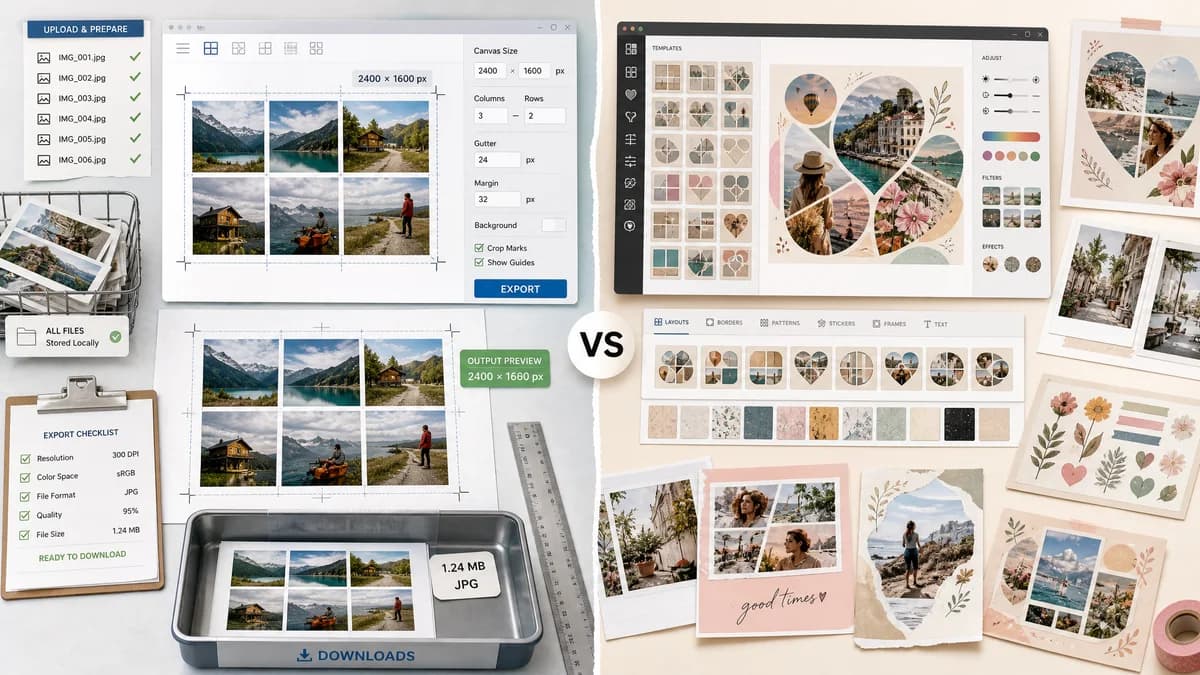
Photo Collage Maker is the baseline in this comparison: Create a precise photo collage in your browser with grid layouts, crop controls, spacing, background color, and verified downloadable image output.
Fotor provides online collage creation with photo grids, custom shapes, heart layouts, templates, and cross-platform photo-editing features.
Quick verdict
Choose TextFaker for exact output control and local validation. Choose Fotor for richer creative template styles and broader online photo editing.
How Photo Collage Maker fits
TextFaker is a utility-first collage maker for people who need clear dimensions, consistent grids, local photo handling, and deterministic export checks.
How Fotor fits
Fotor offers a broad editing environment with many templates and creative collage styles. It is suited to users who want both collage assembly and decorative editing options.
Side-by-side comparison
| Decision point | Photo Collage Maker | Fotor | Takeaway |
|---|---|---|---|
| Layout types | Our workflowStructured grids, rows, columns, contact sheets, social presets, and optional simple mosaics. | Competitor workflowClassic grids, custom shapes, heart layouts, and many templates. | Fotor has broader decorative layouts; TextFaker can be stronger for predictable geometry. |
| Output reporting | Our workflowShows final pixel size, source image count, cells used, crop boxes, gutters, and export format. | Competitor workflowHighlights template choices and visual creation rather than detailed numeric reports. | TextFaker is better for users who need measurable results. |
| Privacy | Our workflowLocal browser rendering avoids uploading source files. | Competitor workflowOnline editor model with cloud platform features. | TextFaker can be simpler for sensitive family, school, or product photos. |
| Learning curve | Our workflowSmall set of controls and validation messages. | Competitor workflowMore creative choices and editing modes. | TextFaker can feel faster for one-off utility tasks. |
| Mobile output | Our workflowCan include fixed social presets and downloadable PNG or JPEG generated in-browser. | Competitor workflowSupports online creation across devices with richer creative tooling. | Both can support mobile, but TextFaker should optimize for small-screen clarity. |
| Testability | Our workflowFixture images can verify that cells and crop rectangles are deterministic. | Competitor workflowTemplate aesthetic outcomes are less suited to automated validation. | TextFaker matches the site's deterministic test expectations. |
Use Photo Collage Maker when
- Exact grid and canvas creation
- Privacy-sensitive personal photos
- Print or social image dimensions that must match requirements
- Automated verification of generated files
Use Fotor when
- Creative template browsing
- Shape collages and decorative designs
- Users who want editing tools around the collage workflow
- Cross-platform photo editing
Detailed comparison
Demand Signal
Fotor's official page targets many collage intents, including structured grids and creative shapes. Public app and forum discussions around collage makers show users also care about cost, watermarks, full-resolution export, and avoiding unwanted restrictions.
- Users need both everyday grids and polished social layouts.
- A utility tool can serve the measurable side of that demand.
Feature Gap
Fotor's template variety is not the best battle for TextFaker. The better gap is transparent, deterministic rendering: users can see exactly how each uploaded image maps into each cell before download.
- Show cell index and assigned filename.
- Show source crop and destination rectangle.
Implementation Notes
Support common presets plus custom dimensions. For each render, compute a stable layout array and display it as a table so tests can read values from the DOM.
- Validate at least two images before enabling export.
- Warn when the selected layout has more cells than images.
Content Angle
The comparison should frame TextFaker as practical and private, not as a replacement for Fotor's creative catalog. Good examples include product grids, school handouts, printable contact sheets, and uncropped cataloging collages.
Research notes
- Fotor's official page confirms classic grids, custom shapes, and many templates.
- Public user discussions show demand for free or low-friction collage tools with full-resolution outputs.
- TextFaker should prioritize dimensions, file checks, and crop transparency over template count.
Official source
The only outbound competitor link on this page is placed here for source checking after the comparison.
Official Fotor source