
Photo Collage Maker vs Google Photos Collage
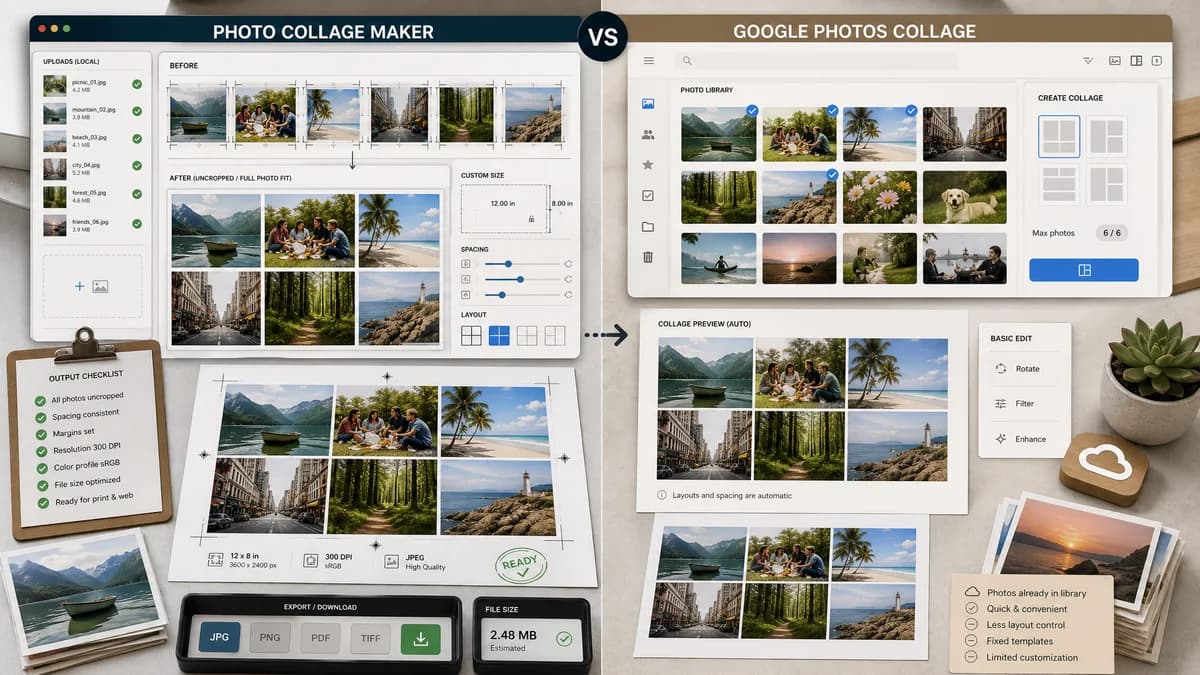
Photo Collage Maker is the baseline in this comparison: Create a precise photo collage in your browser with grid layouts, crop controls, spacing, background color, and verified downloadable image output.
Google Photos includes a collage creation feature for selected photos, with documented desktop selection limits and additional app-based editing.
Quick verdict
Choose TextFaker for custom layout control, local file handling, and exact output validation. Choose Google Photos when the desired photos are already in Google Photos and a basic built-in collage is enough.
How Photo Collage Maker fits
TextFaker should serve users who want more control than a built-in gallery collage: custom dimensions, more predictable layouts, no-crop modes, spacing controls, local uploaded files, and downloadable output metadata.
How Google Photos Collage fits
Google Photos is convenient for users whose images are already in their library. It is not a dedicated collage utility and public support threads show limits around photo counts, layout changes, and preserving full uncropped images.
Side-by-side comparison
| Decision point | Photo Collage Maker | Google Photos Collage | Takeaway |
|---|---|---|---|
| Photo source | Our workflowUpload local files directly into the browser. | Competitor workflowWorks from photos selected in Google Photos. | TextFaker is better for arbitrary local files; Google Photos is convenient for library images. |
| Image count | Our workflowCan support configurable limits based on browser performance and canvas size. | Competitor workflowOfficial desktop help documents selecting up to 9 photos. | TextFaker can support larger contact-sheet use cases. |
| Layout control | Our workflowRows, columns, gutters, canvas size, and fit mode are explicit. | Competitor workflowBuilt-in collage feature with more limited layout control, based on public support questions. | TextFaker can solve layout customization gaps. |
| Cropping | Our workflowCan include contain mode to preserve full images and show any crop rectangles for cover mode. | Competitor workflowPublic support threads ask how to create same-size uncropped collage photos. | No-crop mode is a high-value TextFaker requirement. |
| Output validation | Our workflowReports exact dimensions, cell count, empty cells, format, and file size. | Competitor workflowBuilt-in photo feature does not center on machine-readable output reports. | TextFaker is stronger for deterministic verification. |
| Privacy model | Our workflowProcesses selected files locally in the browser. | Competitor workflowTied to a cloud photo library service. | TextFaker appeals to users who do not want to upload or sync photos first. |
Use Photo Collage Maker when
- Custom row and column layouts
- More than basic built-in collage needs
- No-crop or crop-transparent collages
- Exact downloadable PNG or JPEG with metadata
Use Google Photos Collage when
- Google Photos library users
- Fast basic collages from already-synced photos
- Casual mobile photo memories
- Users who do not need custom geometry
Detailed comparison
Demand Signal
Google Photos support and community pages provide strong public demand evidence. Users ask about making collages with more photos, changing layouts, and preserving full uncropped images for cataloging.
- User problem: more than a small number of photos.
- User problem: same-size cells without cropping.
- User problem: layout control on desktop.
Feature Gap
Google Photos is convenient but not a dedicated precision collage maker. TextFaker can offer exact dimensions and a no-crop fit mode that preserves the full image with a chosen background.
- Add contain mode as a named option.
- Show letterbox or pillarbox background color when no-crop is used.
Implementation Notes
No-crop mode is deterministic: scale each source image to fit inside its destination cell, center it, and fill the remaining area with a matte color. Tests can assert the destination rectangle and matte area.
- Use source aspect ratio to calculate fitted width and height.
- Report unused area per cell if helpful.
Comparison Angle
This page can be highly practical: TextFaker is not a photo library replacement, but it is a better tool when the user needs custom geometry and local files.
Research notes
- Google Photos official help documents desktop collage creation and a selection limit of up to 9 photos.
- Google Photos community threads show users asking for more photos, layout changes, and uncropped same-size images.
- TextFaker should include no-crop mode and custom grid count to address these public problems.
Official source
The only outbound competitor link on this page is placed here for source checking after the comparison.
Official Google Photos Collage source