
Photo Collage Maker vs Pixlr
Photo Collage Maker is the baseline in this comparison: Create a precise photo collage in your browser with grid layouts, crop controls, spacing, background color, and verified downloadable image output.
Pixlr offers an online collage maker with drag-and-drop uploads, professional layouts, border and spacing customization, AI layout suggestions, and downloads.
Quick verdict
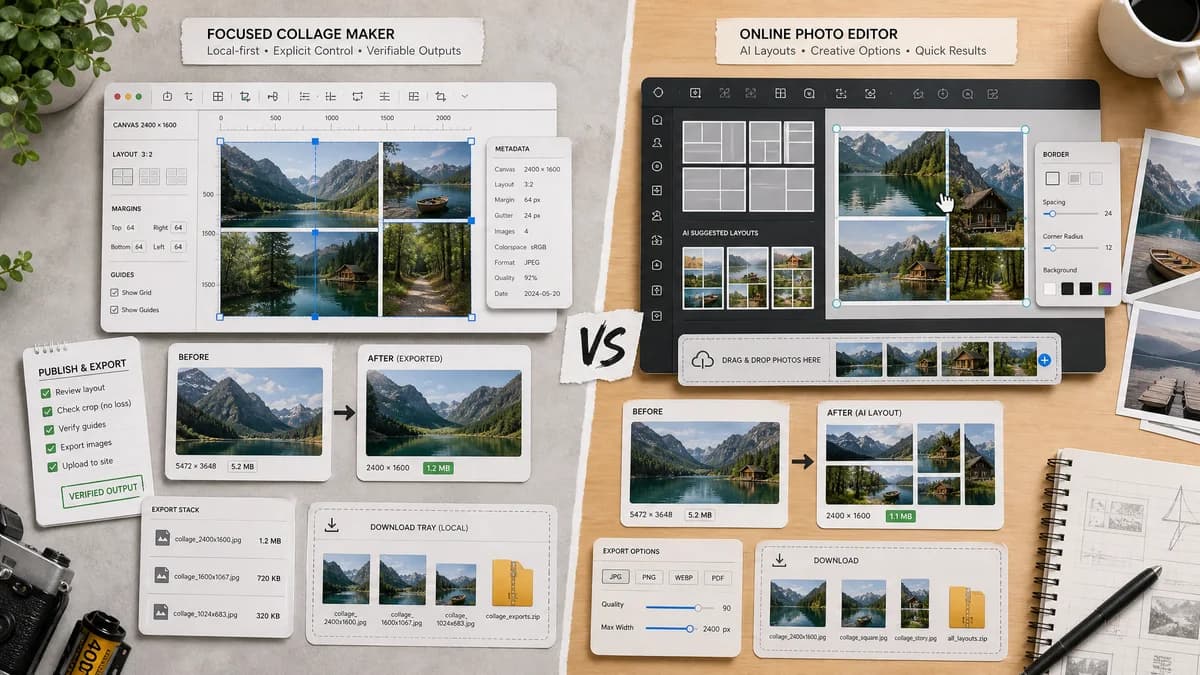
Choose TextFaker for transparent crop control, local rendering, and verifiable outputs. Choose Pixlr for a richer online editor with AI-suggested collage layouts.
How Photo Collage Maker fits
TextFaker provides a local-first collage maker with explicit crop controls and layout metadata, addressing user pain around automatic positioning and unwanted cropping.
How Pixlr fits
Pixlr has a dedicated collage tool and broader online photo editor. It is useful for quick visual layouts and AI-suggested arrangements, but public feedback shows users care about being able to edit and reposition images after layout selection.
Side-by-side comparison
| Decision point | Photo Collage Maker | Pixlr | Takeaway |
|---|---|---|---|
| Image positioning | Our workflowShows and controls fit mode, anchor, and crop rectangle per image. | Competitor workflowOffers drag-and-drop and AI-suggested layouts; public user feedback has criticized inability to reposition in some states. | TextFaker should make crop transparency a core feature. |
| Layout generation | Our workflowDeterministic rows, columns, presets, and optional simple auto-grid based on image count. | Competitor workflowUses smart or AI-suggested layouts along with customizable borders and spacing. | Pixlr is more exploratory; TextFaker is more predictable. |
| Privacy | Our workflowDesigned to process files locally in the browser. | Competitor workflowOnline editor platform. | TextFaker can better address no-upload concerns. |
| Validation | Our workflowReports exact canvas, cell rectangles, crop boxes, output type, and file size. | Competitor workflowEmphasizes visual download rather than explicit validation metadata. | TextFaker can produce testable proof of the result. |
| Editor breadth | Our workflowPurpose-built for collages. | Competitor workflowPart of a broad AI photo editor and image generator ecosystem. | Pixlr wins when users need more editing features. |
| User friction | Our workflowCan avoid account, AI, or template-decision overhead for basic grid creation. | Competitor workflowMore feature-rich interface and creative flow. | TextFaker can be faster for simple image combining. |
Use Photo Collage Maker when
- Users worried about unwanted cropping
- Exact crop-box and fit-mode reporting
- Private browser-local photo handling
- Repeatable contact sheets and social grids
Use Pixlr when
- AI-suggested layouts
- Users who want an online photo editor around collage creation
- Fast decorative collages
- Pixlr users already in its editing workflow
Detailed comparison
Demand Signal
Pixlr's dedicated collage page validates the category. A public Pixlr community thread is especially useful research because it identifies a concrete user need: automatic positioning can cut off important photo areas, so users want editing and repositioning controls.
- User problem: avoid unintended crops.
- User problem: edit the collage after selecting a style.
Product Requirement
TextFaker should include visible crop-box data and easy fit controls for every image. A user should be able to choose cover, contain, fill, and center anchor without guessing what the final output will do.
- Display each image's source dimensions.
- Display each destination cell and source crop rectangle.
Testing Path
Use fixture images with known dimensions and assert exact crop rectangles for cover and contain modes. The generated PNG or JPEG should be inspected for MIME type and expected dimensions.
- Assert crop x, y, width, and height values.
- Assert canvas width and height after export.
Comparison Angle
The Pixlr comparison can be one of the strongest pages because it connects public user frustration directly to a TextFaker feature: deterministic crop control.
Research notes
- Pixlr official page confirms collage layouts, border and spacing controls, AI suggestions, and download workflow.
- The Reddit Pixlr thread says users need repositioning because automatic cropping can cut off important areas.
- TextFaker should explicitly solve this with crop-box display and fit controls.
Official source
The only outbound competitor link on this page is placed here for source checking after the comparison.
Official Pixlr source