
Open Source Alternatives to Adobe Express
Photo Collage Maker is a browser-based alternative for users who need this focused result without installing a proprietary desktop app or entering a larger hosted workflow.
This research compares that workflow with Adobe Express while keeping the outbound source link at the bottom after the analysis.
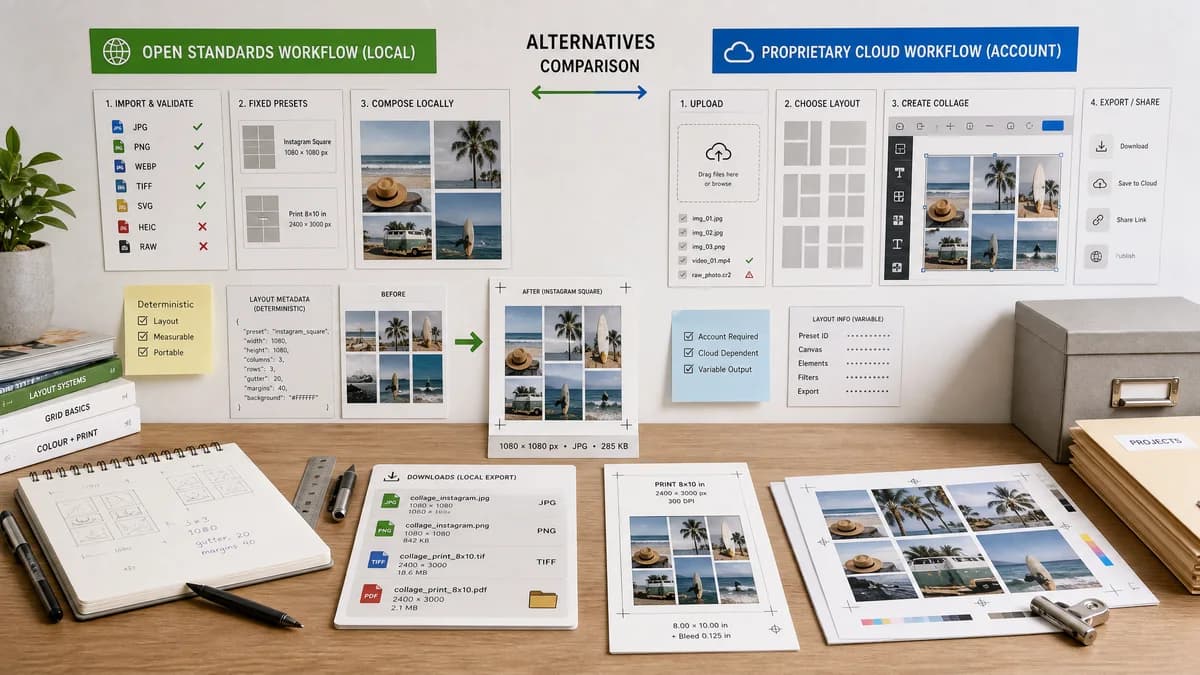
Why Photo Collage Maker fits
TextFaker can provide local photo collage composition with fixed presets, deterministic layout metadata, explicit Instagram and print dimensions, and validation for unsupported files or impossible layouts.
What Adobe Express offers
Adobe Express offers a collage generator and documented quick action for uploading images, selecting layouts, and creating collages inside Adobe's broader design product.
Open alternative signals
Processing model
Photo Collage MakerLocal browser layout and export
Adobe ExpressAdobe Express cloud editor
Validation style
Photo Collage MakerDimension, crop, layout, and Blob validation surfaced as text
Adobe ExpressTemplate preview and editor interactions
Account dependency
Photo Collage MakerCan be designed as a no-account utility
Adobe ExpressPart of Adobe Express service ecosystem
Primary value
Photo Collage MakerPredictable collage files
Adobe ExpressCreative templates and branded content
Decision guide
Private browser-local photo layouts, exact sizing, no-login quick tasks, and repeatable automated validation.
Adobe ecosystem users, branded templates, stock assets, marketing content, and integrated creative workflows.
Side-by-side open source alternative comparison
| Decision point | Photo Collage Maker | Adobe Express | Takeaway |
|---|---|---|---|
| Local privacy | Our workflowSelected photos remain in the browser during composition. | Proprietary workflowAdobe Express workflows are service-based and integrated with Adobe accounts and assets. | Privacy is a strong reason to choose TextFaker for personal photos. |
| Layout control | Our workflowRows, columns, padding, gaps, and fit mode can be explicit numeric controls. | Proprietary workflowAdobe Express emphasizes layouts and templates inside a visual editor. | TextFaker should make the math visible. |
| Community pain points | Our workflowCan preserve reshuffle after size changes by recalculating layout deterministically. | Proprietary workflowCommunity users reported frustration around shuffle and sizing behavior in Express. | Reshuffle-after-resize should be a highlighted feature. |
| Export testing | Our workflowAutomated tests can assert exact dimensions and generated MIME type. | Proprietary workflowExpress output quality is usually reviewed visually. | TextFaker can be built for deterministic QA. |
| Creative assets | Our workflowLimited or no stock/template marketplace. | Proprietary workflowAdobe Express includes templates and stock-oriented creation. | Adobe remains stronger for rich designs. |
| Mobile workflow | Our workflowUpload, reorder, crop, and export should fit a single-column mobile UI. | Proprietary workflowAdobe Express supports mobile and web creative workflows. | The alternative must be intentionally touch-friendly. |
Detailed research
Positioning
Frame the comparison around users who only need collage assembly, not a full Adobe editor. The open-source-powered angle is about local image APIs, deterministic layout algorithms, and transparent output facts.
- No upload for ordinary browser-decodable images.
- Clear messages when a file cannot decode.
- Exact social presets such as square, story, portrait, and landscape.
Implementation details
The tool should expose both the visual canvas and a machine-readable summary panel. That summary gives tests a stable target and helps users understand why their exported collage fits or fails a platform size.
- Report uploaded image count and accepted image count.
- Report selected preset name and final pixel dimensions.
- Report slot destination rectangles and source crop rectangles.
- Report download filename, MIME type, and byte size.
Demand evidence
Adobe Community posts are especially relevant because users discuss the collage feature directly and ask for workflows to be restored or improved. This is public support demand from non-developer users.
- Users ask where collage creation went.
- Users complain that old collage behavior was easier.
- Users want sizing and layout changes to work together.
Recommended first version
Prioritize stable photo-grid behavior over decorative templates. Users coming from Express may expect simple upload, layout selection, and download, which is feasible locally.
- Two-photo, three-photo, 2x2, 3x3, vertical story, and custom grid modes.
- Fit, fill, and no-crop options.
- Reshuffle and reorder controls available after preset changes.
Research notes
- Adobe's official page presents a free collage generator with upload and template-driven creation.
- Adobe's help page documents Collage maker as a Photo quick action where users upload images and select a layout.
- Adobe Community feedback shows users asking what happened to collage creation and complaining about sizing and reshuffling limitations.
- The TextFaker opportunity is a simpler deterministic tool with visible layout numbers and local export checks.
Official source
The proprietary product link is included once here for source checking after the alternative analysis.
Official Adobe Express source