
Open Source Alternatives to BeFunky
Photo Collage Maker is a browser-based alternative for users who need this focused result without installing a proprietary desktop app or entering a larger hosted workflow.
This research compares that workflow with BeFunky while keeping the outbound source link at the bottom after the analysis.
Why Photo Collage Maker fits
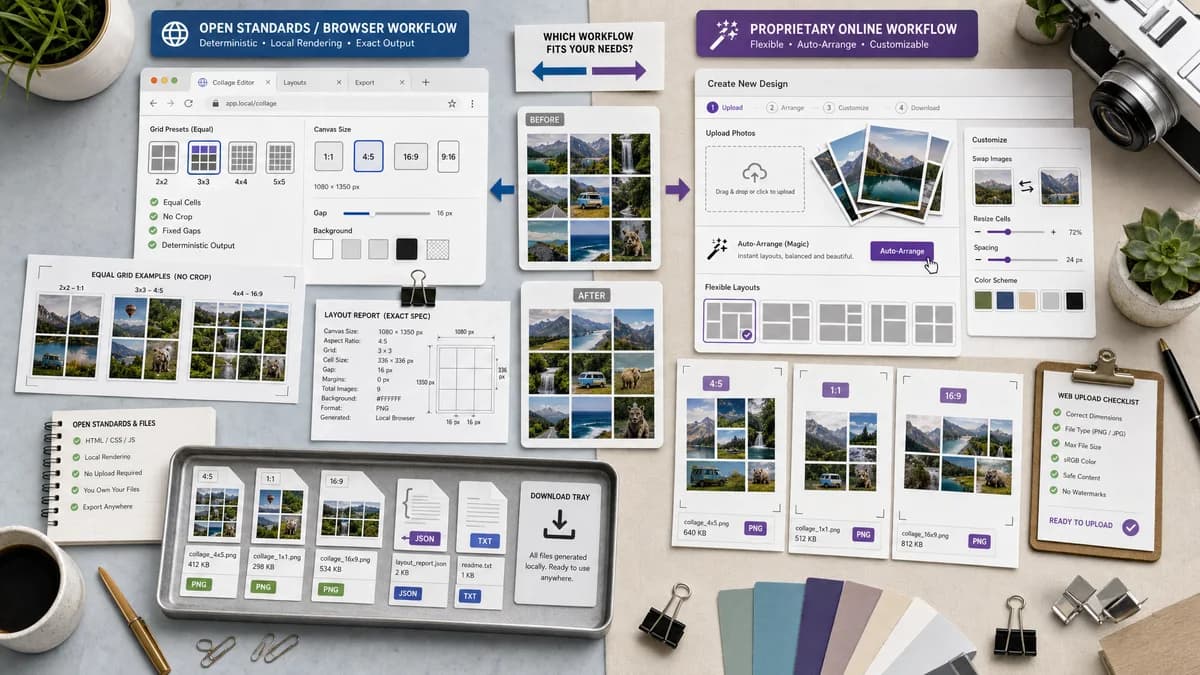
TextFaker can build deterministic collage presets that place images into equal grids, no-crop cells, side-by-side comparisons, and social canvas sizes using local browser rendering.
What BeFunky offers
BeFunky promotes customizable layouts, a Collage Wizard that arranges uploaded images, no-crop or no-clipping behavior, image swapping, size adjustment, and color scheme customization.
Open alternative signals
Auto layout
Photo Collage MakerDeterministic row and column selection with reported slot rectangles
BeFunkyCollage Wizard automatically arranges images
No-crop mode
Photo Collage MakerFit mode with background fill and exact displayed image rectangle
BeFunkyNo cropping or clipping emphasized by BeFunky
Creative controls
Photo Collage MakerGap, padding, background, fit, output format
BeFunkyLayouts, color schemes, editor tools, and effects
Verification
Photo Collage MakerMachine-readable summary in UI
BeFunkyVisual editor output
Decision guide
Private no-crop collages, exact auto-grid output, transparent cell geometry, and simple repeatable downloads.
Users who want automatic creative suggestions, a larger editor, templates, design assets, and integrated photo effects.
Side-by-side open source alternative comparison
| Decision point | Photo Collage Maker | BeFunky | Takeaway |
|---|---|---|---|
| One-click collage | Our workflowAuto grid can choose rows and columns from image count and target aspect ratio. | Proprietary workflowBeFunky advertises a one-click Collage Wizard. | Auto layout is valuable, but TextFaker should make the chosen math visible. |
| No clipping | Our workflowFit mode can guarantee full image visibility and report letterbox rectangles. | Proprietary workflowBeFunky emphasizes no cropping or clipping. | No-crop should be a named mode. |
| Customization | Our workflowNumerical layout controls are enough for v1. | Proprietary workflowBeFunky includes broader design customization and color schemes. | TextFaker can win on clarity, not breadth. |
| Privacy | Our workflowLocal composition avoids uploading personal photo sets. | Proprietary workflowBeFunky is an online creative platform. | This is important for family, school, and event photos. |
| Testability | Our workflowExact slot positions and canvas dimensions can be asserted. | Proprietary workflowWizard results are judged visually by users. | Expose layout decisions in text. |
| Mobile use | Our workflowAuto layout reduces drag-heavy interactions on phones. | Proprietary workflowBeFunky has mobile app and web experiences. | A local mobile UI should minimize precision dragging. |
Detailed research
Positioning
Compare against BeFunky by stressing the same practical goal, fast collage assembly, while narrowing the TextFaker promise to browser-local output with exact validation.
- Good for no-crop grids.
- Good for multi-photo batches.
- Good for users who want a file, not a design project.
Auto-grid algorithm
For deterministic auto layout, calculate candidate row and column pairs for the image count, score each by closeness to the target aspect ratio, and select the lowest score. Fill remaining slots with explicit empty-slot warnings if needed.
- Report selected rows and columns.
- Report empty slots, if any.
- Report each image's scale factor and destination rectangle.
- Allow stable sort by upload order or manual order.
Demand evidence
A public Reddit post asking for a smart collage maker for more than 50 photos shows demand for automation. Adobe support threads also show that users notice when collage workflows are missing or harder to use.
- Auto-arrangement reduces manual resizing work.
- No-crop fit avoids hidden image areas.
- Social presets avoid platform cutoffs.
First version
The first release should include wizard-like auto grid plus manual grid controls. Avoid advanced design effects until output validation and mobile crop behavior are stable.
- Auto, 1x2, 2x1, 2x2, 3x3, 4x5, custom grid.
- Fit and fill modes.
- PNG and JPEG export with quality slider for JPEG.
Research notes
- BeFunky's official page describes customizable layouts, one-click collage generation, no-crop and no-clipping behavior, image swapping, size adjustment, and color schemes.
- Reddit demand for arranging 50 or more pictures maps directly to an auto-grid or wizard-like feature.
- TextFaker can implement a simpler deterministic auto-layout algorithm and report every placement.
Official source
The proprietary product link is included once here for source checking after the alternative analysis.
Official BeFunky source