
Open Source Alternatives to Canva
Photo Collage Maker is a browser-based alternative for users who need this focused result without installing a proprietary desktop app or entering a larger hosted workflow.
This research compares that workflow with Canva while keeping the outbound source link at the bottom after the analysis.
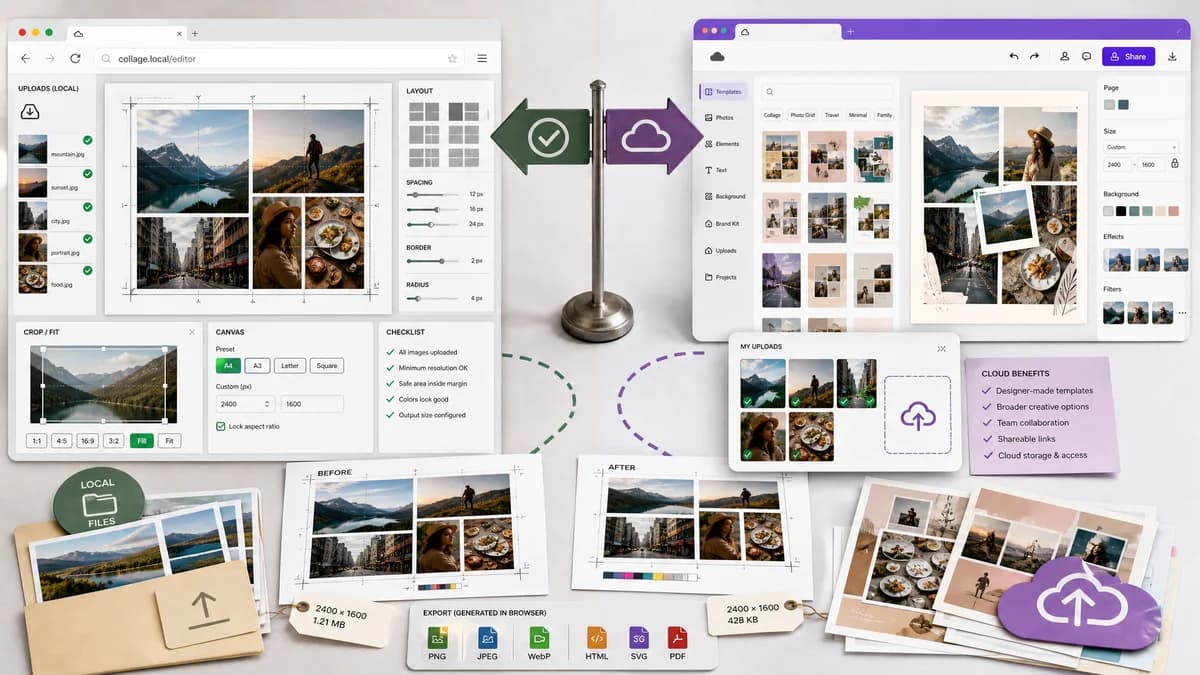
Why Photo Collage Maker fits
TextFaker focuses on deterministic collage production: fixed canvas presets, grid layouts, local uploads, crop and fit controls, spacing values, output size checks, and PNG/JPEG/WebP downloads generated in the browser.
What Canva offers
Canva offers a broad template-driven design environment for photo collages, with designer-made templates, uploaded images, and download-oriented sharing workflows.
Open alternative signals
Processing model
Photo Collage MakerLocal browser canvas workflow
CanvaCloud design workspace
Output verification
Photo Collage MakerReports canvas width, height, cell count, crop boxes, MIME type, filename, and file size
CanvaPrimarily visual template editing and download
Scope
Photo Collage MakerPurpose-built photo collage layout and export
CanvaFull design suite with templates and assets
Mobile fit
Photo Collage MakerTouch-friendly upload, reorder, crop, and export controls
CanvaMobile-friendly Canva product experience
Decision guide
Fast private collages, side-by-side comparisons, exact social sizes, transparent validation messages, and automated tests based on dimensions and layout math.
Template-heavy social graphics, branded assets, stock media, collaboration, and broader design work beyond collage assembly.
Side-by-side open source alternative comparison
| Decision point | Photo Collage Maker | Canva | Takeaway |
|---|---|---|---|
| Privacy | Our workflowImages can be decoded and composed locally without upload. | Proprietary workflowCanva is a cloud design product with account and workspace features. | Local processing is the clearest differentiation for personal photos. |
| Determinism | Our workflowEvery layout can expose exact rows, columns, gaps, crop rectangles, and output dimensions. | Proprietary workflowTemplate editing is optimized for visual design rather than machine-verifiable layout reporting. | TextFaker can be easier to test and trust for exact outputs. |
| Creative range | Our workflowFocused presets for grids, side-by-side layouts, stories, posts, and print sizes. | Proprietary workflowLarge template and asset ecosystem. | Canva remains stronger for elaborate branded designs. |
| Implementation risk | Our workflowCanvas-based composition with standard browser image decoding is realistic. | Proprietary workflowCanva includes many proprietary design, media, and collaboration systems. | A smaller local tool can ship a useful subset without matching the entire platform. |
| Automated testing | Our workflowTests can upload fixtures and assert generated Blob type, pixel dimensions, image count, and crop metadata. | Proprietary workflowVisual template quality often requires human review. | Deterministic validation should be a core product promise. |
| User workflow | Our workflowChoose preset, add photos, reorder, set fit or fill, export. | Proprietary workflowStart from templates inside a broader editor. | The alternative should be faster for simple collage jobs. |
Detailed research
Positioning
Position the page around practical collage jobs: combine photos for social posts, before-and-after comparisons, family grids, marketplace proofs, and print sheets. Avoid claiming TextFaker is open source unless the project license is public; use browser-based and open-source-powered language instead.
- Emphasize local image handling.
- Highlight exact dimensions and downloadable output.
- Mention that Canva is broader and template-led.
Deterministic implementation
The tool can be tested without aesthetic judgment by treating a collage as layout data rendered to a canvas. Each image slot should expose a stable crop box and destination rectangle.
- Inputs: image count, preset, output width, output height, rows, columns, gap, padding, background color, fit mode.
- Outputs: downloadable file, MIME type, dimensions, file size, slot rectangles, crop rectangles, validation warnings.
- Tests: fixture images verify pixel dimensions, slot count, filename extension, and invalid layout messages.
Demand evidence
Public discussion sources show users asking for simpler collage tools, not only full design editors. The recurring problems are side-by-side images, resizing before saving, Instagram-safe aspect ratios, and automatic arrangement of many photos.
- Reddit users ask for Layout-like simplicity.
- Adobe Community users complain when collage features change or disappear.
- Large collage requests show demand beyond decorative templates.
Feature scope
A useful first version should avoid a template marketplace and instead ship exact, inspectable layouts. This matches TextFaker's existing browser-local image utilities.
- Grid, side-by-side, vertical stack, masonry-like auto grid, and social presets.
- PNG, JPEG, and WebP export when browser support allows.
- Per-image reorder, rotate, fit, fill, and crop reset.
Research notes
- Official page describes creating photo collages by placing uploaded images into designer-made templates and downloading the result.
- Public Reddit demand includes users who want simple side-by-side collage output without extra editing complexity.
- A browser-based alternative should not claim to replace Canva's full design suite; it should compete on local processing, predictable grid math, and exact exported dimensions.
Official source
The proprietary product link is included once here for source checking after the alternative analysis.
Official Canva source