
Open Source Alternatives to Kapwing
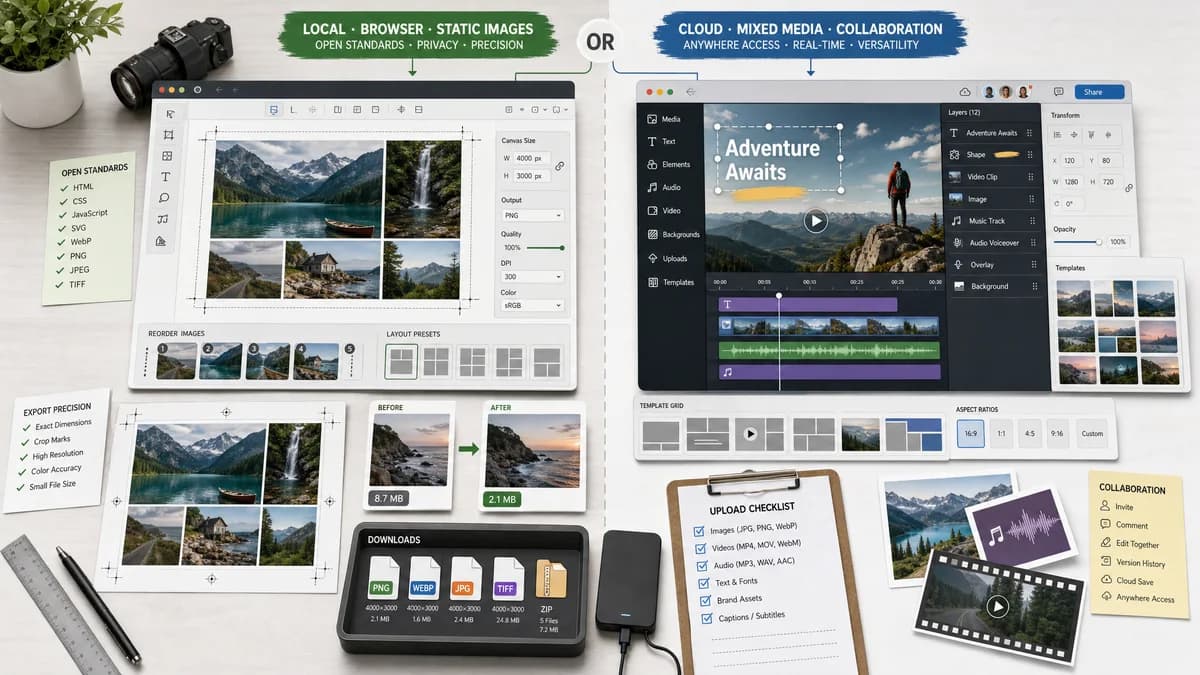
Photo Collage Maker is a browser-based alternative for users who need this focused result without installing a proprietary desktop app or entering a larger hosted workflow.
This research compares that workflow with Kapwing while keeping the outbound source link at the bottom after the analysis.
Why Photo Collage Maker fits
TextFaker can provide static image collage rendering from local files with reorder controls, layout presets, cell crop boxes, output dimensions, and downloadable files.
What Kapwing offers
Kapwing describes a picture collage maker with more than 60 templates and the ability to rearrange or resize pictures, plus broader support for text, video, music, and mixed media.
Open alternative signals
Media scope
Photo Collage MakerStatic image collage output
KapwingPhoto, video, music, and mixed media editing
Templates
Photo Collage MakerDeterministic preset layouts
KapwingMore than 60 collage templates
Layer reporting
Photo Collage MakerVisible image count, slot count, and crop boxes
KapwingVisual canvas and media editor layers
Export
Photo Collage MakerBrowser-generated PNG/JPEG/WebP file
KapwingCloud media export workflow
Decision guide
Static private photo grids, before-and-after panels, exact social dimensions, and deterministic output checks.
Video collages, mixed media projects, audio, subtitles, timeline editing, and collaborative cloud media workflows.
Side-by-side open source alternative comparison
| Decision point | Photo Collage Maker | Kapwing | Takeaway |
|---|---|---|---|
| Static collages | Our workflowLocal canvas rendering is sufficient for photo-only collages. | Proprietary workflowKapwing supports photo collage inside a larger media editor. | TextFaker should not try to match video features. |
| Layer count | Our workflowReport image count and slot count as deterministic output. | Proprietary workflowKapwing pages mention templates and media layers in examples. | Layer facts make automated tests simple. |
| Resizing | Our workflowImage resizing can be controlled through fit, fill, and per-slot crop values. | Proprietary workflowKapwing supports rearranging and resizing pictures visually. | TextFaker should expose resize values numerically. |
| Privacy | Our workflowLocal processing can avoid upload for still images. | Proprietary workflowKapwing is a cloud media editor. | A local static tool is preferable for private photo sets. |
| Creative scope | Our workflowLimited to collage geometry, background, and export. | Proprietary workflowKapwing includes text, video, music, and broader edits. | Kapwing remains stronger for multimedia output. |
| Testing | Our workflowAssert output canvas dimensions, MIME, byte size, image count, and crop boxes. | Proprietary workflowCloud editor output is mostly visual and project-based. | TextFaker can provide a more deterministic utility. |
Detailed research
Positioning
Kapwing is a strong comparison for social creators, but TextFaker should position as the faster local tool for static collages. This prevents overreach into timeline or audio features.
- Static photo-only composition.
- No project workspace required.
- Exact social and custom dimensions.
Implementation guidance
Use layout presets and a slot model rather than arbitrary design layers. That gives users enough control for collages while keeping validation simple.
- Slot order matches upload order unless reordered.
- Each slot stores source index, destination rectangle, source crop rectangle, and fit mode.
- Canvas export reports MIME and dimensions.
Demand evidence
Public user threads often ask for two-photo, vertical, or many-photo composition, not full video editing. A lightweight local utility fits those jobs.
- Side-by-side comparison collages.
- Instagram-safe vertical collages.
- Large photo grids for collections.
Scope boundary
Do not include video collage in this tool's first version because TextFaker already has an Image to Video Maker and because static output is easier to verify deterministically.
- Keep animation out of v1.
- Link conceptually to future video collage only if product strategy needs it.
- Prioritize image export quality and layout facts.
Research notes
- Kapwing's official page states that its photo collage maker has more than 60 templates and supports rearranging or resizing pictures.
- Kapwing also positions collage work inside a broader media editor that can include video and music.
- TextFaker should focus on static browser-generated image output because that is easier to keep local and testable.
Official source
The proprietary product link is included once here for source checking after the alternative analysis.
Official Kapwing source