
Open Source Alternatives to PicMonkey
Photo Collage Maker is a browser-based alternative for users who need this focused result without installing a proprietary desktop app or entering a larger hosted workflow.
This research compares that workflow with PicMonkey while keeping the outbound source link at the bottom after the analysis.
Why Photo Collage Maker fits
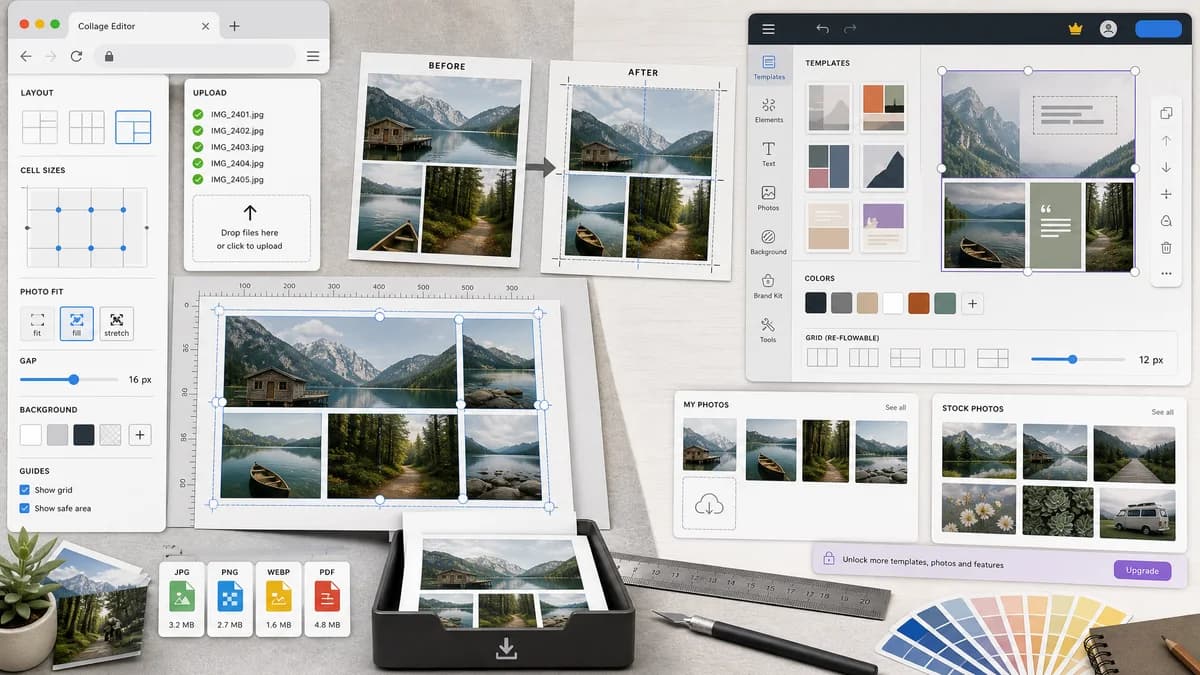
TextFaker should offer user-controlled layout grids, cell sizes, photo fit modes, background and gap controls, deterministic crop boxes, and downloadable collage files.
What PicMonkey offers
PicMonkey describes an easy collage maker with designer-crafted templates, resizable and re-flowable grids, cell sizing, colors, text, personal photos, and stock photos.
Open alternative signals
Grid editing
Photo Collage MakerNumeric cell rectangles and deterministic resizing
PicMonkeyVisual grid reflow and template editing
Media sources
Photo Collage MakerUser-uploaded local files
PicMonkeyPersonal photos plus stock media options
Download checks
Photo Collage MakerMIME type, extension, dimensions, and byte size shown
PicMonkeyDesigner output downloaded from editor
Workflow breadth
Photo Collage MakerCollage-only utility
PicMonkeyPhoto editor and design platform
Decision guide
Private personal-photo collages, exact before-and-after layouts, simple social grids, and testing-friendly generated files.
Brand-heavy graphics, stock-photo use, template browsing, text-rich designs, and general design workflows.
Side-by-side open source alternative comparison
| Decision point | Photo Collage Maker | PicMonkey | Takeaway |
|---|---|---|---|
| Grid reflow | Our workflowCan reflow from rows and columns while preserving image order and reporting new slot rectangles. | Proprietary workflowPicMonkey advertises resize and re-flow behavior for grids and cells. | Reflow is important but should be implemented as explicit layout math. |
| Cell resizing | Our workflowCould support equal cells first, then weighted columns or rows with exact percentages. | Proprietary workflowPicMonkey offers visual cell-size adjustments. | Start deterministic before adding freeform cell dragging. |
| Text and graphics | Our workflowOptional caption support can be limited and measured. | Proprietary workflowPicMonkey includes broader text, color, stock, and design assets. | TextFaker should not compete on design embellishment initially. |
| Privacy | Our workflowLocal image handling can be a core promise. | Proprietary workflowPicMonkey is an online design service. | Local composition is a practical differentiator. |
| Automated QA | Our workflowFixture tests assert output dimensions and layout metadata. | Proprietary workflowTemplate quality is evaluated visually. | TextFaker can ship safer deterministic behavior. |
| Mobile ergonomics | Our workflowCell editing should use steppers, menus, and crop handles that work on touch. | Proprietary workflowPicMonkey offers app and web experiences. | Mobile support needs explicit design attention. |
Detailed research
Positioning
Pitch the tool as a focused browser-local collage builder for exact grids. This fits users who want to combine images quickly, especially for social posts or comparisons.
- Emphasize no broad editor learning curve.
- Expose dimensions and slot data.
- Keep stock assets out of the first version.
Implementation guidance
Represent the collage as a layout object with canvas size, background, gap, padding, and slots. Rendering becomes a pure function of image dimensions and layout settings.
- Equal grid mode.
- Side-by-side mode.
- Weighted-row or weighted-column mode after the basics.
- Crop reset and per-cell fit mode.
Testing path
Automated tests should use small fixture images with known colors and dimensions. The page can expose text summaries that avoid screenshot-based judgment.
- Assert accepted count equals uploaded valid images.
- Assert destination rectangles match the selected preset.
- Assert exported file extension and MIME type.
- Assert validation message for too few images or zero-size canvas.
Demand evidence
Public questions about simple Layout-like apps, vertical Instagram collages, and large smart collages support a narrower product than PicMonkey. Users frequently need completion, not a full design environment.
- Side-by-side layouts are a repeated need.
- Social aspect-ratio fit is a repeated need.
- Auto-arranging many images is a higher-end need.
Research notes
- PicMonkey's official page highlights customizable templates, grid reflow, cell resizing, colors, text, personal photos, and stock photos.
- Community threads show users want simple collage tools and often do not need a heavy editor around the task.
- A TextFaker alternative should not mimic PicMonkey's stock and design ecosystem; it should specialize in deterministic local layout.
Official source
The proprietary product link is included once here for source checking after the alternative analysis.
Official PicMonkey source