
PNG to JPG Converter vs FreeConvert
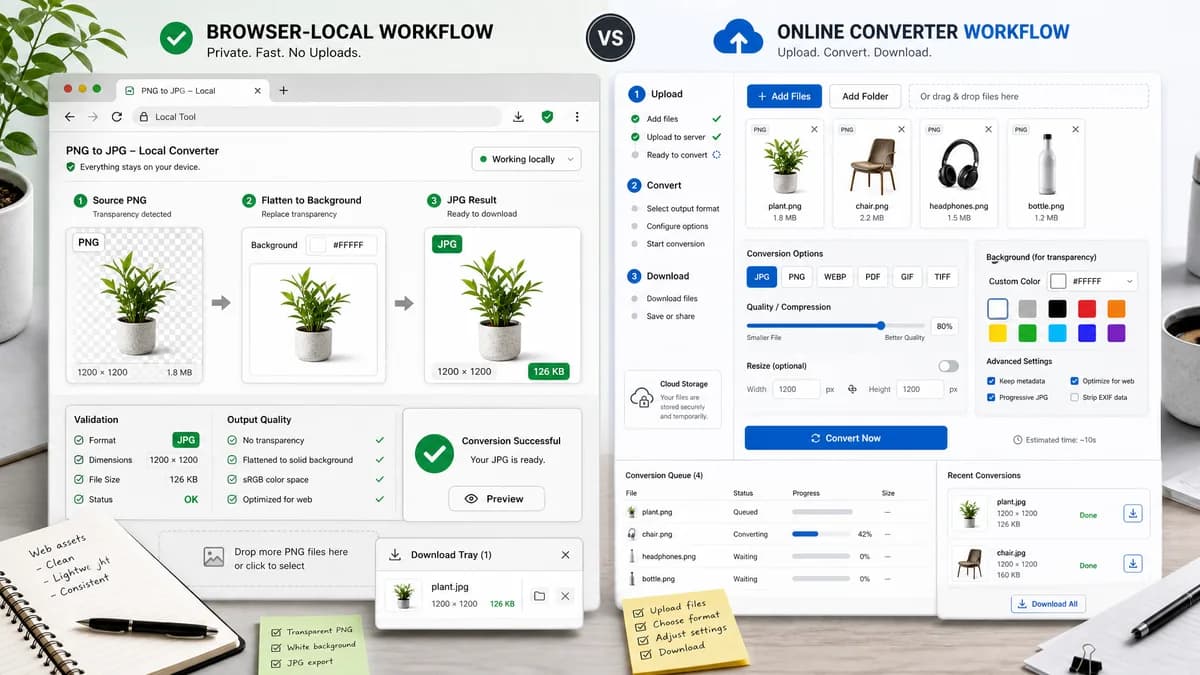
PNG to JPG Converter is the baseline in this comparison: Convert a PNG image to JPG in your browser, choose the JPEG quality and matte color for transparency, then confirm image/jpeg MIME, .jpg filename, dimensions, file size, and Blob status before download.
TextFaker can be a privacy-forward local alternative for straightforward PNG-to-JPG conversion with visible JPEG output checks.
Quick verdict
PNG to JPG Converter is the better fit when the job is a focused browser-local PNG to JPG conversion with visible JPEG output checks and explicit transparency flattening. FreeConvert is still a better fit when the user needs the broader freemium online file converter workflow around the same conversion.
How PNG to JPG Converter fits
TextFaker's PNG to JPG Converter should focus on browser-local conversion and objective validation. It can use open browser APIs to turn PNG pixels into an image/jpeg Blob and make transparency flattening explicit.
How FreeConvert fits
FreeConvert provides an online PNG to JPG converter as part of its larger conversion and compression site and says transparent areas can be replaced with a custom color.
Side-by-side comparison
| Decision point | PNG to JPG Converter | FreeConvert | Takeaway |
|---|---|---|---|
| Privacy | Our workflowConversion can happen without upload in the browser. | Competitor workflowHosted web converter flow. | Use local conversion messaging for sensitive images. |
| Conversion target | Our workflowLocked to JPEG for this dedicated page. | Competitor workflowBroader converter and file tools site. | A narrower page can match search intent better. |
| Alpha handling | Our workflowFlatten PNG transparency over a selected matte. | Competitor workflowOffers custom color replacement for transparent areas. | TextFaker should make matte selection visible and testable. |
| Filename | Our workflowSuggest deterministic .jpg output filename. | Competitor workflowDownloaded filename is service-defined. | Test filename behavior explicitly. |
| Result copy | Our workflowProvide stable copy text with output type and dimensions. | Competitor workflowHosted UI copy can vary. | Stable copy supports automated verification and user confidence. |
| Generated image | Our workflowGenerated preview and download are created from the browser Blob. | Competitor workflowGenerated file is returned by the hosted converter. | Tie visible output details to the exact downloadable image. |
Use PNG to JPG Converter when
- Browser-local PNG to JPG conversion for private or unpublished images.
- Checking image/jpeg MIME, .jpg filename, dimensions, file size, and generated Blob details after conversion.
- Flattening transparent PNG pixels against an explicit matte before downloading the JPG.
Use FreeConvert when
- Users who want a hosted conversion service with many adjacent file tools.
- Users who already work inside FreeConvert or need its broader hosted workflow.
- Cases where account-based, batch, editor, cloud, marketplace, or multi-format features matter more than a focused local utility.
Detailed comparison
Differentiator
The practical difference from FreeConvert is not that TextFaker has more formats; it is that the conversion can be local and transparent.
- Report input PNG dimensions.
- Report output JPG size.
- Show matte color for transparent inputs.
SEO Page
The dedicated page should avoid generic image converter copy and repeat the PNG-to-JPG/JPEG promise in title, description, H1, and test expectations.
UX Details
Use deterministic labels so copy and download controls can be asserted in tests.
- Convert PNG to JPG
- Download JPG
- Copy JPG details
Research Caveat
Do not compare file-size limits or pricing unless the implementation data is kept current from official FreeConvert pages.
Research notes
- Official FreeConvert page confirms a PNG to JPG converter.
- FreeConvert mentions replacing transparent PNG areas with a custom color.
- FreeConvert is proprietary software in the freemium online converter category.
Official source
The only outbound competitor link on this page is placed here for source checking after the comparison.
Official FreeConvert source