
PNG to JPG Converter vs Online-Convert
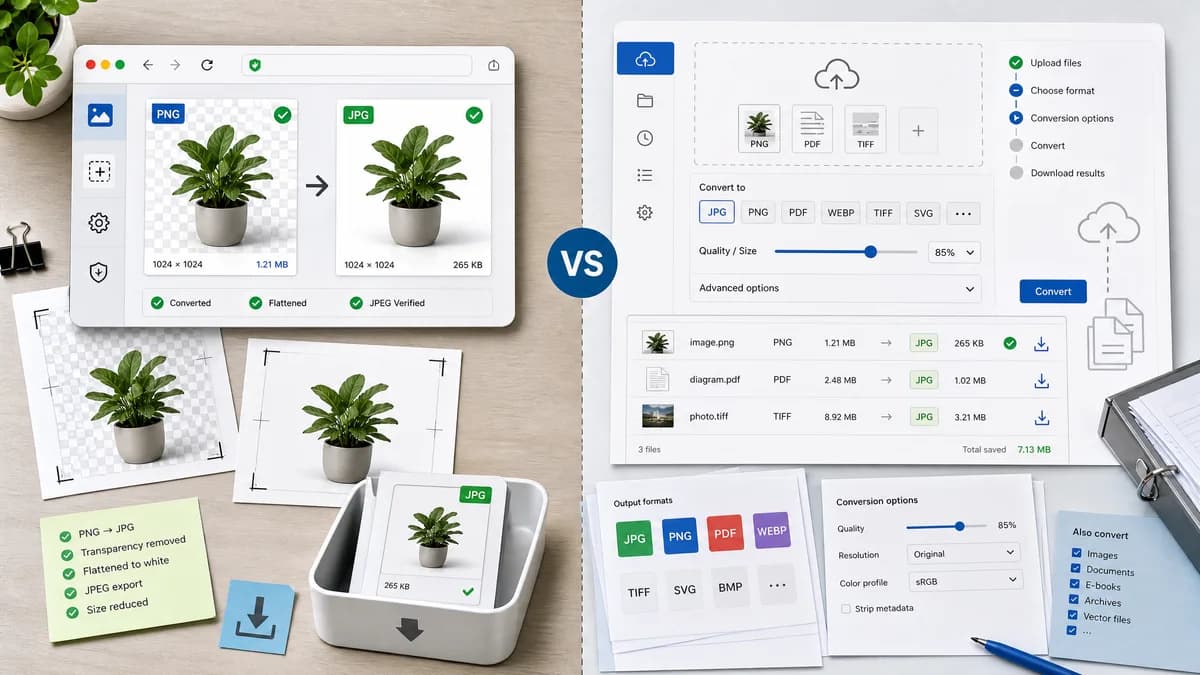
PNG to JPG Converter is the baseline in this comparison: Convert a PNG image to JPG in your browser, choose the JPEG quality and matte color for transparency, then confirm image/jpeg MIME, .jpg filename, dimensions, file size, and Blob status before download.
TextFaker can target users who need a direct local PNG-to-JPG page rather than a multi-option hosted conversion service.
Quick verdict
PNG to JPG Converter is the better fit when the job is a focused browser-local PNG to JPG conversion with visible JPEG output checks and explicit transparency flattening. Online-Convert is still a better fit when the user needs the broader commercial online file conversion service workflow around the same conversion.
How PNG to JPG Converter fits
TextFaker should present a restrained PNG to JPG converter that produces image/jpeg files locally and verifies output facts. Its local canvas-based workflow is a useful contrast with a hosted conversion service.
How Online-Convert fits
Online-Convert offers a PNG to JPG route in its image conversion section and provides output quality controls.
Side-by-side comparison
| Decision point | PNG to JPG Converter | Online-Convert | Takeaway |
|---|---|---|---|
| Service breadth | Our workflowDedicated PNG to JPG page. | Competitor workflowBroad online conversion product. | TextFaker should not dilute the page with unrelated format options. |
| Privacy | Our workflowKeep the image in the browser during conversion. | Competitor workflowHosted online converter flow. | Local conversion is the main user benefit. |
| Transparency | Our workflowUser sees or chooses the matte for transparent PNG pixels. | Competitor workflowTransparency treatment is part of service behavior. | Make alpha flattening a visible setting. |
| Output facts | Our workflowDisplay image/jpeg, .jpg, dimensions, and Blob status. | Competitor workflowConversion service returns a file. | Technical feedback helps developers and designers trust the result. |
| Advanced settings | Our workflowOnly include quality or matte settings that are supported by the shared core. | Competitor workflowOffers quality-oriented conversion settings. | Prefer honest minimal controls over unimplemented settings. |
| Generated image | Our workflowShow the exact generated JPG Blob in the result area. | Competitor workflowGenerated image is supplied by the hosted service. | Preview and download should remain synchronized. |
Use PNG to JPG Converter when
- Browser-local PNG to JPG conversion for private or unpublished images.
- Checking image/jpeg MIME, .jpg filename, dimensions, file size, and generated Blob details after conversion.
- Flattening transparent PNG pixels against an explicit matte before downloading the JPG.
Use Online-Convert when
- Users who need many conversion settings, hosted workflows, or broader file conversion categories.
- Users who already work inside Online-Convert or need its broader hosted workflow.
- Cases where account-based, batch, editor, cloud, marketplace, or multi-format features matter more than a focused local utility.
Detailed comparison
Page Strategy
The Online-Convert comparison should emphasize that TextFaker is a local utility, not a complete hosted conversion platform.
Core Behavior
The route should call the same conversion core used by the general Image Format Converter with output constrained to JPEG.
- Keep dimensions.
- Flatten alpha.
- Create Blob.
- Download .jpg.
User Language
Use plain copy around transparency: transparent PNG areas become the selected matte color in the JPG.
Comparison Safety
Avoid claims about Online-Convert speed, retention, limits, or pricing unless refreshed from official documentation.
Research notes
- Official Online-Convert image route confirms PNG-to-JPG conversion.
- The page includes output quality options such as best quality, smallest file, and quality controls.
- Online-Convert is proprietary software in the online conversion service category.
Official source
The only outbound competitor link on this page is placed here for source checking after the comparison.
Official Online-Convert source