
PNG to JPG Converter vs Pixelied
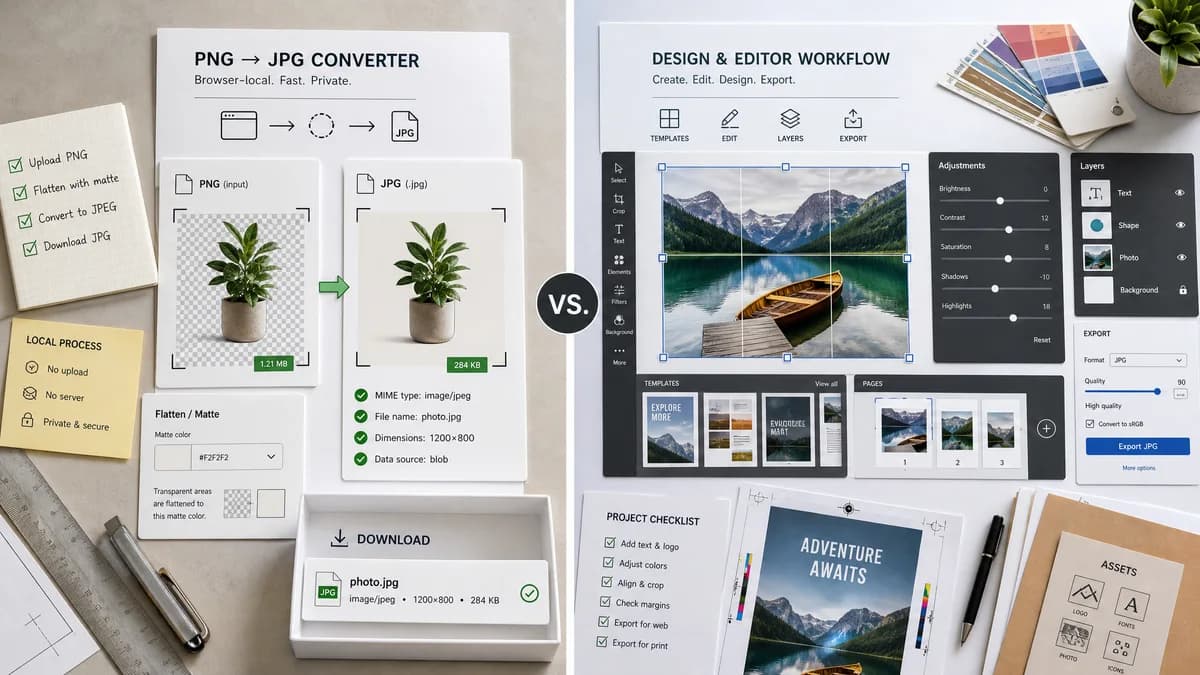
PNG to JPG Converter is the baseline in this comparison: Convert a PNG image to JPG in your browser, choose the JPEG quality and matte color for transparency, then confirm image/jpeg MIME, .jpg filename, dimensions, file size, and Blob status before download.
TextFaker can be a narrower local PNG-to-JPG utility for users who do not need Pixelied's design editor or template workflow.
Quick verdict
PNG to JPG Converter is the better fit when the job is a focused browser-local PNG to JPG conversion with visible JPEG output checks and explicit transparency flattening. Pixelied is still a better fit when the user needs the broader commercial online design editor and image converter workflow around the same conversion.
How PNG to JPG Converter fits
TextFaker's page should focus on quick local conversion, not design editing. It can provide stronger technical clarity by showing the JPEG MIME, .jpg filename, preserved dimensions, generated image Blob, and the matte used for transparent PNG regions.
How Pixelied fits
Pixelied offers a PNG to JPEG conversion page as part of its online design and image editing platform.
Side-by-side comparison
| Decision point | PNG to JPG Converter | Pixelied | Takeaway |
|---|---|---|---|
| Best use case | Our workflowOne-off conversion and QA. | Competitor workflowImage editing and design tasks around conversion. | TextFaker should win on focus. |
| Transparency handling | Our workflowShow exactly how alpha pixels become matte pixels. | Competitor workflowConversion page output may not foreground alpha details. | This is a meaningful UX differentiator for PNG logos and icons. |
| Output naming | Our workflowDeterministic .jpg filename from source name. | Competitor workflowService-defined naming behavior. | Filename rules should be included in tests. |
| Privacy | Our workflowBrowser-local conversion design. | Competitor workflowHosted proprietary web tool. | Privacy-sensitive users may prefer TextFaker. |
| Feature honesty | Our workflowDoes not claim to be a design editor. | Competitor workflowBroader creative toolset. | Alternative content should be clear about tradeoffs. |
| Generated image | Our workflowPreview the exact generated JPEG Blob that will download. | Competitor workflowGenerated file is delivered by Pixelied's hosted workflow. | Keep result preview and download tied together. |
Use PNG to JPG Converter when
- Browser-local PNG to JPG conversion for private or unpublished images.
- Checking image/jpeg MIME, .jpg filename, dimensions, file size, and generated Blob details after conversion.
- Flattening transparent PNG pixels against an explicit matte before downloading the JPG.
Use Pixelied when
- Users who want a design editor, templates, image editing, or brand-oriented creative workflows.
- Users who already work inside Pixelied or need its broader hosted workflow.
- Cases where account-based, batch, editor, cloud, marketplace, or multi-format features matter more than a focused local utility.
Detailed comparison
SEO Angle
Users searching for Pixelied alternatives may want a simpler converter rather than another editor. The page should target that narrow intent.
Implementation Reuse
Reuse the general Image Format Converter core and mirror the adapter style used by JPG to PNG, changing accepted source and target output behavior.
- Source: PNG.
- Target MIME: image/jpeg.
- Extension: .jpg.
Transparency Copy
Use clear text that transparent and semi-transparent PNG pixels are flattened onto the chosen matte because JPG does not support transparency.
Generated Result
The generated preview and downloadable file should come from the same Blob so the UI and download match.
Research notes
- Official Pixelied URL confirms a PNG to JPEG converter path.
- Pixelied mentions bulk conversion and a photo editing toolkit after conversion.
- Pixelied is proprietary software in the design/editor category.
Official source
The only outbound competitor link on this page is placed here for source checking after the comparison.
Official Pixelied source