
PNG to JPG Converter vs Shutterstock
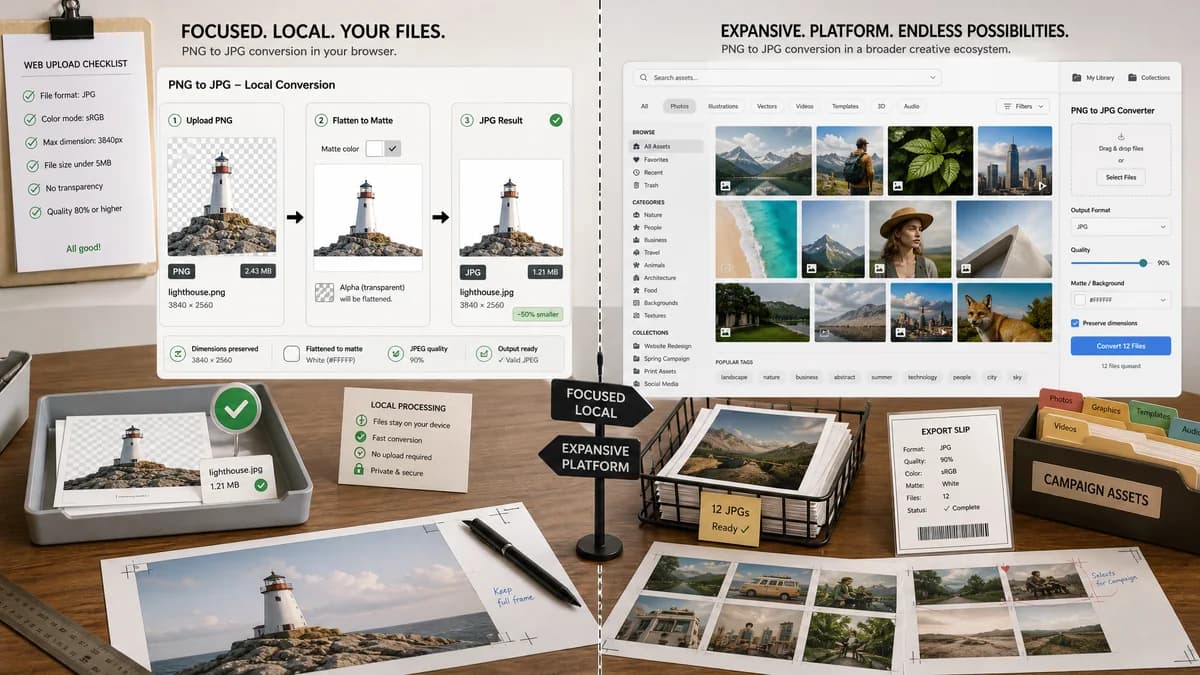
PNG to JPG Converter is the baseline in this comparison: Convert a PNG image to JPG in your browser, choose the JPEG quality and matte color for transparency, then confirm image/jpeg MIME, .jpg filename, dimensions, file size, and Blob status before download.
TextFaker can serve users who want direct local PNG-to-JPG conversion without stock media search or marketplace context.
Quick verdict
PNG to JPG Converter is the better fit when the job is a focused browser-local PNG to JPG conversion with visible JPEG output checks and explicit transparency flattening. Shutterstock is still a better fit when the user needs the broader commercial stock media platform with image converter workflow around the same conversion.
How PNG to JPG Converter fits
TextFaker should provide a browser-local conversion workflow for user-owned PNG files, with a generated JPEG Blob, preserved dimensions, and matte-controlled alpha flattening.
How Shutterstock fits
Shutterstock offers a PNG to JPG image converter alongside its broader stock media and creative asset ecosystem.
Side-by-side comparison
| Decision point | PNG to JPG Converter | Shutterstock | Takeaway |
|---|---|---|---|
| User intent | Our workflowA user already has a PNG and needs a JPG. | Competitor workflowA user may be working in a stock media ecosystem. | TextFaker should avoid marketplace language and stay utility-first. |
| Privacy | Our workflowLocal browser conversion for supported files. | Competitor workflowHosted web service workflow. | Local conversion is important for unpublished graphics and private assets. |
| Output validation | Our workflowMIME, filename, dimensions, and Blob are visible. | Competitor workflowConverter focuses on upload and download. | TextFaker can provide stronger technical proof. |
| Transparency | Our workflowMatte is explicit and user-selectable. | Competitor workflowTransparency handling is not the central public promise. | Alpha flattening should be explained in the UI. |
| Format scope | Our workflowDedicated PNG to JPG page only. | Competitor workflowImage converter lists several formats. | Specificity helps search and testing. |
| Generated image consistency | Our workflowPreview, details, and download all reference the same generated JPEG Blob. | Competitor workflowHosted result details depend on the service flow. | Use one output object for reliable UX. |
Use PNG to JPG Converter when
- Browser-local PNG to JPG conversion for private or unpublished images.
- Checking image/jpeg MIME, .jpg filename, dimensions, file size, and generated Blob details after conversion.
- Flattening transparent PNG pixels against an explicit matte before downloading the JPG.
Use Shutterstock when
- Users who are already sourcing or editing assets inside Shutterstock's broader creative ecosystem.
- Users who already work inside Shutterstock or need its broader hosted workflow.
- Cases where account-based, batch, editor, cloud, marketplace, or multi-format features matter more than a focused local utility.
Detailed comparison
Differentiation
Shutterstock is a broader creative asset company, so the alternative page should focus on users who need conversion only.
Implementation
The adapter should limit accepted source messaging to PNG and output messaging to JPG/JPEG even if the shared core supports more formats.
- Accept PNG.
- Export JPEG.
- Use .jpg filename.
Transparency
Because PNG often carries alpha and JPEG does not, matte selection is a more important control than format selection on this page.
Testing
Add tests for generated Blob type, filename, dimensions, result copy, download label, and transparent pixel flattening.
Research notes
- Official Shutterstock page confirms PNG to JPG conversion and lists multiple output formats in its image converter.
- Shutterstock is proprietary software in the stock media and creative tools category.
- Avoid comparing stock library features because TextFaker's page is only an image format converter.
Official source
The only outbound competitor link on this page is placed here for source checking after the comparison.
Official Shutterstock source