
PNG to JPG Converter vs Zamzar
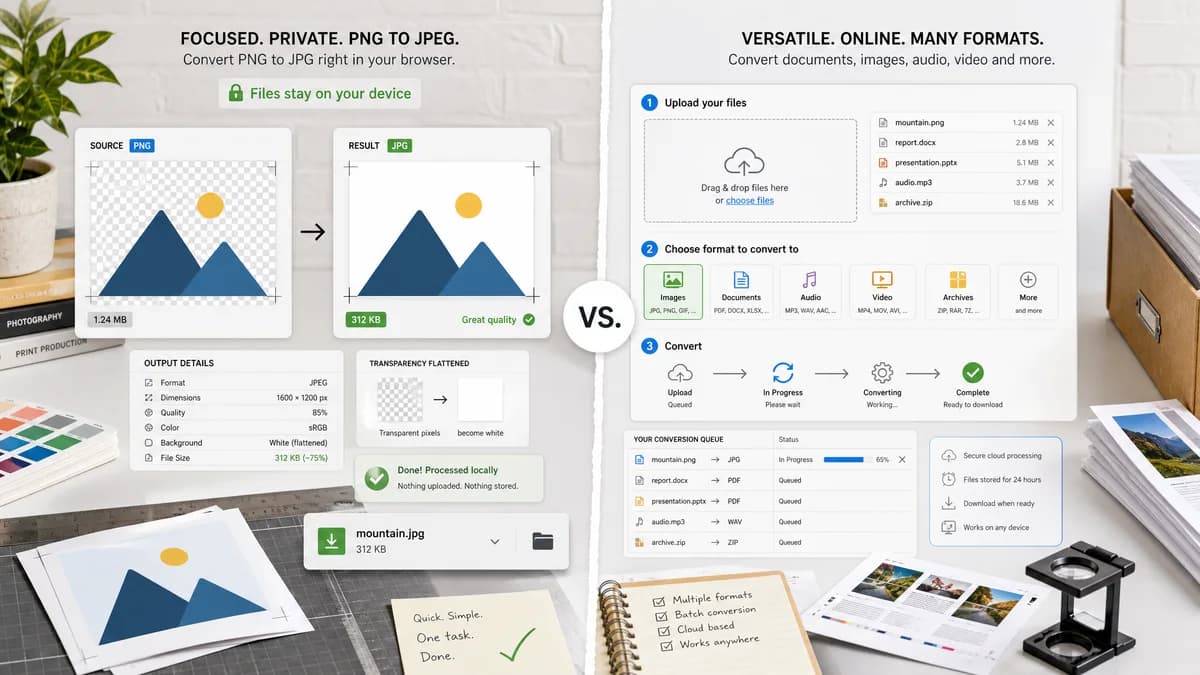
PNG to JPG Converter is the baseline in this comparison: Convert a PNG image to JPG in your browser, choose the JPEG quality and matte color for transparency, then confirm image/jpeg MIME, .jpg filename, dimensions, file size, and Blob status before download.
TextFaker can provide a local PNG-to-JPG alternative for users who do not need Zamzar's broad file conversion service.
Quick verdict
PNG to JPG Converter is the better fit when the job is a focused browser-local PNG to JPG conversion with visible JPEG output checks and explicit transparency flattening. Zamzar is still a better fit when the user needs the broader commercial online file conversion service workflow around the same conversion.
How PNG to JPG Converter fits
TextFaker's dedicated converter should turn PNG files into JPEG files in the browser and expose the generated output details. It is best framed as a privacy-forward manual tool, not a full replacement for Zamzar's many-format service.
How Zamzar fits
Zamzar offers PNG to JPG conversion as part of a broad online conversion service spanning many file categories.
Side-by-side comparison
| Decision point | PNG to JPG Converter | Zamzar | Takeaway |
|---|---|---|---|
| Breadth | Our workflowFocused image converter page. | Competitor workflowMany file conversion categories. | Use TextFaker for focused image conversion; use Zamzar for broad format needs. |
| Privacy | Our workflowFile stays in the browser for conversion. | Competitor workflowHosted conversion requires service handling. | Local processing is a meaningful alternative for private graphics. |
| Transparency handling | Our workflowChoose or use a default matte before JPEG export. | Competitor workflowGeneral conversion workflow. | Transparent PNGs need explicit user-facing behavior. |
| Output verification | Our workflowConfirm generated Blob type and filename in UI and tests. | Competitor workflowService returns converted result. | Objective checks reduce ambiguity. |
| Copy/download text | Our workflowUse stable labels and copyable JPG details. | Competitor workflowHosted UI copy may change. | Deterministic text supports regression tests. |
| Generated preview | Our workflowPreview should be created from the exact browser-generated JPG Blob. | Competitor workflowPreview and download behavior depend on the hosted service. | One generated output should drive all result UI. |
Use PNG to JPG Converter when
- Browser-local PNG to JPG conversion for private or unpublished images.
- Checking image/jpeg MIME, .jpg filename, dimensions, file size, and generated Blob details after conversion.
- Flattening transparent PNG pixels against an explicit matte before downloading the JPG.
Use Zamzar when
- Users who want broad online conversion categories or service-supported file conversion flows.
- Users who already work inside Zamzar or need its broader hosted workflow.
- Cases where account-based, batch, editor, cloud, marketplace, or multi-format features matter more than a focused local utility.
Detailed comparison
Comparison Frame
Zamzar is a broad converter, so TextFaker should not compete on number of supported formats. It should compete on locality and explicit output checks.
Feature Contract
The dedicated route should be strict: PNG in, JPEG out, .jpg download, preserved dimensions, matte-composited transparency.
SEO Safety
Avoid claims about Zamzar retention, limits, speed, or pricing unless independently sourced from official pages.
- Use official URL only in the proprietaryUrl field.
- Keep body copy free of outbound URLs.
Testing
A fixture with transparent corners can validate that output is flattened, not alpha-preserving.
Research notes
- Official Zamzar URL confirms a PNG to JPG converter page.
- Zamzar also describes its converter as cloud-based on its PNG converter pages.
- Zamzar is proprietary software in the hosted file conversion category.
Official source
The only outbound competitor link on this page is placed here for source checking after the comparison.
Official Zamzar source