
Open Source Alternatives to Convertio
PNG to JPG Converter is a browser-based alternative for users who need this focused result without installing a proprietary desktop app or entering a larger hosted workflow.
This research compares that workflow with Convertio while keeping the outbound source link at the bottom after the analysis.
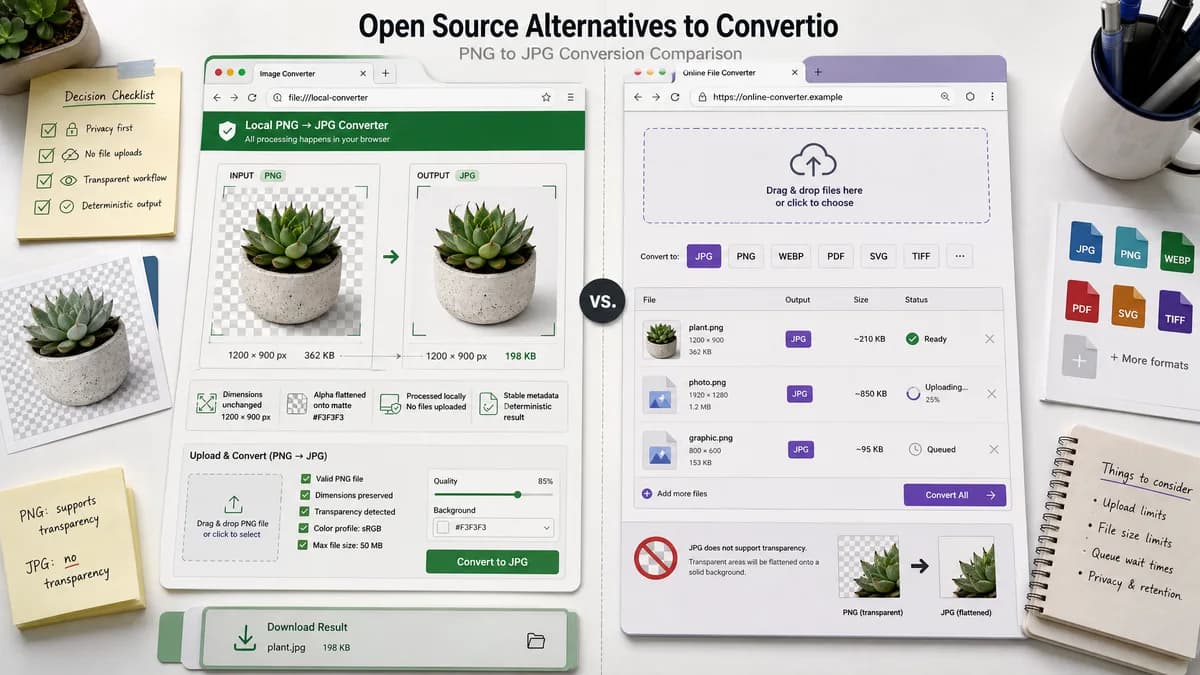
Why PNG to JPG Converter fits
A TextFaker PNG to JPG page should give users a direct, browser-based workflow for PNG image files and make JPEG-specific behavior visible. The strongest comparison points are local processing, alpha matte flattening, preserved dimensions, and deterministic output metadata.
What Convertio offers
Convertio offers a PNG to JPG conversion page within a broader online file conversion service and notes that JPG does not support transparency.
Open alternative signals
Scope
PNG to JPG ConverterPNG to JPG/JPEG only.
ConvertioMany-format online converter.
Processing
PNG to JPG ConverterBrowser-based conversion target.
ConvertioHosted cloud conversion site.
Transparency
PNG to JPG ConverterMatte flattening control for alpha pixels.
ConvertioSolid background fill during conversion.
QA output
PNG to JPG ConverterMIME, filename, dimensions, Blob, generated preview, and copy text.
ConvertioConverted file download.
Decision guide
One-off PNG images where browser-local handling and clear JPEG output checks are important.
Users who need broad conversion categories beyond images or prefer a cloud converter workflow.
Side-by-side open source alternative comparison
| Decision point | PNG to JPG Converter | Convertio | Takeaway |
|---|---|---|---|
| File handling | Our workflowLocal browser decode and encode for supported PNG files. | Proprietary workflowCloud-based web conversion flow. | TextFaker is preferable when users want conversion without handing off the file. |
| Breadth | Our workflowFocused image route. | Proprietary workflowLarge cross-format converter catalog. | Convertio remains stronger for unusual conversion pairs. |
| JPEG alpha limitation | Our workflowExplains and controls matte compositing. | Proprietary workflowStates transparent areas are filled with a solid background color. | TextFaker can improve this with user-selectable matte controls. |
| Result details | Our workflowShow image/jpeg MIME and .jpg filename after Blob generation. | Proprietary workflowDownload result from hosted converter. | Visible result details build trust for technical users. |
| Testing | Our workflowFocused deterministic tests can cover the entire route. | Proprietary workflowExternal service UI may change independently. | Keep TextFaker's contract stable and testable. |
| User intent | Our workflowBest for a user who searched specifically for PNG to JPG. | Proprietary workflowGood for users who want a general-purpose converter. | SEO copy should remain specific rather than generic. |
Detailed research
Positioning
Against Convertio, TextFaker should be framed as narrower and more transparent. The user benefit is knowing exactly what the browser produced.
Feature Requirements
The page should inherit existing image converter mechanics while hiding unrelated target formats.
- Input: PNG.
- Output: JPG/JPEG.
- Optional quality control if the shared core already supports it.
Copy Strategy
Avoid broad converter claims. Use concrete language about converting PNG to a JPEG file locally and flattening transparent pixels onto a matte.
Acceptance Tests
Include a transparent PNG fixture to ensure the JPEG output has no alpha and dimensions are unchanged.
- Check Blob type.
- Check suggested filename.
- Check generated image preview.
- Check copy/download labels.
Research notes
- Official Convertio page confirms PNG to JPG conversion and cloud-based processing.
- Convertio's page notes that JPG does not support transparency and transparent PNG areas are filled with a solid background color during conversion.
- Convertio is proprietary software in the hosted conversion category.
Official source
The proprietary product link is included once here for source checking after the alternative analysis.
Official Convertio source