
PNG to WebP Converter vs CloudConvert
PNG to WebP Converter is the baseline in this comparison: Convert PNG images to WebP locally with image/webp output checks, .webp filenames, preserved dimensions, transparency handling, and adjustable quality.
CloudConvert provides a web-hosted PNG to WebP converter with format, resolution, quality, and file-size controls.
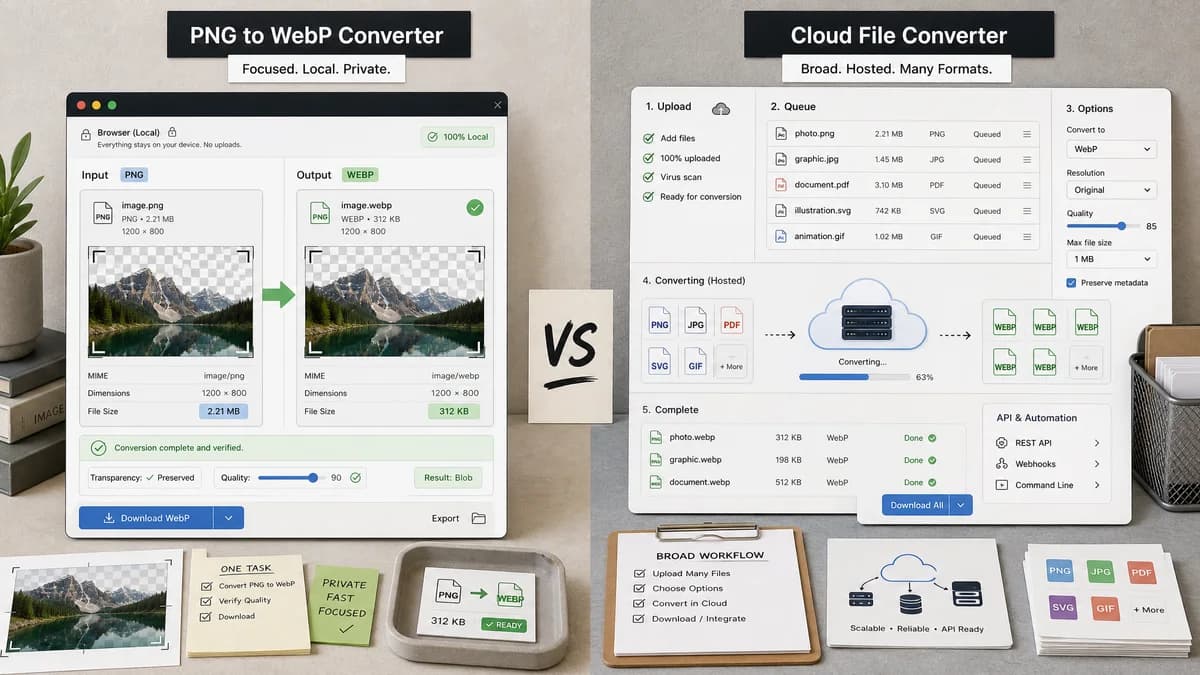
Quick verdict
TextFaker is a better fit when the user wants a narrow local PNG-to-WebP utility with transparent output validation. CloudConvert is better when the user needs a broad hosted conversion platform or API-style workflow.
How PNG to WebP Converter fits
TextFaker PNG to WebP Converter focuses on one browser-local task: convert PNG input into verified WebP output without uploading the image, while surfacing MIME, extension, dimensions, Blob, transparency, and quality-slider checks.
How CloudConvert fits
CloudConvert is broader and cloud-oriented. It supports many formats and exposes conversion options, but the core flow depends on selecting or uploading files into a hosted conversion service.
Side-by-side comparison
| Decision point | PNG to WebP Converter | CloudConvert | Takeaway |
|---|---|---|---|
| Processing model | Our workflowBrowser-local conversion using the shared image-format converter adapter pattern. | Competitor workflowHosted conversion service with file selection and upload-oriented workflow. | TextFaker lead on local privacy and deterministic validation. |
| Tool scope | Our workflowDedicated PNG to WebP page only. | Competitor workflowPart of a broad multi-format converter platform. | TextFaker can use simpler page copy and tests because it owns one conversion path. |
| Output validation | Our workflowExplicitly verifies image/webp MIME, .webp filename, preserved dimensions, and generated Blob. | Competitor workflowPresents conversion controls but does not center the UI around these browser-side validation facts. | Validation is a differentiator for QA-minded users. |
| Transparency handling | Our workflowTests transparent PNG input and confirm WebP output preserves alpha where the browser encoder supports it. | Competitor workflowWebP supports transparency, but the CloudConvert page copy is general-purpose. | TextFaker make transparent PNG behavior a first-class acceptance case. |
| Quality behavior | Our workflowWebP quality slider produces deterministic output text and affect generated WebP size/quality. | Competitor workflowOffers quality and file-size controls within a hosted conversion interface. | Both can expose quality, but TextFaker can make the browser encoder behavior directly inspectable. |
| Download naming | Our workflowProduces a predictable .webp filename from the original PNG name. | Competitor workflowDownloads converted output from the service workflow. | Deterministic naming belongs in TextFaker tests and SEO copy. |
Use PNG to WebP Converter when
- Private one-off PNG to WebP conversion in the browser
- Users who want visible image/webp, .webp, dimensions, and Blob validation
- Transparent PNG checks without a cloud upload
Use CloudConvert when
- Users already relying on a hosted conversion account
- Multi-format conversion beyond PNG to WebP
- Workflows needing CloudConvert's broader file conversion ecosystem
Detailed comparison
Privacy Positioning
CloudConvert is useful for broad file conversion, but PNG to WebP is a task that modern browsers can complete locally. TextFaker emphasize that the image does not need to leave the device for this specific conversion path.
Validation Positioning
The page does not just say a conversion happened. It reports exact output MIME, extension, original and output dimensions, and Blob readiness so users can trust the generated file before downloading.
- Assert image/webp output.
- Assert a .webp filename.
- Assert width and height are preserved.
Transparency Positioning
PNG files often contain transparent UI assets, icons, and logos. TextFaker include transparent PNG handling in examples and tests because converting transparency safely is a key reason to choose WebP over JPEG.
Quality Controls
CloudConvert exposes conversion options, so TextFaker needs a focused WebP quality slider rather than a generic settings area. The slider uses deterministic copy so test snapshots stay stable.
- Quality changes regenerate the WebP Blob.
- The selected quality is visible in the result summary.
Research notes
- CloudConvert supports PNG, JPG, GIF, WebP, HEIC and conversion options such as resolution, quality, and file size.
- The comparison avoids claiming CloudConvert is browser-local; its public positioning is a cloud conversion service.
- TextFaker implementation reuses the existing dedicated converter adapter pattern from JPG to PNG, PNG to JPG, and JPG to WebP.
Official source
The only outbound competitor link on this page is placed here for source checking after the comparison.
Official CloudConvert source