
PNG to WebP Converter vs Tinify
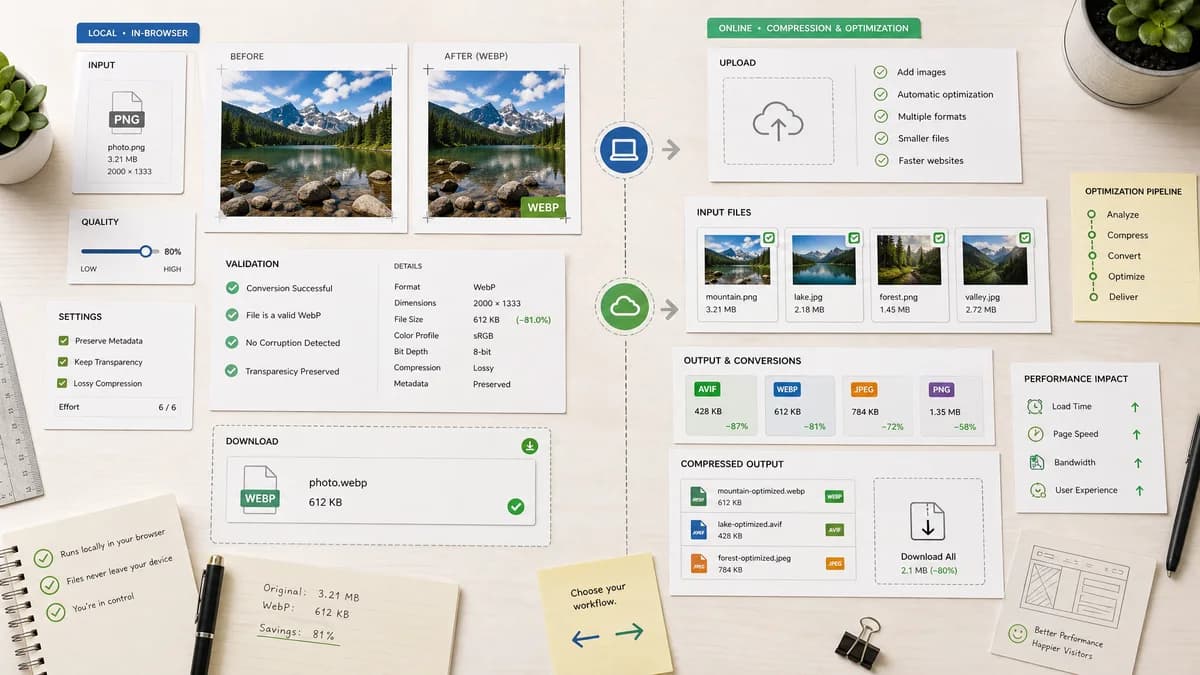
PNG to WebP Converter is the baseline in this comparison: Convert PNG images to WebP locally with image/webp output checks, .webp filenames, preserved dimensions, transparency handling, and adjustable quality.
Tinify provides an online image converter for AVIF, PNG, JPEG, and WebP, combining format conversion with compression for web performance.
Quick verdict
TextFaker is better when the user wants local control and file verification. Tinify is better when the user's main goal is automatic compression in an established online optimization workflow.
How PNG to WebP Converter fits
TextFaker keep the conversion local and transparent: the user chooses PNG input, optionally adjusts WebP quality, sees output validation, and downloads the WebP Blob.
How Tinify fits
Tinify is compression-first and web-performance-oriented. Its converter changes formats and compresses images, and it is adjacent to TinyPNG's broader compression ecosystem.
Side-by-side comparison
| Decision point | PNG to WebP Converter | Tinify | Takeaway |
|---|---|---|---|
| Primary promise | Our workflowConvert PNG to WebP locally with validated output. | Competitor workflowConvert and compress common web image formats for web performance. | Tinify is compression-first; TextFaker is validation-first. |
| Processing model | Our workflowBrowser-local for supported PNG files. | Competitor workflowOnline converter service workflow. | TextFaker has a stronger local privacy story. |
| Quality behavior | Our workflowUser-controlled WebP quality slider. | Competitor workflowCompression-oriented workflow with conversion target selection. | TextFaker make manual quality tuning explicit. |
| Transparency | Our workflowTransparent PNG support is tested and described. | Competitor workflowSupports PNG and WebP conversion, but public copy emphasizes optimization broadly. | TextFaker can speak more directly to transparent image assets. |
| Output checks | Our workflowMIME, extension, dimensions, Blob, and filename checks visible. | Competitor workflowFocuses on resulting optimized files. | TextFaker can help users confirm the exact file they downloaded. |
| Family consistency | Our workflowReuses existing image-format converter library and dedicated adapter pattern. | Competitor workflowPart of Tinify's own compression product flow. | TextFaker align with its existing JPG/PNG/WebP converter pages. |
Use PNG to WebP Converter when
- Local PNG to WebP conversion
- Users who want to inspect output facts
- Transparent PNG handling with no matte flattening
Use Tinify when
- Compression-first workflows
- Users already using TinyPNG or Tinify
- Batch web performance image optimization
Detailed comparison
Compression First
Tinify is a strong adjacent competitor because PNG to WebP conversion is often motivated by smaller web images. TextFaker include output size feedback but avoid becoming a full compressor page.
Manual Quality
The requested WebP quality slider gives TextFaker a clear control surface. The slider is direct, visible, and reflected in result text.
Local Conversion
Tinify's online workflow is convenient, but local conversion is better for private drafts, unreleased product graphics, and files that does not leave the user's browser.
Implementation Notes
The shared image-format converter likely already handles WebP encoder options for JPG to WebP. The PNG adapter reuses that behavior while adding PNG-specific input acceptance and transparency tests.
Research notes
- Tinify documents converting AVIF, PNG, JPEG, and WebP files and choosing a desired output format.
- Tinify's compression positioning means TextFaker include size information, but not promise compression targets unless implemented.
- The PNG to WebP page is distinct from JPEG Quality Slider Compressor and generic Image Format Converter.
Official source
The only outbound competitor link on this page is placed here for source checking after the comparison.
Official Tinify source