
PNG to WebP Converter vs toWebP.io
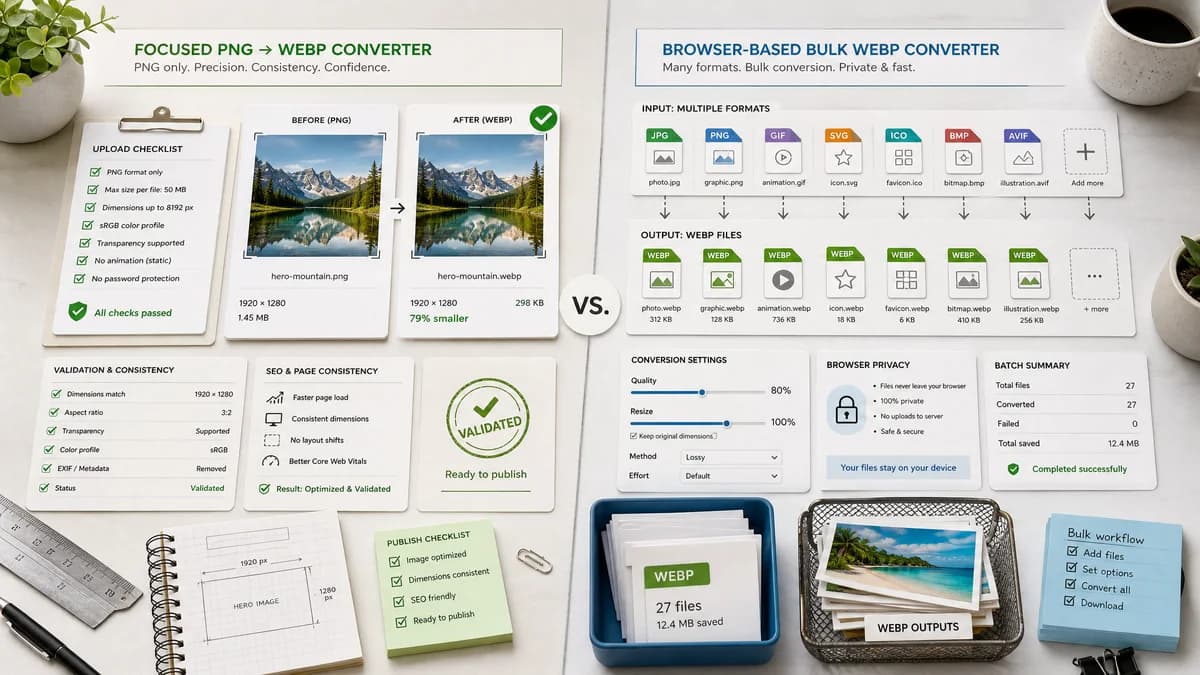
PNG to WebP Converter is the baseline in this comparison: Convert PNG images to WebP locally with image/webp output checks, .webp filenames, preserved dimensions, transparency handling, and adjustable quality.
toWebP.io batch converts JPG, PNG, GIF, SVG, ICO, BMP, and AVIF to WebP directly online in the browser with quality and scale controls.
Quick verdict
TextFaker is better for exact PNG-to-WebP validation and SEO page consistency. toWebP.io is better for users converting many image types or batches into WebP.
How PNG to WebP Converter fits
TextFaker be a dedicated PNG-only converter with stronger result validation and integration into the existing TextFaker image converter registry.
How toWebP.io fits
toWebP.io is focused on bulk conversion into WebP and claims files stay private because conversion happens in the browser. It supports multiple input formats and batch downloads.
Side-by-side comparison
| Decision point | PNG to WebP Converter | toWebP.io | Takeaway |
|---|---|---|---|
| Input scope | Our workflowPNG input only for this dedicated tool. | Competitor workflowJPG, PNG, GIF, SVG, ICO, BMP, and AVIF inputs to WebP. | toWebP.io is broader; TextFaker is more exact. |
| Batch support | Our workflowFollows the existing TextFaker dedicated converter pattern, likely single-file unless the family supports multiple files. | Competitor workflowBulk conversion is a core feature. | toWebP.io wins for batches. |
| Processing | Our workflowBrowser-local conversion. | Competitor workflowBrowser-based conversion with no-upload positioning. | Privacy is likely parity. |
| Quality control | Our workflowWebP quality slider tied to output validation. | Competitor workflowQuality choices from 100% down to lower values plus scale controls. | toWebP.io has broader transform controls; TextFaker keep verification clearer. |
| Transparency checks | Our workflowTransparent PNG handling is tested and visible in notes/results. | Competitor workflowGeneral WebP conversion page, not specifically a transparent PNG QA page. | TextFaker can be stronger for alpha-sensitive PNG assets. |
| Result validation | Our workflowMIME, extension, dimensions, and Blob status surfaced. | Competitor workflowConversion queue and downloads are central. | TextFaker can provide more technical confirmation. |
Use PNG to WebP Converter when
- Exact PNG-only conversion
- Visible file validity checks
- Transparent PNG validation and deterministic download labels
Use toWebP.io when
- Bulk conversion to WebP
- Users converting many source formats
- Users who need quality plus scale controls
Detailed comparison
Bulk Competitor
toWebP.io shows that many users want fast batch conversion. If TextFaker stays single-file, it compensates with clearer validation and a more trustworthy exact-task page.
Privacy Parity
Because toWebP.io also claims browser-local conversion, TextFaker avoid treating local processing as the only differentiator. The differentiator is local processing plus objective result details.
Quality And Scale
toWebP.io includes both quality and scaling. TextFaker's requested validation says dimensions is preserved, so scale controls does not be part of this dedicated tool unless scoped separately.
- Preserve dimensions by default.
- Do not add resize controls to the dedicated PNG to WebP adapter.
Family Consistency
This is the fifth browser-local image conversion family tool. It feels consistent with JPG to PNG, PNG to JPG, and JPG to WebP rather than copying a bulk queue product.
Research notes
- toWebP.io advertises batch conversion, browser-local privacy, quality choices, and scale options.
- TextFaker's requested preserved-dimensions validation conflicts with adding scale as a primary control.
- If future batch support is added, it is shared across the converter family rather than special-cased here.
Official source
The only outbound competitor link on this page is placed here for source checking after the comparison.
Official toWebP.io source