
PNG to WebP Converter vs Zamzar
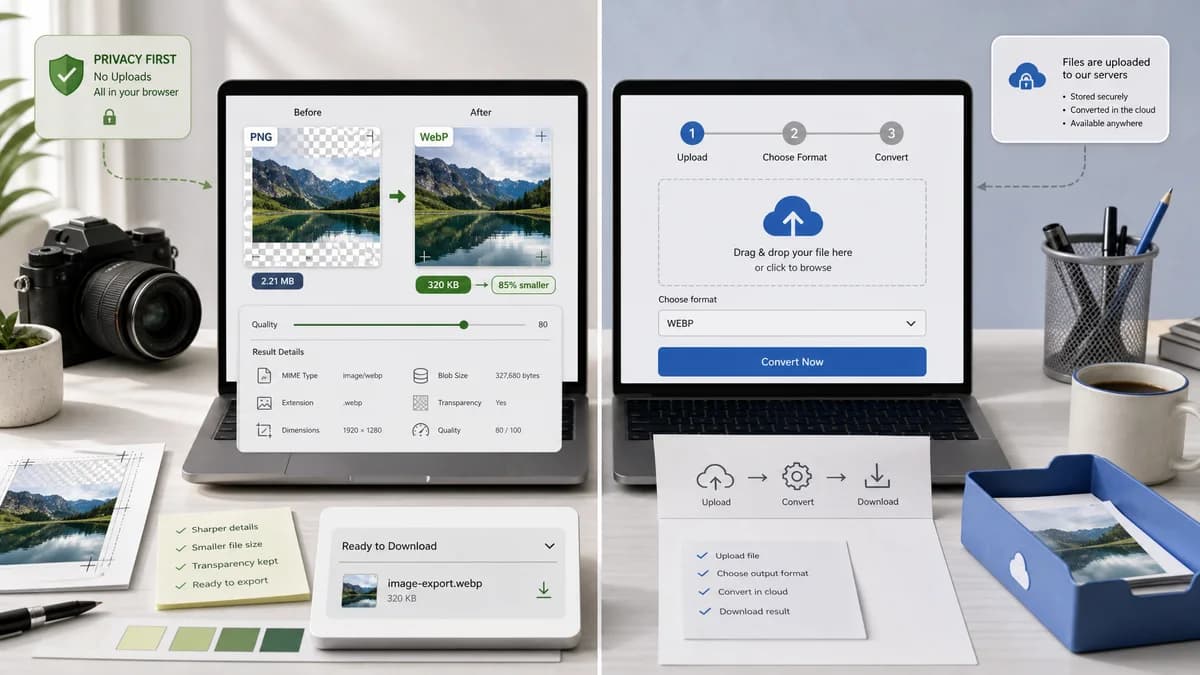
PNG to WebP Converter is the baseline in this comparison: Convert PNG images to WebP locally with image/webp output checks, .webp filenames, preserved dimensions, transparency handling, and adjustable quality.
Zamzar provides a PNG to WebP converter using a simple choose-format-convert flow.
Quick verdict
TextFaker win for privacy, technical result visibility, and dedicated PNG-to-WebP UX. Zamzar is suitable for users who prefer a familiar generic conversion service.
How PNG to WebP Converter fits
TextFaker provide a no-upload PNG to WebP workflow with richer result inspection: MIME type, extension, dimensions, Blob, transparency, and quality setting.
How Zamzar fits
Zamzar is simple and broad. It is built around uploading a file, selecting WebP, and converting through its service.
Side-by-side comparison
| Decision point | PNG to WebP Converter | Zamzar | Takeaway |
|---|---|---|---|
| Conversion steps | Our workflowSelect PNG, adjust WebP quality if needed, inspect verified output, download .webp. | Competitor workflowChoose PNG, select WebP, click convert, then download service output. | TextFaker add useful verification without adding complexity. |
| Upload requirement | Our workflowNo upload for browser-supported PNG inputs. | Competitor workflowHosted upload-based conversion flow. | Privacy-sensitive users have a clear reason to choose TextFaker. |
| Output metadata | Our workflowShows output MIME, extension, dimensions, Blob, and file size details. | Competitor workflowPrimarily oriented around conversion completion. | TextFaker can answer whether the generated file is truly WebP. |
| Transparency | Our workflowTransparent PNG fixtures remain transparent in WebP output. | Competitor workflowThe page is not framed around alpha-channel verification. | TextFaker describe transparent PNG handling directly. |
| Quality slider | Our workflowWebP-specific quality slider included because WebP output is lossy-capable. | Competitor workflowSimple conversion flow; advanced control visibility may be limited compared with specialized tools. | TextFaker can serve users who need quick quality tuning. |
| Implementation reuse | Our workflowReuse src/lib/image-format-converter.ts and existing dedicated adapter pattern. | Competitor workflowExternal hosted implementation. | TextFaker can maintain consistency across its browser-local converter family. |
Use PNG to WebP Converter when
- Private PNG conversion without account friction
- Users checking exact output properties
- Web developers optimizing transparent PNG assets
Use Zamzar when
- Users familiar with Zamzar's conversion flow
- Broad document, media, and image conversion needs
- Simple hosted conversion with minimal controls
Detailed comparison
Simple Competitor
Zamzar is important because it represents the simple hosted converter pattern. TextFaker match the ease of use while adding local execution and output validation.
Result Confidence
The result panel clearly says the generated file is WebP, name the output file, and show dimensions. This avoids ambiguity when a browser preview alone looks identical to the source PNG.
Quality Slider
Because WebP quality settings can materially affect output size, the slider updates the generated result and keep copy text deterministic.
- Use stable labels such as WebP quality and Download WebP.
- Avoid dynamic wording that makes tests brittle.
Adapter Fit
The existing JPG to WebP converter provides the closest adapter precedent. PNG input validation and transparent PNG handling are the main differences.
Research notes
- Zamzar documents the three-step process for PNG to WebP conversion.
- TextFaker not imply Zamzar is local; it is positioned as an online file conversion service.
- The output filename requirement explicitly replace .png with .webp, including uppercase .PNG cases if existing helpers support normalization.
Official source
The only outbound competitor link on this page is placed here for source checking after the comparison.
Official Zamzar source