
Open Source Alternatives to Convertio
PNG to WebP Converter is a browser-based alternative for users who need this focused result without installing a proprietary desktop app or entering a larger hosted workflow.
This research compares that workflow with Convertio while keeping the outbound source link at the bottom after the analysis.
Why PNG to WebP Converter fits
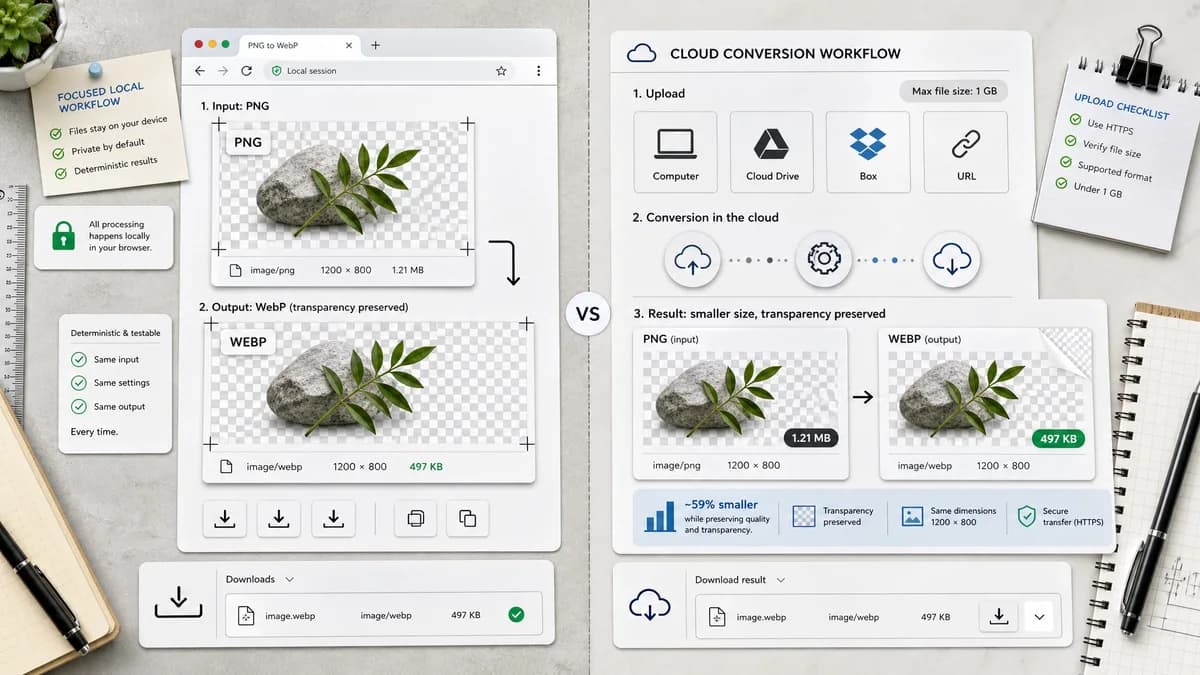
TextFaker handles PNG input locally, produce a WebP Blob with image/webp MIME, preserve dimensions and transparency, and make copy/download labels deterministic for tests and user confidence.
What Convertio offers
Convertio's PNG to WEBP page supports file selection from computer, Google Drive, Dropbox, or URL, lists a 1 GB maximum file size message, and positions WEBP as smaller with transparency support.
Open alternative signals
File location
PNG to WebP ConverterLocal browser file input for PNG images
ConvertioComputer, Google Drive, Dropbox, and URL sources
Conversion focus
PNG to WebP ConverterPNG to WebP only
ConvertioLarge catalog of file formats and conversion directions
Verification
PNG to WebP ConverterMIME, extension, Blob, dimensions, transparency, and quality behavior checks
ConvertioHosted conversion and download flow
Copy behavior
PNG to WebP ConverterDeterministic copy/download text for QA and repeat usage
ConvertioGeneral conversion UI text across many formats
Decision guide
Best for users who want a single-purpose PNG to WebP converter with visible output validation and no cloud-source picker.
Best for users who need cloud import sources, many conversion directions, large-format breadth, or a familiar hosted conversion queue.
Side-by-side open source alternative comparison
| Decision point | PNG to WebP Converter | Convertio | Takeaway |
|---|---|---|---|
| Upload sources | Our workflowPrioritize a local file picker and browser-side processing. | Proprietary workflowConvertio supports computer, Google Drive, Dropbox, and URL sources. | Convertio is more flexible for cloud files; TextFaker is simpler for local PNGs. |
| Privacy posture | Our workflowA browser-local implementation avoids sending supported images to a conversion server. | Proprietary workflowConvertio is a hosted online converter with cloud and URL input options. | TextFaker lead with local processing for privacy-sensitive PNG assets. |
| Format scope | Our workflowDedicated converter fixes input to PNG and output to WebP. | Proprietary workflowConvertio advertises broad file and format support beyond images. | Narrow intent can reduce UI ambiguity and improve testability. |
| Alpha channel | Our workflowTransparent PNG handling is an explicit validation point. | Proprietary workflowConvertio FAQ says WEBP supports alpha channels like PNG. | Both address transparency; TextFaker prove it in the result summary. |
| Quality mode | Our workflowExpose WebP quality slider behavior on the dedicated page. | Proprietary workflowConvertio discusses lossy and lossless WebP choices in FAQ-style content. | TextFaker can map quality control to a simpler slider, while avoiding unsupported lossless claims unless implemented. |
| Result naming | Our workflowEmit a predictable .webp filename from the source PNG name. | Proprietary workflowConvertio lets users download the converted WebP after the hosted job completes. | Predictable naming belongs in TextFaker's acceptance criteria. |
Detailed research
Why compare
Convertio is a strong comparison target because it is a broad online converter with a specific PNG to WEBP landing page and cloud-source import options. Users may search for alternatives when they want fewer account, upload, or queue assumptions.
- Avoid claiming parity with Convertio's full format catalog.
- Focus on browser-local conversion and transparent output checks.
- Use the primary keyword exactly for the alternative page title prefix.
Implementation Notes
The TextFaker adapter reuses shared conversion code rather than duplicating canvas or Blob logic. The dedicated route can set accepted input to PNG, target MIME to image/webp, extension to .webp, and enable the WebP quality slider.
- Preserve source width and height.
- Preserve transparent alpha when the browser WebP encoder supports it.
- Show deterministic output copy for automated tests.
Generated Image
The page image can show a local PNG file card converting into a verified WebP card with green checks for MIME, dimensions, transparency, and Blob.
- Use generic UI, not Convertio branding.
- Include cloud-source icons only if they are generic and not logo-based.
Content Risks
Convertio's public page includes strong claims about browser support and transparency. TextFaker content relies on its own implemented behavior and avoid restating broad browser-coverage percentages unless independently sourced.
Research notes
- Official Convertio page describes selecting files from Computer, Google Drive, Dropbox, or URL.
- The page states WEBP supports transparency and offers smaller image files, which supports a transparency-focused TextFaker test case.
- The page mentions many supported formats and conversion directions, so TextFaker position itself as narrower rather than as a broader proprietary software replacement.
- Generated image: upload picker replaced by an in-browser canvas panel that outputs a verified .webp badge.
Official source
The proprietary product link is included once here for source checking after the alternative analysis.
Official Convertio source