
Open Source Alternatives to Online-Convert
PNG to WebP Converter is a browser-based alternative for users who need this focused result without installing a proprietary desktop app or entering a larger hosted workflow.
This research compares that workflow with Online-Convert while keeping the outbound source link at the bottom after the analysis.
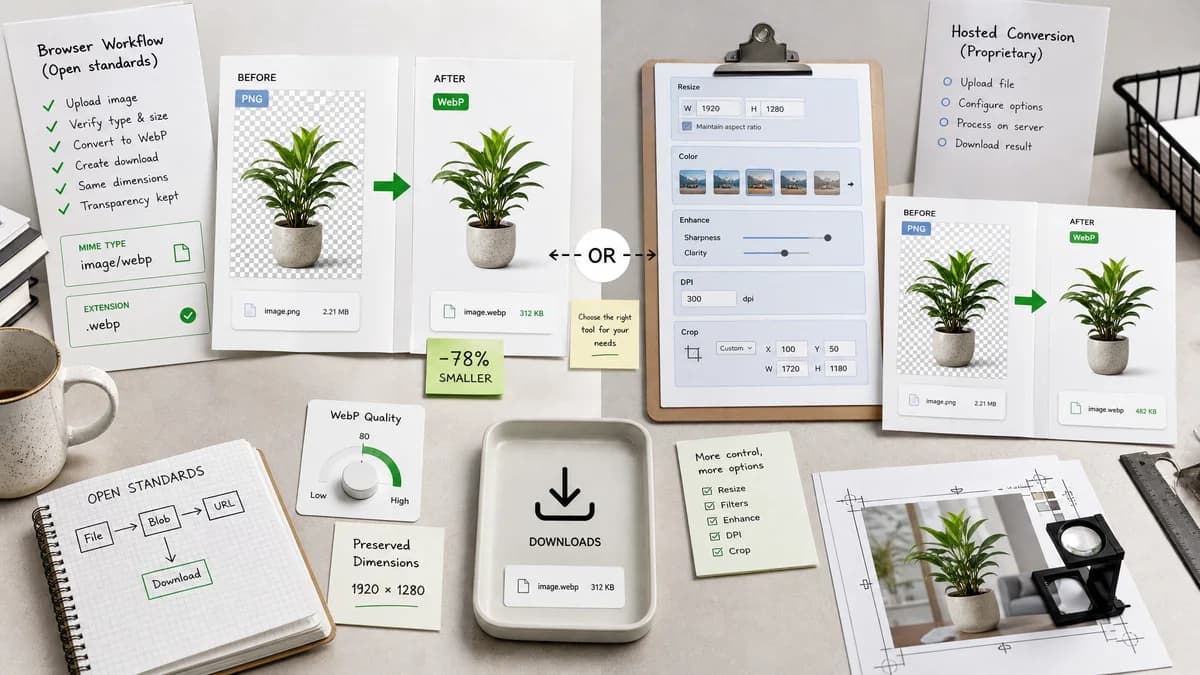
Why PNG to WebP Converter fits
TextFaker's page avoids broad editing controls and instead provide a fast browser conversion with WebP quality, MIME and extension verification, Blob creation, preserved dimensions, and transparent PNG support.
What Online-Convert offers
Online-Convert's official PNG to WEBP page converts Portable Network Graphics files to WebP and exposes optional settings such as resizing, color filters, enhancement, DPI, and crop controls.
Open alternative signals
Settings breadth
PNG to WebP ConverterWebP quality and output verification only for this dedicated page
Online-ConvertResize, filter, enhance, DPI, crop, and other optional settings
Conversion scope
PNG to WebP ConverterPNG input to WebP output
Online-ConvertHosted image conversion page with many adjustment options
Output QA
PNG to WebP ConverterMIME, extension, dimensions, Blob, transparency, and quality checks
Online-ConvertConfigurable conversion flow
Complexity
PNG to WebP ConverterLower-control surface for predictable output
Online-ConvertMore controls for users who need transformations
Decision guide
Best when users want direct PNG to WebP output without resizing, filtering, or other transformation settings.
Best when users want a hosted converter with optional resize, crop, DPI, color filter, and enhancement controls in the same flow.
Side-by-side open source alternative comparison
| Decision point | PNG to WebP Converter | Online-Convert | Takeaway |
|---|---|---|---|
| Transformation controls | Our workflowKeep conversion focused on format and quality. | Proprietary workflowOnline-Convert includes resizing, color filters, enhancement, DPI, and crop settings. | Online-Convert is more configurable; TextFaker is more direct. |
| Dimension preservation | Our workflowPreserved dimensions is part of validation. | Proprietary workflowOnline-Convert allows size changes, so dimension preservation is optional rather than the default promise. | TextFaker can serve users who want conversion without resizing. |
| Quality | Our workflowDedicated WebP quality slider behavior is visible and tested. | Proprietary workflowOnline-Convert has a richer settings panel, with quality-related options depending on page controls. | TextFaker keep quality control simple. |
| Privacy posture | Our workflowBrowser-local workflow for supported PNG files. | Proprietary workflowOnline-Convert is a hosted online conversion service. | Local conversion is the main practical difference. |
| Result data | Our workflowShow generated Blob and MIME details after conversion. | Proprietary workflowOnline-Convert's researched page centers setup options before conversion. | TextFaker center result facts after conversion. |
| Use case | Our workflowBest for web developers converting transparent PNG assets to WebP without other edits. | Proprietary workflowBest for users who need format conversion and image adjustments in one hosted workflow. | Differentiate by keeping the dedicated page lean. |
Detailed research
Why compare
Online-Convert is a useful benchmark because it exposes many optional transformations on the PNG to WEBP page. That makes it clear what TextFaker and does not include for the requested dedicated converter.
- Keep scope to conversion and WebP quality.
- Do not add crop, filter, or DPI features for this page.
- Make preserved dimensions a validation feature.
Implementation Notes
The adapter does not inherit unrelated controls from the generic image converter page if they would blur the dedicated SEO intent. It uses shared conversion internals while constraining the user-visible flow to PNG input, WebP output, quality, preview, result facts, copy, and download.
- Stable filename behavior matters for tests.
- Blob must be non-empty and downloadable.
- Transparent PNG fixture passes.
Generated Image
Create a clean comparison visual showing fewer controls and stronger result checks, with a WebP badge and a transparent checkerboard preview.
- Avoid showing Online-Convert branding.
- Use generic settings icons if needed.
Content Risks
Because Online-Convert offers transformation settings, TextFaker copy does not say it is more powerful. It is more focused for a no-resize conversion job.
Research notes
- Official Online-Convert page confirms PNG to WEBP conversion and lists optional settings including size changes, color filters, enhancement, DPI, and crop pixels.
- Those optional transformations are outside the requested TextFaker scope, so comparisons frame TextFaker as simpler rather than more configurable.
- Generated image: minimal converter with only a quality slider contrasted against a generic multi-setting panel.
Official source
The proprietary product link is included once here for source checking after the alternative analysis.
Official Online-Convert source