
Open Source Alternatives to Tinify
PNG to WebP Converter is a browser-based alternative for users who need this focused result without installing a proprietary desktop app or entering a larger hosted workflow.
This research compares that workflow with Tinify while keeping the outbound source link at the bottom after the analysis.
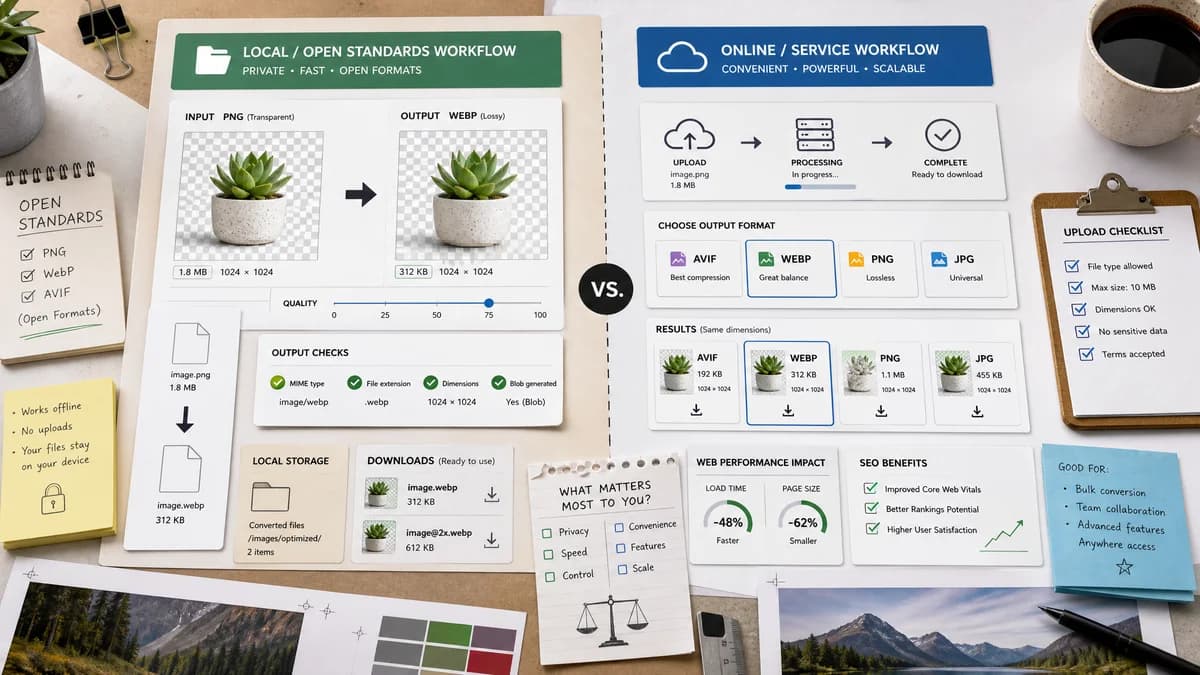
Why PNG to WebP Converter fits
TextFaker convert PNG to WebP locally with transparent PNG preservation, WebP quality slider behavior, and objective output checks for MIME, extension, dimensions, and Blob generation.
What Tinify offers
Tinify's online converter page says it transforms images to formats including AVIF, WebP, PNG, and JPG to improve website speed and SEO ranking.
Open alternative signals
Conversion target
PNG to WebP ConverterPNG to WebP only
TinifyAVIF, WebP, PNG, JPG conversion options
Optimization model
PNG to WebP ConverterBrowser WebP encoding with quality slider
TinifyCommercial smart compression and conversion service
Output validation
PNG to WebP ConverterMIME, filename, dimensions, Blob, transparency, quality checks
TinifyWebsite-speed and SEO-focused conversion messaging
API/platform
PNG to WebP ConverterNo API needed for one-off local conversion
TinifyTinify/TinyPNG ecosystem includes API and commercial optimization products
Decision guide
Best for quick local PNG-to-WebP conversion where users want a deterministic downloadable file and visible output checks.
Best for users who want Tinify/TinyPNG's commercial compression engine, broader format conversion, API, or optimization workflow.
Side-by-side open source alternative comparison
| Decision point | PNG to WebP Converter | Tinify | Takeaway |
|---|---|---|---|
| Optimization depth | Our workflowUses browser encoding controls suitable for immediate WebP output. | Proprietary workflowTinify is known for smart compression and commercial optimization workflows. | Tinify may produce stronger optimization in some pipelines; TextFaker is better for local one-off conversion. |
| Format range | Our workflowDedicated PNG to WebP route. | Proprietary workflowTinify converter supports several target formats including AVIF, WebP, PNG, and JPG. | Tinify is broader; TextFaker is more intent-specific. |
| Quality slider | Our workflowExpose the selected WebP quality value directly. | Proprietary workflowTinify emphasizes automated conversion and optimization rather than a dedicated PNG-to-WebP slider in the researched page. | Manual quality control can be a TextFaker differentiator. |
| Privacy posture | Our workflowSupported conversion can run in the browser and generate a local Blob. | Proprietary workflowTinify is a web service for conversion and compression. | Local processing is useful for assets users do not want to upload. |
| Transparency handling | Our workflowTransparent PNG support is explicitly tested. | Proprietary workflowTinify supports PNG and WebP formats, but the researched converter excerpt does not detail alpha validation. | Make alpha behavior visible. |
| SEO framing | Our workflowSEO page focuses on conversion facts and web asset preparation. | Proprietary workflowTinify frames conversion around website speed and SEO ranking. | TextFaker can use performance motivation while staying precise about the tool's narrower role. |
Detailed research
Why compare
Tinify is a relevant comparison because PNG to WebP conversion is often part of image optimization. TextFaker not claim to duplicate Tinify's compression service; it offer a transparent local conversion step with visible output checks.
- Position as local conversion, not commercial optimizer replacement.
- Mention WebP quality control.
- Avoid unsupported compression-ratio promises.
Implementation Notes
The implementation exposes before/after file sizes but avoid guaranteeing smaller output for every PNG, because flat graphics, alpha, and encoder behavior can vary. The important invariant is valid image/webp output with the expected filename and dimensions.
- Show file-size delta as measured, not promised.
- Keep alpha preservation tested.
- Keep output Blob downloadable.
Generated Image
Show a web asset card moving from PNG to WebP with a measured size indicator and browser-local badge.
- No Tinify or panda branding.
- Avoid SEO ranking graphics that imply guaranteed ranking gains.
Content Risks
Image optimization tools often make compression claims. TextFaker report actual output size and quality settings rather than promising a fixed percentage reduction.
Research notes
- Official Tinify converter page says it can transform images to AVIF, WebP, PNG, and JPG.
- Related TinyPNG/TinyJPG pages describe smart lossy compression for WebP, JPEG, and PNG and mention API/platform features.
- TextFaker frame itself as open-source-powered and browser-based, not as a replacement for Tinify's commercial compression engine or API.
- Generated image: developer asset pipeline showing local PNG to verified WebP before committing to a website.
Official source
The proprietary product link is included once here for source checking after the alternative analysis.
Official Tinify source