
Print Bleed Border Checker vs Adobe Acrobat Pro Preflight
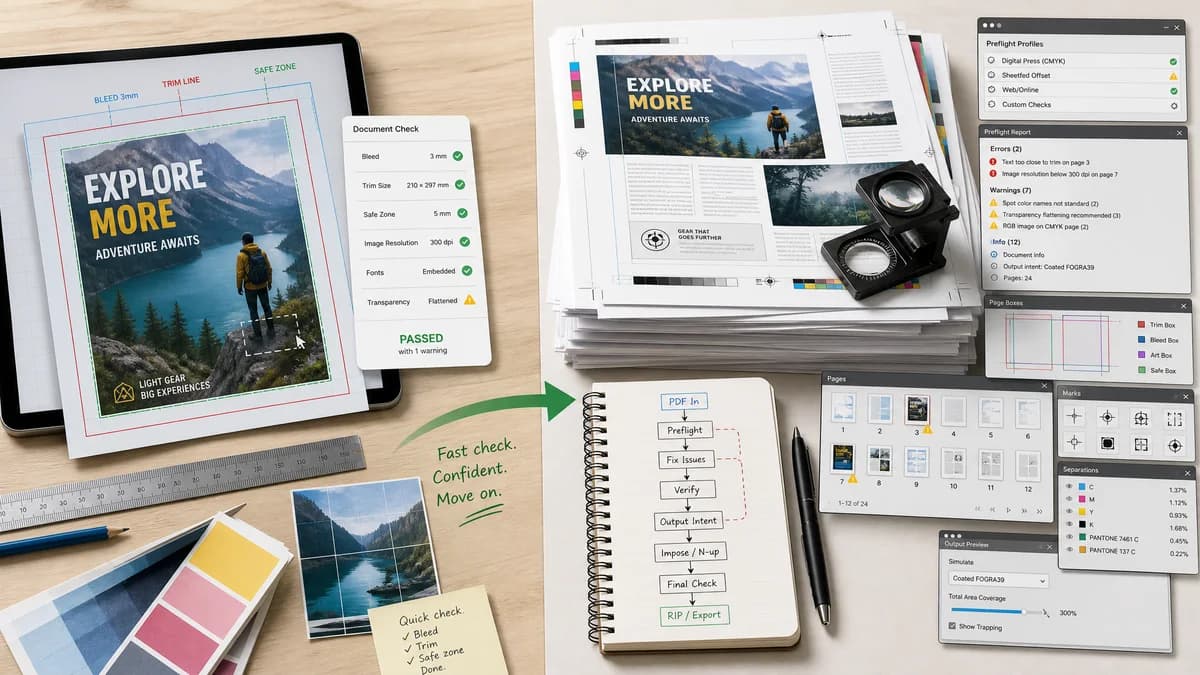
Print Bleed Border Checker is the baseline in this comparison: Check image trim size, bleed, safe zone, borders, and print dimensions locally before sending artwork to a printer.
Adobe Acrobat Pro includes Print Production and Preflight tools for inspecting PDFs, page boxes, printer marks, and many print-production checks.
Quick verdict
Acrobat is deeper for professional PDF workflows; TextFaker can be faster and more accessible for one-off bleed, border, and safe-zone checks.
How Print Bleed Border Checker fits
Print Bleed Border Checker is designed to be a lightweight browser-local utility for non-specialists who need a simple bleed and safe-zone report from an image or PDF.
How Adobe Acrobat Pro Preflight fits
Acrobat Pro is a professional PDF tool with extensive preflight profiles, page-box tools, and print-production features, but it is paid and complex for casual print users.
Side-by-side comparison
| Decision point | Print Bleed Border Checker | Adobe Acrobat Pro Preflight | Takeaway |
|---|---|---|---|
| Audience | Our workflowGeneral users, creators, small businesses, and students preparing print files. | Competitor workflowDesigners, print operators, and users comfortable with Acrobat Print Production tools. | TextFaker can avoid prepress terminology overload. |
| File types | Our workflowCan prioritize browser-readable images and optionally PDFs. | Competitor workflowFocused on PDF inspection and correction. | TextFaker can serve image uploads that never became PDFs. |
| Cost and access | Our workflowCan be free and browser-based. | Competitor workflowRequires Acrobat Pro access for Preflight tools. | TextFaker is better for quick public web access. |
| Depth | Our workflowFocused checks: dimensions, bleed, safe zone, border width, crop output. | Competitor workflowBroad PDF preflight libraries and production checks. | Acrobat remains better for full professional PDF compliance. |
| Output | Our workflowCopy-ready report, exact box coordinates, pass/fail statuses, and downloads. | Competitor workflowPreflight results and PDF production tools inside Acrobat. | TextFaker output can be designed around deterministic web tests. |
| Learning curve | Our workflowWizard-style inputs for trim size, units, DPI, bleed, and safe margin. | Competitor workflowRequires understanding profiles, fixups, boxes, and production panels. | TextFaker can reduce the task to a few measurable settings. |
Use Print Bleed Border Checker when
- Casual users checking a flyer, card, poster, label, or photo print
- Browser-local numeric validation without Acrobat Pro
- Image-first workflows using PNG, JPG, or WebP
- Simple downloadable annotated proof files
Use Adobe Acrobat Pro Preflight when
- Professional PDF preflight
- Managing PDF trim, bleed, media, and art boxes
- Advanced print-production inspection
- Users already subscribed to Acrobat Pro
Detailed comparison
Demand Signal
Adobe community questions about checking bleed specs and adding bleed to PDFs show that even Acrobat users need guidance for this specific print task. The underlying user need is not just preflight generally; it is knowing whether the file has enough edge allowance.
- Users ask whether there is a preflight check for bleed.
- Users ask how to inspect bleed specs in a PDF.
Product Gap
Acrobat is powerful but broad. A focused browser tool can offer a direct path: upload, select target trim, see exact boxes and warnings.
- No profile selection needed.
- No desktop software needed.
Implementation Fit
TextFaker should explicitly distinguish detectable measurements from design intent. It can validate page dimensions and edge/border bands deterministically, while wording warnings carefully when the tool cannot know which content is important.
- Report 'safe-zone geometry' separately from 'content importance'.
- Use deterministic edge sampling for border and white-edge risk.
Testing Path
Automated fixtures can include images whose canvas size is exactly trim plus bleed, too small by one pixel, or includes a known white border. Tests can assert status messages and measured values.
- Fixture: 3.75 x 2.25 inch business card at 300 DPI with 0.125 inch bleed.
- Fixture: same trim size with missing left bleed.
- Fixture: image with 12 px border near trim.
Research notes
- Adobe official docs confirm Acrobat supports page boxes and preflight inspection.
- Adobe community posts show bleed-specific questions remain common even among Acrobat users.
- TextFaker should not claim to replace Acrobat preflight; it should focus on simple measurable checks.
Official source
The only outbound competitor link on this page is placed here for source checking after the comparison.
Official Adobe Acrobat Pro Preflight source