
Print Bleed Border Checker vs callas pdfToolbox
Print Bleed Border Checker is the baseline in this comparison: Check image trim size, bleed, safe zone, borders, and print dimensions locally before sending artwork to a printer.
callas pdfToolbox provides PDF preflight and correction across desktop, server, CLI, and SDK variants, including tools for checking and generating bleed.
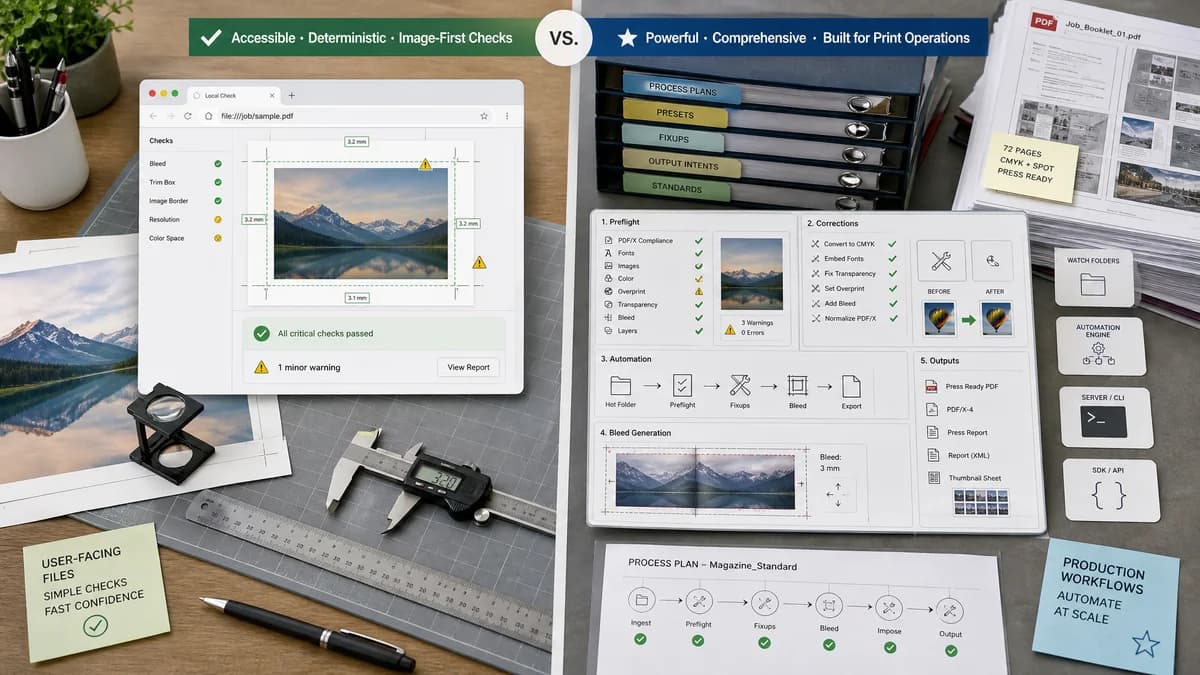
Quick verdict
pdfToolbox is more powerful for print operations; TextFaker can be more accessible for deterministic user-facing checks and image-first print prep.
How Print Bleed Border Checker fits
Print Bleed Border Checker is designed to provide a much smaller local browser interface for measuring bleed and border risks in user-supplied images or PDFs.
How callas pdfToolbox fits
pdfToolbox is suited to professional print workflows that need configurable PDF preflight, correction, automation, and bleed-related process plans.
Side-by-side comparison
| Decision point | Print Bleed Border Checker | callas pdfToolbox | Takeaway |
|---|---|---|---|
| Tool category | Our workflowBrowser-local consumer and creator utility. | Competitor workflowProfessional PDF preflight and correction suite. | The products can serve different levels of print risk. |
| Bleed handling | Our workflowMeasures whether user-selected file dimensions satisfy target bleed and reports edge/border risks. | Competitor workflowDocuments processes for identifying and fixing bleed issues in PDFs. | pdfToolbox is stronger for PDF repair; TextFaker is simpler for validation. |
| Automation | Our workflowAutomated within the web page and testable through UI fixtures. | Competitor workflowOffers server, CLI, and SDK variants for production automation. | pdfToolbox wins for enterprise automation. |
| Image support | Our workflowCan prioritize PNG, JPG, WebP, AVIF, and browser-readable images. | Competitor workflowCentered on PDF preflight workflows. | TextFaker can handle common exported image assets directly. |
| User input | Our workflowTrim size, unit, DPI, bleed amount, safe margin, and border tolerance. | Competitor workflowProfiles, process plans, and PDF preflight settings. | TextFaker is easier for non-specialists. |
| Report format | Our workflowCompact copyable report plus downloadable proof image/PDF. | Competitor workflowProfessional preflight reports and corrections. | TextFaker can optimize for support tickets and automated verification. |
Use Print Bleed Border Checker when
- Quick self-service print checks
- Image uploads from phone, design, or marketplace workflows
- Plain-language status messages
- Downloadable annotated crop and safe-zone previews
Use callas pdfToolbox when
- Automated PDF preflight pipelines
- Advanced PDF correction
- Print businesses standardizing production checks
- Users needing server, CLI, or SDK integration
Detailed comparison
Demand Signal
callas documents bleed-specific checking and fixing because missing or incorrect bleed is a known production problem. Public forum posts also show users ask for a simpler way to know whether bleed is present.
- Bleed issues are not limited to one printer or one design app.
- The common user task is checking dimensions and edge safety before upload.
Product Gap
pdfToolbox serves experts. TextFaker should present a bounded interpretation: 'your file matches the requested geometry' or 'your file is short on these edges'.
- Avoid advanced PDF production claims.
- Expose exact assumptions in the output.
Implementation Fit
The tool can compute boxes from user inputs. For a raster image, the full canvas is the bleed box, the trim box is inset by bleed, and the safe zone is inset from trim by safe margin. Border checks can sample edge bands and compare widths.
- All boxes can be expressed in px, in, and mm.
- All checks can be deterministic.
Risk Handling
No automated tool can always know whether a logo or text is important in a raster image. TextFaker should phrase safe-zone results as geometry and optional contrast/border warnings, not definitive semantic design approval.
- Use 'content may be too close' only when measurable features cross the safe boundary.
- Keep image analysis conservative.
Research notes
- callas official product and help pages confirm PDF preflight and bleed-fix capability.
- Adobe community comments note the difficulty of automating true design-intent bleed checks, which supports careful TextFaker wording.
- TextFaker should be transparent about what it can and cannot detect.
Official source
The only outbound competitor link on this page is placed here for source checking after the comparison.
Official callas pdfToolbox source