
Print Bleed Border Checker vs PressPDF
Print Bleed Border Checker is the baseline in this comparison: Check image trim size, bleed, safe zone, borders, and print dimensions locally before sending artwork to a printer.
PressPDF provides online printable-PDF utilities including PDF checking, adding bleed and crop marks, image-to-PDF conversion, and print-preparation modules.
Quick verdict
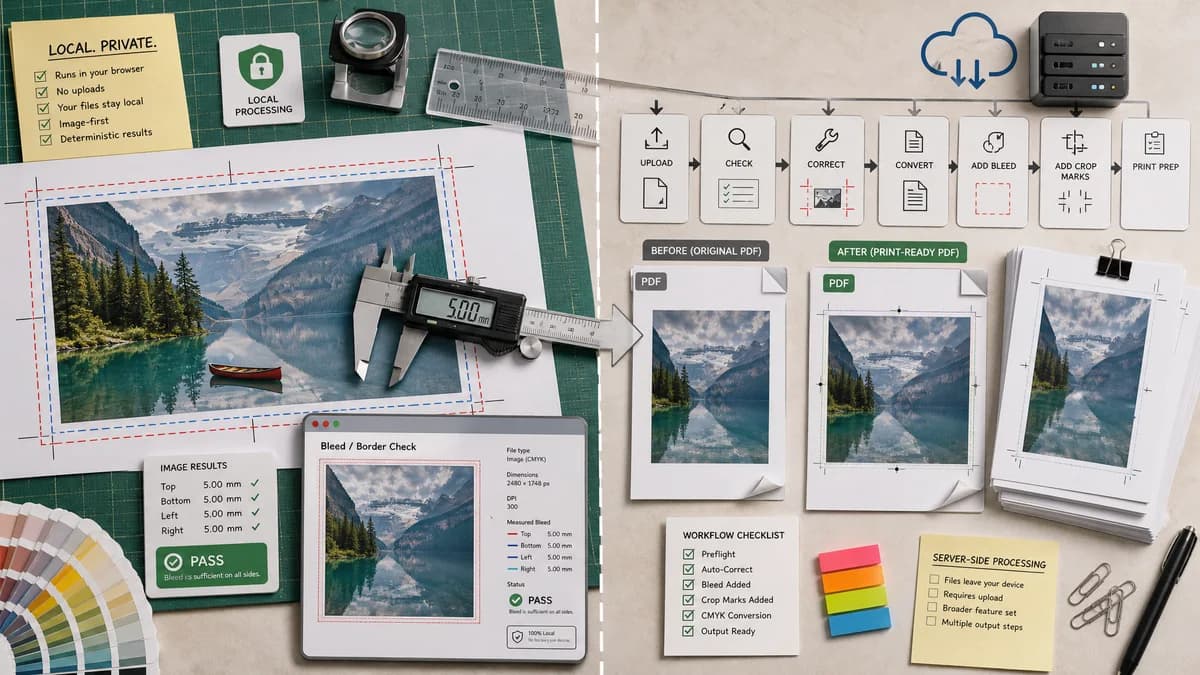
PressPDF has broader PDF correction features; TextFaker can differentiate with privacy, local processing, image-first support, and simpler testable outputs.
How Print Bleed Border Checker fits
Print Bleed Border Checker is designed to run locally in the browser and focus on deterministic measurements and validation messages for image and print-file bleed and border checks.
How PressPDF fits
PressPDF offers a broader server-side print-PDF workflow with checking and correction modules, including adding bleed and crop marks.
Side-by-side comparison
| Decision point | Print Bleed Border Checker | PressPDF | Takeaway |
|---|---|---|---|
| Processing location | Our workflowBrowser-local by design. | Competitor workflowSite states processing occurs on a European cloud server with deletion after a retention window. | TextFaker can make privacy a clear advantage. |
| File emphasis | Our workflowImage-first with optional PDF checks. | Competitor workflowPrintable PDF workflows, plus image-to-PDF with bleed and crop marks. | PressPDF is stronger for PDF transformations. |
| Output | Our workflowValidation report, measured boxes, border widths, annotated proof, and optional cropped/padded files. | Competitor workflowCorrected or converted printable PDFs and checking lists. | TextFaker should focus on transparent measurements. |
| User complexity | Our workflowFew controls centered on trim, bleed, safe margin, DPI, and border tolerance. | Competitor workflowMultiple print-PDF modules. | TextFaker can be quicker for one check. |
| Mobile friendliness | Our workflowCan be built as a responsive drop-zone and settings form. | Competitor workflowOnline service, but print-PDF tools may be less optimized for small-screen quick checks. | Mobile UX is a TextFaker opportunity. |
| Verification | Our workflowEvery result can be asserted from file dimensions and pixel samples. | Competitor workflowProvides broader check/correction outputs that may vary by module. | TextFaker can be easier to test and explain. |
Use Print Bleed Border Checker when
- Local processing without uploading print files to a server
- Fast image bleed checks before creating a PDF
- Numeric border and safe-zone reports
- Deterministic validation for automated tests
Use PressPDF when
- Adding bleed and crop marks to PDFs online
- PDF print-preparation corrections
- Users who want a managed online PDF workflow
- Combining multiple PDF print checks in one service
Detailed comparison
Demand Signal
PressPDF's existence shows a market for web-based print-file repair. Public user discussions show people often need a simpler explanation and pre-upload confidence before paying for print.
- Users fear white borders and cut-off text.
- Users ask how bleed and safety zones map to final output.
Product Gap
A local browser checker avoids server upload, which matters for invitations, client artwork, school materials, and commercial designs. It can also validate images before the user converts them to PDF.
- Privacy is a real differentiator.
- Image-first checking fits phone and creator workflows.
Implementation Fit
The tool should generate a downloadable annotated proof with colored box overlays and a JSON-like text summary in the UI. The annotations are not subjective; the coordinates come from user settings.
- Proof overlay can include bleed box, trim box, safe box, and measured border bands.
- Tests can inspect reported coordinates rather than screenshot aesthetics.
Positioning
The comparison can position PressPDF as a print-PDF service and TextFaker as a private local checker. This avoids overclaiming against a more complete correction product.
Research notes
- PressPDF official page states it can add bleed and crop marks and check/correct printable PDFs.
- PressPDF also says upload processing happens on cloud infrastructure, making local processing a legitimate TextFaker differentiator.
- TextFaker should emphasize measurement first, correction second.
Official source
The only outbound competitor link on this page is placed here for source checking after the comparison.
Official PressPDF source