
Print Bleed Border Checker vs Printful Design Maker
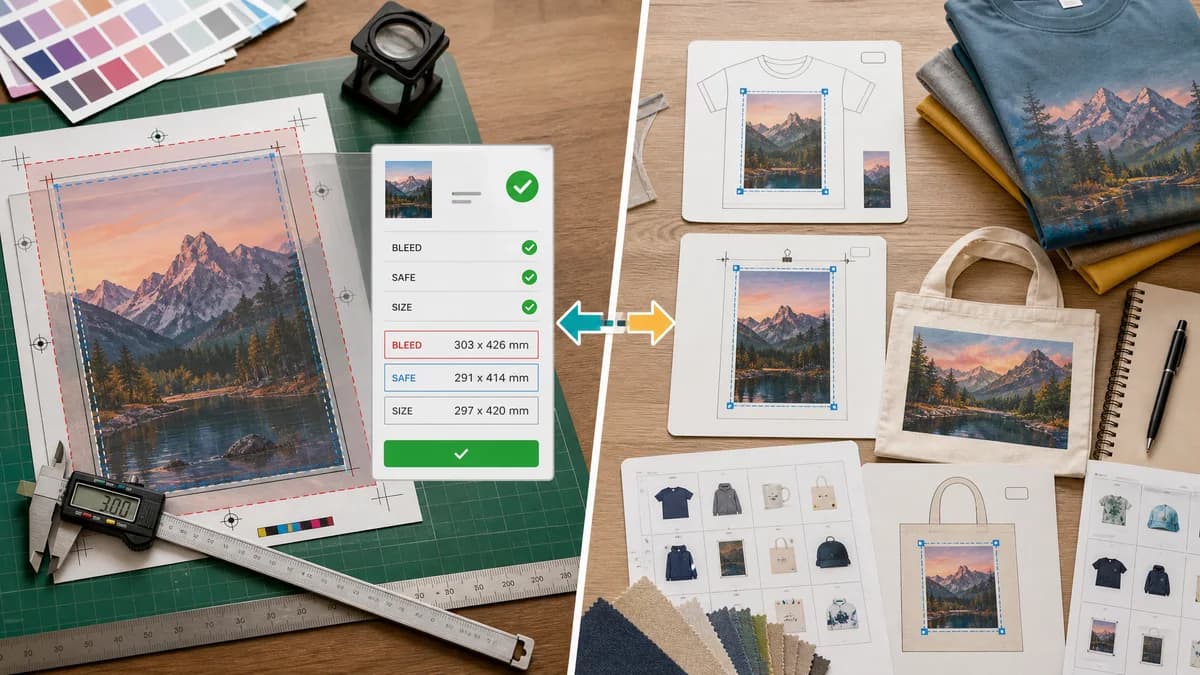
Print Bleed Border Checker is the baseline in this comparison: Check image trim size, bleed, safe zone, borders, and print dimensions locally before sending artwork to a printer.
Printful Design Maker shows safe print areas for products and advises full-bleed images that cover the print area while keeping important details inside the safe zone.
Quick verdict
Printful is best for product-specific placement; TextFaker is best for pre-upload validation and cross-printer bleed/border checking.
How Print Bleed Border Checker fits
Print Bleed Border Checker is designed to let users check artwork before uploading it to Printful or another print-on-demand platform, with exact file dimensions and safe-zone measurements.
How Printful Design Maker fits
Printful's design tools are tied to products and production templates, making them useful for creating and placing designs within Printful's catalog.
Side-by-side comparison
| Decision point | Print Bleed Border Checker | Printful Design Maker | Takeaway |
|---|---|---|---|
| Vendor specificity | Our workflowVendor-neutral presets and custom sizes. | Competitor workflowPrintful-specific product templates and safe print areas. | TextFaker helps before choosing or switching vendors. |
| User problem | Our workflowReports whether an image file has enough bleed and safe margin. | Competitor workflowShows a dotted line in Design Maker and product-specific guidance. | TextFaker turns the guide concept into numbers. |
| Supported workflow | Our workflowPre-upload QA for exported artwork. | Competitor workflowProduct creation and placement in Printful's system. | The tools can be complementary. |
| Full bleed | Our workflowChecks whether the image canvas covers expected full-bleed dimensions and whether edge bands are suspicious. | Competitor workflowRecommends full-bleed images that cover the print area. | TextFaker can flag missing edge coverage before upload. |
| Output | Our workflowCopyable report and annotated file for support or designer handoff. | Competitor workflowDesign Maker canvas guidance and product setup. | TextFaker gives portable evidence. |
| Mobile use | Our workflowCan optimize for quick file-drop and numeric readout. | Competitor workflowProduct design interfaces can be more involved on small screens. | TextFaker can win quick checks on mobile. |
Use Print Bleed Border Checker when
- Checking a poster or wall-art image before uploading to Printful
- Comparing artwork against custom bleed and safe-zone specs
- Getting numeric reasons for a warning
- Using the same file across multiple vendors
Use Printful Design Maker when
- Creating Printful products
- Seeing Printful-specific safe print outlines
- Using downloadable product templates
- Placing artwork on product mockups
Detailed comparison
Demand Signal
A public Printful discussion shows a user confused about safe print area and full bleed for posters, asking whether the preview is exactly how the poster will look. Official Printful help similarly stresses keeping crucial details in the safe area and using full-bleed images.
- The confusion is practical, not academic.
- Users want confidence before ordering or listing products.
Product Gap
Printful's tool is tied to its product workflow. TextFaker can be used before upload and can explain whether the source file itself is prepared correctly.
- Useful for sellers who reuse art across Printful, Gelato, local printers, and marketplaces.
- Useful when a designer sends a file and the seller wants to verify it independently.
Implementation Fit
Include presets for common poster and card sizes, plus custom trim dimensions. The validation report should show final trim size, required file size, actual file size, and safe-zone rectangle.
- Border checks should report top, right, bottom, and left values separately.
- Warnings should identify which side is short.
Content Angle
The comparison page can reference print-on-demand pain points: blank edges, cropped details, and safe-area uncertainty. It should avoid pretending to simulate Printful's production process exactly.
Research notes
- Printful official help defines safe print area and advises full-bleed images for paper products.
- The Reddit Printful poster thread is a strong public demand source because the user specifically asks what the safe print area means and whether the preview matches the printed result.
- TextFaker should position itself as a pre-upload checker, not a product mockup generator.
Official source
The only outbound competitor link on this page is placed here for source checking after the comparison.
Official Printful Design Maker source