
Print Bleed Border Checker vs Smartpress Bleed and Crop Marks Guidance
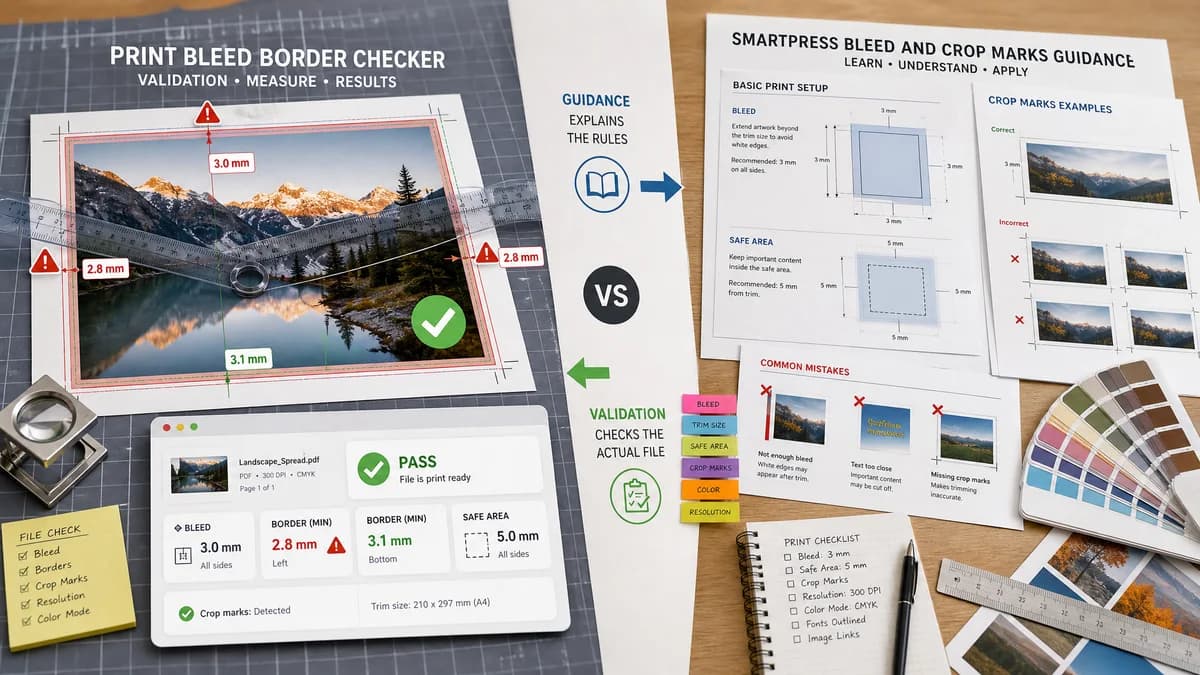
Print Bleed Border Checker is the baseline in this comparison: Check image trim size, bleed, safe zone, borders, and print dimensions locally before sending artwork to a printer.
Smartpress support explains bleed, crop marks, borders, margins, and file setup requirements for print jobs.
Quick verdict
Smartpress explains the rules; TextFaker can validate a file against rules with exact dimensions and border warnings.
How Print Bleed Border Checker fits
Print Bleed Border Checker is designed to turn print-preparation guidance into a browser-local measurement tool that checks whether a user's actual image or PDF meets the selected rules.
How Smartpress Bleed and Crop Marks Guidance fits
Smartpress guidance is useful for learning how to set up files for Smartpress print jobs and understanding why bleed and borders matter.
Side-by-side comparison
| Decision point | Print Bleed Border Checker | Smartpress Bleed and Crop Marks Guidance | Takeaway |
|---|---|---|---|
| Function | Our workflowInteractive file checker. | Competitor workflowSupport article and printer guidance. | TextFaker can make guidance executable. |
| Border risk | Our workflowMeasures border bands and warns about uneven or unsafe borders. | Competitor workflowExplains bleed, borders, and crop marks conceptually. | TextFaker is more diagnostic for border-specific issues. |
| Vendor scope | Our workflowGeneric and customizable. | Competitor workflowSmartpress-specific support context. | TextFaker fits multi-printer preparation. |
| Output | Our workflowPass/fail, coordinates, dimensions, edge measurements, downloads. | Competitor workflowInstructions and recommendations. | TextFaker provides a result for the user's file. |
| Testability | Our workflowAutomated tests can assert exact measured outputs. | Competitor workflowStatic guidance is not a validation engine. | TextFaker aligns with TextFaker's deterministic tool pattern. |
| Privacy | Our workflowNo upload required for checking. | Competitor workflowGuidance is public, while actual ordering requires file submission. | TextFaker can happen before order upload. |
Use Print Bleed Border Checker when
- Checking whether a border is too close to trim
- Validating custom trim, bleed, and margin settings
- Getting a downloadable proof overlay
- Running locally without submitting artwork
Use Smartpress Bleed and Crop Marks Guidance when
- Learning Smartpress file setup basics
- Preparing files for Smartpress orders
- Understanding crop marks and bleed terminology
- Following printer-specific support instructions
Detailed comparison
Demand Signal
Smartpress publishes bleed and border guidance because edge setup is a recurring print-preparation issue. Public discussions confirm users worry about cut-off text, white edges, and border appearance.
- Borders are especially risky because small trim shifts make uneven edges visible.
- A border checker is a strong differentiator versus generic dimension tools.
Product Gap
Instruction pages tell users what to do; they do not inspect the file. TextFaker can report exactly whether the user's file matches the stated requirements.
- Convert print rules into pass/fail measurements.
- Show which side or margin needs attention.
Implementation Fit
Border detection can be deterministic by sampling inward from each edge until pixel color or alpha changes beyond a threshold, then reporting band width per side. A tolerance setting can avoid brittle results.
- Do not call the result 'aesthetic quality'.
- Call it 'measured border band' and 'border near trim risk'.
Release Scope
The initial version can focus on raster image files and simple PDF page rendering. Full print preflight categories such as CMYK, font embedding, and ink coverage can remain out of scope.
Research notes
- Smartpress official support covers bleed and borders as print basics.
- Public Reddit graphic-design discussions show border and safe-zone confusion from end users, not only prepress professionals.
- TextFaker can build a practical checker around this pain point.
Official source
The only outbound competitor link on this page is placed here for source checking after the comparison.
Official Smartpress Bleed and Crop Marks Guidance source