
Open Source Alternatives to Adobe Acrobat Pro
Print Bleed Border Checker is a browser-based alternative for users who need this focused result without installing a proprietary desktop app or entering a larger hosted workflow.
This research compares that workflow with Adobe Acrobat Pro while keeping the outbound source link at the bottom after the analysis.
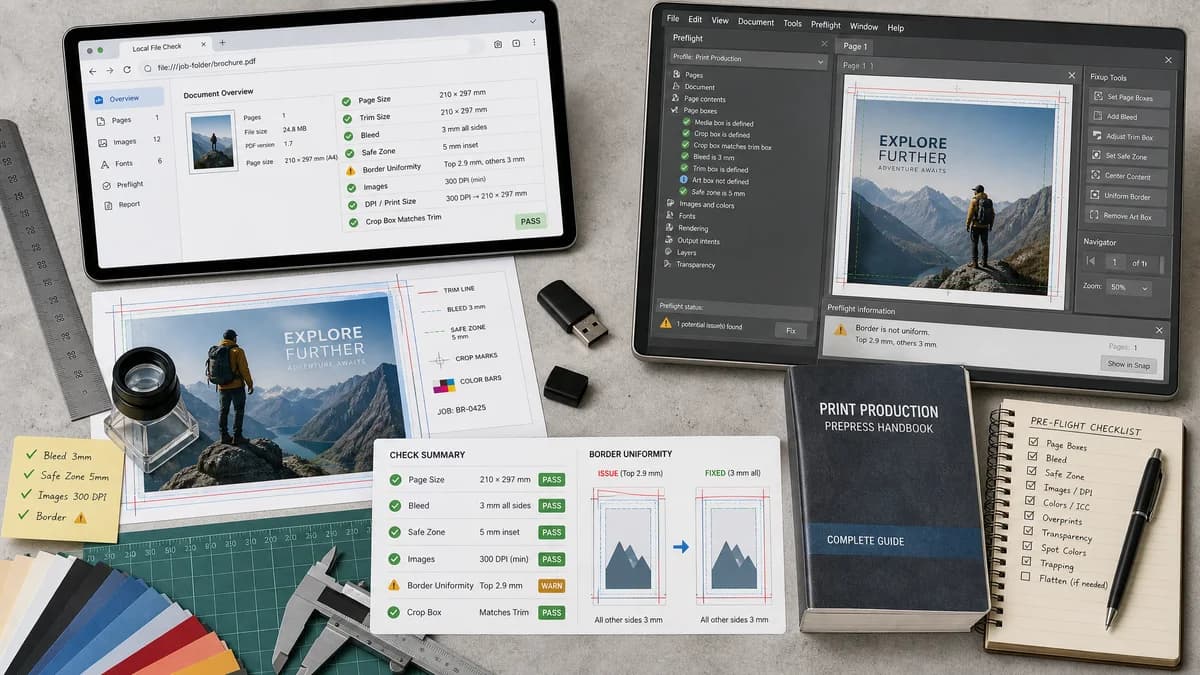
Why Print Bleed Border Checker fits
The TextFaker tool can focus on the narrow print-readiness questions general users can test locally: page size, trim size, bleed amount, safe-zone inset, border uniformity, DPI-derived print size, crop boxes, and pass/fail validation messages. It does use open PDF and image parsing libraries in the browser and return copy-ready measurements plus annotated downloads.
What Adobe Acrobat Pro offers
Adobe Acrobat Pro is a full commercial PDF editor with print production tools, including Preflight checks and fixups for PDF conditions used in professional print workflows.
Open alternative signals
Runs locally in browser
Print Bleed Border CheckerYes, intended browser-local processing with no upload required.
Adobe Acrobat ProNo, commercial desktop app workflow.
Scope
Print Bleed Border CheckerFocused bleed, safe-zone, crop-box, and border checker.
Adobe Acrobat ProBroad PDF editor and professional preflight suite.
Deterministic output
Print Bleed Border CheckerDirect measurements, validation messages, and annotated downloadable files.
Adobe Acrobat ProProfile-driven preflight reports and fixups.
Audience
Print Bleed Border CheckerGeneral users, creators, students, small shops, and print customers.
Adobe Acrobat ProPDF power users, designers, and print production teams.
Decision guide
Fast privacy-preserving checks for a single artwork file when the user needs deterministic bleed, safe-zone, and border status without learning a full prepress suite.
Full PDF editing, print production panels, standards-oriented preflight profiles, and broader PDF correction workflows.
Side-by-side open source alternative comparison
| Decision point | Print Bleed Border Checker | Adobe Acrobat Pro | Takeaway |
|---|---|---|---|
| Privacy | Our workflowFiles can be parsed locally in the browser. | Proprietary workflowFiles are opened in a commercial desktop application. | A browser-local checker is easier to trust for quick personal artwork checks. |
| Learning curve | Our workflowSingle-purpose inputs for trim, bleed, safe zone, DPI, and border tolerance. | Proprietary workflowPowerful print production panels and profile concepts. | TextFaker should avoid prepress jargon where a deterministic pass/fail message is enough. |
| Automated testing | Our workflowExpected rectangles and measurements can be asserted from known fixture files. | Proprietary workflowProfile reports may vary by configuration. | A narrow deterministic engine is easier to cover with unit and browser tests. |
| Correction | Our workflowCan offer annotated download and optional safe crop/padding output. | Proprietary workflowCan run broader PDF fixups. | Keep correction limited to transparent operations that can be measured. |
| Mobile use | Our workflowShould support upload, presets, and results on phone screens. | Proprietary workflowDesktop-first workflow. | Mobile-friendly checks can serve users ordering prints from phones. |
| Cost and access | Our workflowOpen-source-powered browser workflow can be available without installing a paid suite. | Proprietary workflowCommercial subscription product. | The comparison angle is convenience and accessibility, not replacing a full prepress department. |
Detailed research
Demand Signals
Users repeatedly ask whether bleed is already included, whether crop marks should be enabled, and whether safe-area lines represent the cut line. These are simple measurement problems that a focused browser checker can answer before a print order is rejected or trimmed poorly.
- Support threads show beginner confusion around bleed and slug terms.
- Marketplace and print-order discussions show anxiety about dotted safe-area guides and cut lines.
- A deterministic checker can convert visual uncertainty into measurements and pass/fail messages.
Implementation Fit
The tool should accept PNG, JPG, WebP, SVG when safely rasterized, and PDF pages through a browser PDF renderer. Users can choose a preset such as business card, flyer, KDP cover/page, label, postcard, or custom trim size.
- Return original pixel dimensions, inferred DPI where available, and print-size estimates.
- Compute bleed box, trim box, safe-zone box, and border widths in px, mm, and inches.
- Flag insufficient bleed, content too close to trim, uneven borders, mismatched aspect ratio, and missing DPI metadata separately.
Positioning
The page should describe TextFaker as a browser-based, open-source-powered alternative for quick print artwork checks, not as an open-source clone of Acrobat Pro.
Test Plan
Automated tests can load synthetic fixtures with known dimensions and edge colors, then assert exact validation messages and rectangles without judging visual design quality.
- Fixture with 3 mm bleed on all sides should pass the bleed rule.
- Fixture with a 1 px white strip at the edge should fail edge-coverage detection.
- Fixture with a thin centered border should report side-by-side border differences.
Research notes
- Official documentation says Acrobat Pro Preflight analyzes PDF content for print production conditions and can run checks and fixups.
- Public Adobe and Reddit discussions show users asking basic bleed, slug, safe-zone, and crop-mark questions before printing.
- Implementation should expose testable outputs: detected page/image dimensions, requested trim box, computed bleed box, safe-zone rectangle, border thickness per side, and pass/fail reasons.
Official source
The proprietary product link is included once here for source checking after the alternative analysis.
Official Adobe Acrobat Pro source