
Open Source Alternatives to Affinity Publisher
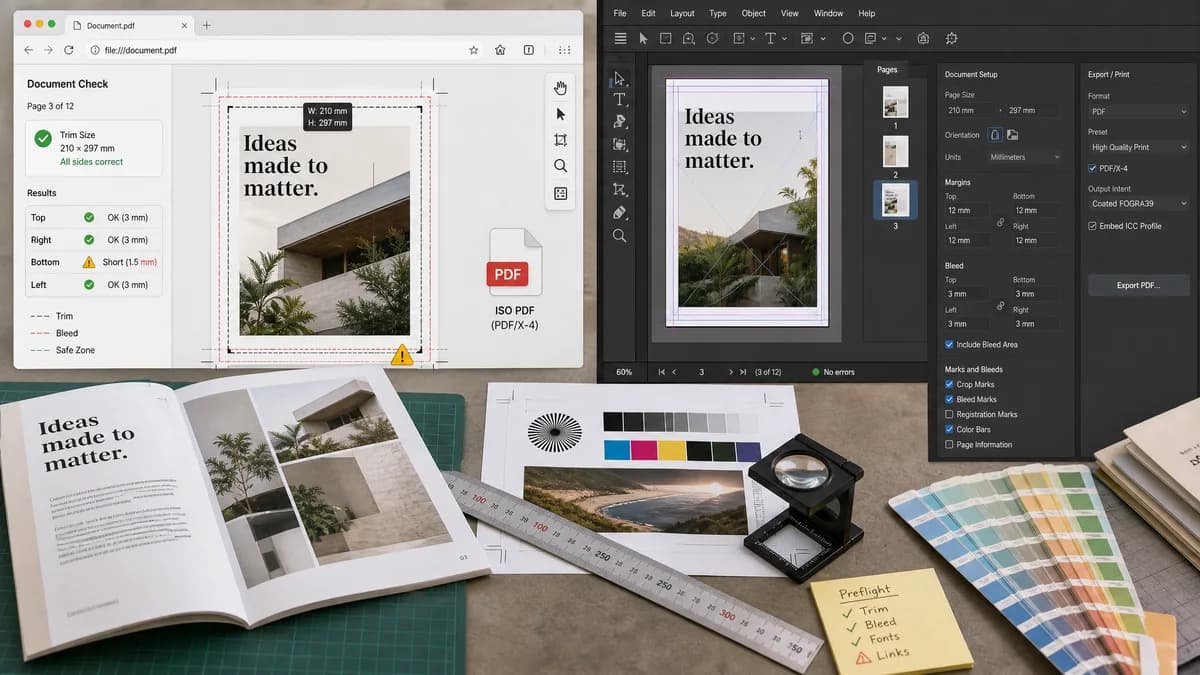
Print Bleed Border Checker is a browser-based alternative for users who need this focused result without installing a proprietary desktop app or entering a larger hosted workflow.
This research compares that workflow with Affinity Publisher while keeping the outbound source link at the bottom after the analysis.
Why Print Bleed Border Checker fits
TextFaker can help Affinity users and print customers validate final files without opening the source project. It can measure the exported page or image against required trim, bleed, and safe-zone values and report exact problem sides.
What Affinity Publisher offers
Affinity Publisher is a commercial desktop publishing app. Official Affinity help explains enabling bleed and marks when printing or sharing documents.
Open alternative signals
Runs locally in browser
Print Bleed Border CheckerYes, checks the final export locally.
Affinity PublisherDesktop publishing app.
Creation features
Print Bleed Border CheckerNo layout editor; validation only.
Affinity PublisherFull publication layout and export.
Deterministic reporting
Print Bleed Border CheckerExact rectangles, dimensions, side measurements, and warning codes.
Affinity PublisherVisual guides and export settings.
Best audience
Print Bleed Border CheckerPrint customers, reviewers, and creators needing a quick pre-upload check.
Affinity PublisherDesigners creating page-layout documents.
Decision guide
Independent validation of an exported print file, especially when the source app is unavailable.
Designing publications, setting bleed during document setup, and exporting professional print layouts.
Side-by-side open source alternative comparison
| Decision point | Print Bleed Border Checker | Affinity Publisher | Takeaway |
|---|---|---|---|
| Source file requirement | Our workflowOnly needs the exported image or PDF. | Proprietary workflowWorks from the publication document. | TextFaker helps when users only have the final file. |
| Bleed math | Our workflowComputes expected total file dimensions from trim plus bleed. | Proprietary workflowLets users set bleed in the document or print settings. | The checker turns setup into verifiable output. |
| Safe margin | Our workflowShows and reports content-risk zones using selected safe margin. | Proprietary workflowDesign-time guides and settings. | Final-file safe-zone validation is easier for reviewers. |
| Mobile use | Our workflowCan be used from a browser on phone or tablet. | Proprietary workflowDesktop-first creation workflow. | Good for quick checks during print ordering. |
| Tests | Our workflowCan assert exact output from controlled PDF and raster fixtures. | Proprietary workflowManual layout/export workflow. | Deterministic outputs satisfy TextFaker tool requirements. |
| Repair | Our workflowCan create simple padded output or annotated proof. | Proprietary workflowAllows actual layout edits. | Keep TextFaker repair features transparent and limited. |
Detailed research
Demand Signals
Affinity users publicly ask how bleeds and margins relate. That mirrors broader print-customer confusion around safe areas and trim risk.
- Users are unsure where bleed is set versus included.
- Margins and bleed are often confused.
- Print providers ask users to keep important content inside safe zones.
Implementation Fit
Use a preset panel plus custom dimensions. The checker should immediately show whether the uploaded file is too small, correct trim size only, or correct trim plus bleed.
- Support inches, millimeters, centimeters, and pixels.
- Convert units deterministically using selected DPI/PPI.
- Store validation rule IDs for automated tests.
Content Angle
Comparison content can focus on independent output verification after using any desktop publishing app.
Test Plan
Generate fixtures representing the common mistake of setting the document to final trim size without adding bleed.
- Expected fail: file equals trim dimensions and bleed is required.
- Expected warning: missing embedded DPI but user-selected PPI allows calculation.
- Expected pass: safe-zone and bleed boxes match preset.
Research notes
- Official Affinity help documents bleed and marks settings for print output.
- Public Affinity discussions show users asking how bleed and margins work and where to set bleed values.
- General print support sources repeatedly warn that content outside safe zones may be trimmed off.
Official source
The proprietary product link is included once here for source checking after the alternative analysis.
Official Affinity Publisher source