
Open Source Alternatives to Canva
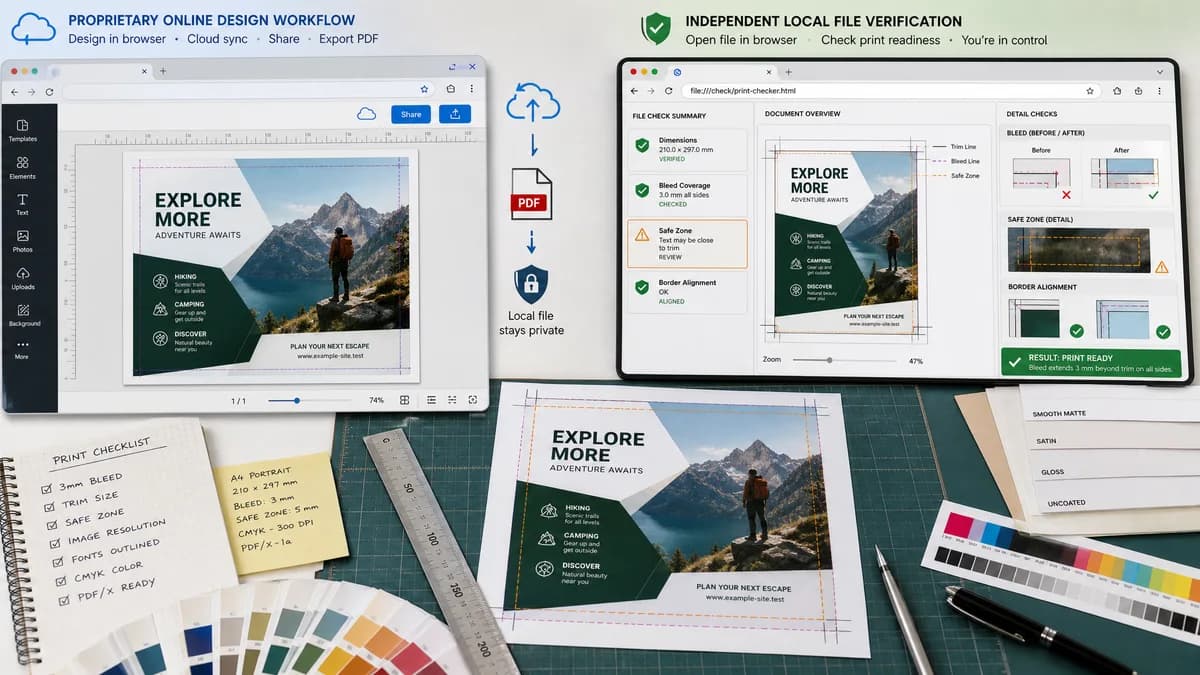
Print Bleed Border Checker is a browser-based alternative for users who need this focused result without installing a proprietary desktop app or entering a larger hosted workflow.
This research compares that workflow with Canva while keeping the outbound source link at the bottom after the analysis.
Why Print Bleed Border Checker fits
TextFaker can serve users who design in Canva or another editor but want an independent local check of the exported file. The tool can confirm whether the file dimensions match the expected trim plus bleed and whether edge-to-edge artwork actually fills the bleed area.
What Canva offers
Canva is a proprietary online design platform. Its help center documents margins, print bleed, rulers, crop marks, PDF Print downloads, and print proofing guidance.
Open alternative signals
Runs locally in browser
Print Bleed Border CheckerYes, final exported file can be checked without upload.
CanvaOnline design platform with cloud-based editing.
Main job
Print Bleed Border CheckerValidate print geometry after export.
CanvaCreate and export designs.
Deterministic dimensions
Print Bleed Border CheckerExplicit trim, bleed, and safe-zone measurements in px, mm, and inches.
CanvaVisual bleed and margin guides inside the editor.
Best fit
Print Bleed Border CheckerIndependent pre-upload confidence check.
CanvaDesign creation and template workflow.
Decision guide
Checking a finished exported PNG, JPG, or PDF locally before uploading to a print shop or marketplace.
Creating designs, using templates, collaborating, and ordering or exporting print-ready files from within the design app.
Side-by-side open source alternative comparison
| Decision point | Print Bleed Border Checker | Canva | Takeaway |
|---|---|---|---|
| Workflow stage | Our workflowAfter export, before printing or marketplace upload. | Proprietary workflowDuring design and export. | TextFaker complements design tools by checking the final artifact. |
| Bleed clarity | Our workflowShows required final file size and per-side pass/fail status. | Proprietary workflowShows print bleed guides and export options. | Users who are unsure about fixed bleed settings get a numeric answer. |
| Local processing | Our workflowNo server upload required for the check. | Proprietary workflowDesigns are created in an online platform. | Privacy is a strong utility message. |
| Border risk | Our workflowMeasures side-by-side border width and simulated trim shift effects. | Proprietary workflowProvides visual layout tools and guides. | Automated border-risk output fills a gap for cards, invitations, labels, and covers. |
| Mobile | Our workflowShould make presets and result cards usable on phone screens. | Proprietary workflowMobile apps and web editor exist, but print checks are part of a broader editor. | A focused mobile result view can be faster for last-minute checks. |
| Testing | Our workflowFixtures can assert exact dimension math for common Canva exports. | Proprietary workflowVisual editor output depends on document setup. | TextFaker can publish reliable examples and expected results. |
Detailed research
Demand Signals
Canva users publicly ask whether exported print files should include crop marks and bleed, and how to calculate document dimensions when a print provider asks for bleed. This is exactly the kind of narrow, deterministic print math the TextFaker tool can handle.
- KDP-style page sizes create confusion around trim versus bleed size.
- Fixed design-app bleed guides can leave users unsure about final dimensions.
- Transparent PNG and sticker workflows add more uncertainty.
Implementation Fit
Provide presets for common print products, plus custom trim and bleed fields. The result should say whether the uploaded file is already trim size, trim plus bleed, or an unexpected size.
- Detect and report if crop marks appear outside the artwork area when possible.
- Warn when uploaded dimensions equal trim size but bleed is required.
- Export an annotated preview with bleed, trim, and safe-zone overlays.
Search Positioning
The page can target users searching for open-source-powered alternatives to proprietary design platforms for checking print bleed, while making clear it checks exported files rather than replacing a design editor.
Test Plan
Create test files for 8.5 by 11 inch trim at 300 PPI, with and without 0.125 inch bleed on all sides.
- Expected trim-plus-bleed dimensions: 2625 by 3375 px for 8.75 by 11.25 inches at 300 PPI.
- Expected warning when a file is 2550 by 3300 px and 0.125 inch bleed is required.
- Expected pass when background fills all four bleed strips.
Research notes
- Official Canva help explains showing print bleed and using crop marks, margins, and PDF Print export options.
- A public Canva discussion shows users asking whether to enable crop marks and bleed when their document already includes KDP bleed dimensions.
- Another public Canva discussion shows users calculating whether 0.125 inch bleed applies once or on both sides, demonstrating a need for deterministic dimension math.
Official source
The proprietary product link is included once here for source checking after the alternative analysis.
Official Canva source