
Open Source Alternatives to Enfocus PitStop Pro
Print Bleed Border Checker is a browser-based alternative for users who need this focused result without installing a proprietary desktop app or entering a larger hosted workflow.
This research compares that workflow with Enfocus PitStop Pro while keeping the outbound source link at the bottom after the analysis.
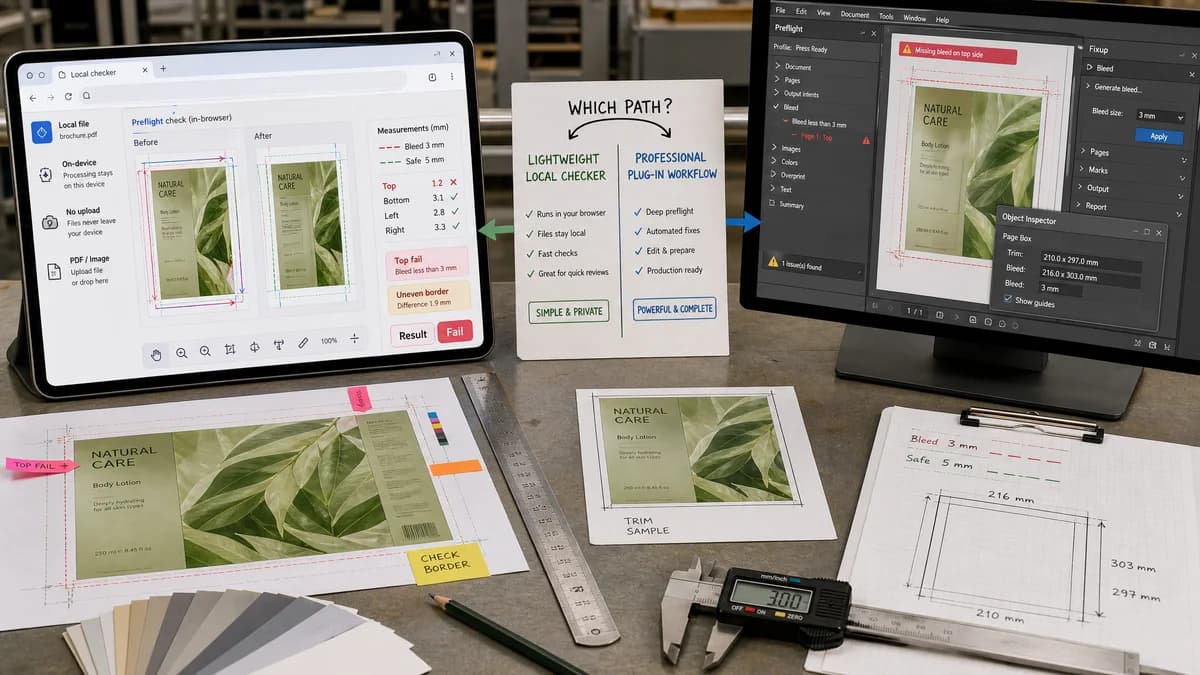
Why Print Bleed Border Checker fits
TextFaker can cover the common front-end print customer need: determine whether an uploaded image or PDF has enough bleed and safe margin, then display the exact measurements and any failing sides. The workflow can be open-source-powered in the browser and does avoid server-side uploads.
What Enfocus PitStop Pro offers
Enfocus PitStop Pro is a commercial Acrobat plug-in for professional PDF preflight and editing. Its official page highlights missing-bleed detection and automatic bleed generation.
Open alternative signals
Runs locally in browser
Print Bleed Border CheckerYes, proposed no-upload image/PDF measurement workflow.
Enfocus PitStop ProNo, desktop plug-in for a commercial PDF editor.
Bleed focus
Print Bleed Border CheckerChecks enough bleed and edge coverage against selected presets.
Enfocus PitStop ProDetects and can generate bleed in a professional PDF editing workflow.
Output style
Print Bleed Border CheckerPlain-language pass/fail status, numeric side measurements, and downloadable annotated preview.
Enfocus PitStop ProPreflight messages, object-level edits, and fixups.
Complexity
Print Bleed Border CheckerDesigned for one task and mobile-friendly use.
Enfocus PitStop ProProfessional prepress feature set.
Decision guide
Non-expert users who need a quick local pass/fail check and annotated proof before sending files to a print shop.
Production prepress users who need deep PDF object editing, automated fixups, and integration with Acrobat workflows.
Side-by-side open source alternative comparison
| Decision point | Print Bleed Border Checker | Enfocus PitStop Pro | Takeaway |
|---|---|---|---|
| Primary job | Our workflowCheck whether an artwork file is likely safe for trimming. | Proprietary workflowPreflight and edit production PDFs inside Acrobat. | TextFaker should optimize for clarity over feature breadth. |
| Bleed handling | Our workflowMeasure bleed sufficiency and optionally create a simple padded/cropped output. | Proprietary workflowCan add generated bleed around pages and shapes. | Avoid promising professional object-aware bleed repair unless implemented deterministically. |
| User skill | Our workflowPreset-driven and plain-language. | Proprietary workflowRequires prepress knowledge and profile setup. | The market gap is approachable validation for customers before they reach a printer. |
| Testing | Our workflowSynthetic edge-color and rectangle fixtures can assert results exactly. | Proprietary workflowProfessional results depend on chosen actions and profiles. | A narrow checker can provide stable automated test coverage. |
| Supported workflows | Our workflowImages and simple PDF pages for general-user print prep. | Proprietary workflowComplex production PDFs and Acrobat-based prepress. | Clearly scope TextFaker to print-prep checks, not full PDF repair. |
| Privacy | Our workflowNo server upload required when implemented fully client-side. | Proprietary workflowDesktop-local but commercial software dependent. | Both can avoid browser uploads, but TextFaker is easier to access. |
Detailed research
Demand Signals
Bleed mistakes are common enough that professional preflight tools market missing-bleed detection, while public forums show non-experts struggling with the basic concepts before submitting files.
- Users ask whether crop marks and bleed should be included together.
- Users ask whether safe-area guides mean actual cut lines.
- Users ask how much bleed is needed for business cards, labels, and print-on-demand files.
Implementation Fit
Start with deterministic geometry: decode file dimensions, map chosen physical trim to pixels using DPI or user-entered resolution, then compute required bleed and safe zones.
- Report missing or insufficient bleed per side.
- Report whether border widths differ beyond a user-selected tolerance.
- Report whether final trim aspect ratio matches the selected preset.
Alternative Angle
The comparison should be framed around a lightweight browser checker powered by open standards and open-source libraries, not around replacing a professional PitStop workflow.
Validation Outputs
Every result should be serializable into a testable report object.
- status: pass, warning, or fail
- boxes: bleed, trim, safe zone, and detected content bounds
- measurements: top, right, bottom, left in pixels, mm, and inches
Research notes
- Official Enfocus material highlights missing bleed as a supported preflight concern and describes automatic bleed generation.
- An Enfocus community discussion about bleed sensitivity shows that professional bleed detection has parameters and edge cases users must understand.
- Public general-user discussions show people still need a simpler explanation of safe zones, trim lines, and bleed before ordering prints.
Official source
The proprietary product link is included once here for source checking after the alternative analysis.
Official Enfocus PitStop Pro source