
Open Source Alternatives to Esko ArtPro+
Print Bleed Border Checker is a browser-based alternative for users who need this focused result without installing a proprietary desktop app or entering a larger hosted workflow.
This research compares that workflow with Esko ArtPro+ while keeping the outbound source link at the bottom after the analysis.
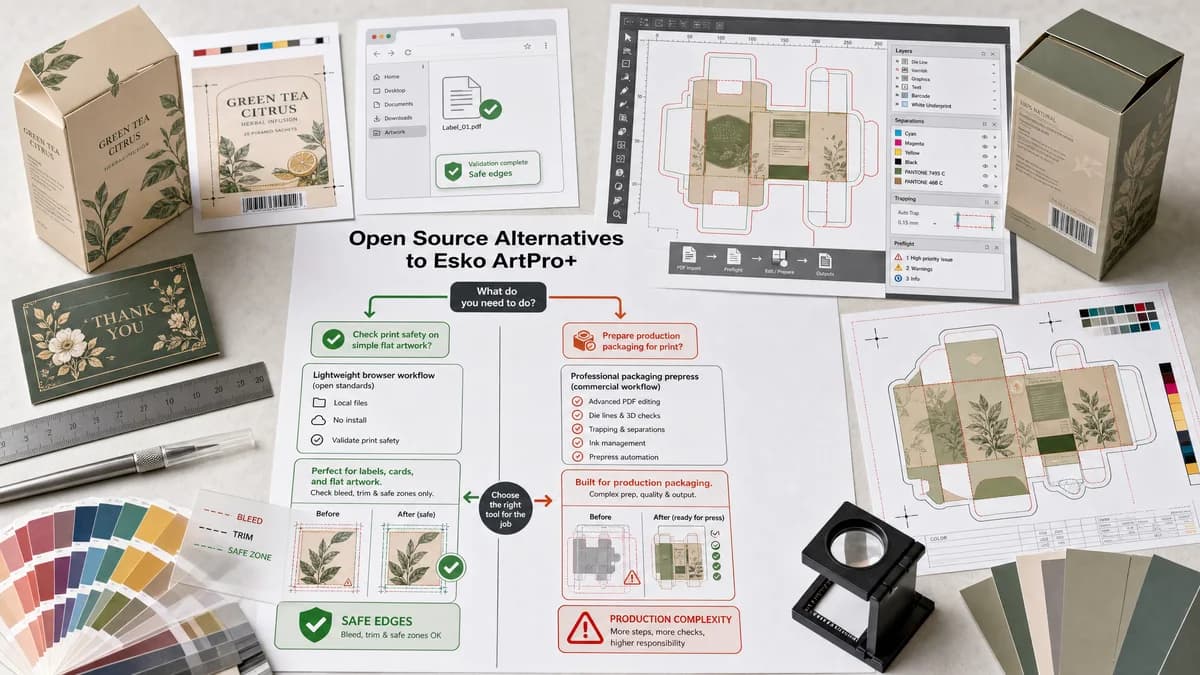
Why Print Bleed Border Checker fits
TextFaker can provide a lightweight, local validation path for simple packaging labels, cards, and flat artwork where users need to know if edges and safe zones are print-safe. It does not attempt to replace packaging prepress editing, trapping, or CAD-driven production workflows.
What Esko ArtPro+ offers
Esko ArtPro+ is a commercial native PDF editor for packaging prepress that prepares artwork for printing production. Official Esko materials discuss adding bleed and using packaging prepress workflows.
Open alternative signals
Runs locally in browser
Print Bleed Border CheckerYes, for supported image and PDF inputs.
Esko ArtPro+Commercial professional prepress software.
Packaging depth
Print Bleed Border CheckerBasic flat artwork geometry checks only.
Esko ArtPro+Packaging prepress editing and production preparation.
Deterministic report
Print Bleed Border CheckerExact boxes, side measurements, edge coverage, and warnings.
Esko ArtPro+Professional editing and production tools.
Best audience
Print Bleed Border CheckerCreators and small sellers preparing simple labels or packaging graphics.
Esko ArtPro+Packaging prepress professionals.
Decision guide
Simple flat artwork checks for labels, cards, inserts, stickers, and small packaging proofs before sharing with a printer.
Professional packaging prepress, native PDF editing, production preparation, and connected packaging workflows.
Side-by-side open source alternative comparison
| Decision point | Print Bleed Border Checker | Esko ArtPro+ | Takeaway |
|---|---|---|---|
| Use case | Our workflowCheck simple exported artwork before submission. | Proprietary workflowPrepare packaging PDFs for production. | TextFaker should define a limited flat-artwork scope. |
| Bleed handling | Our workflowMeasure required bleed and edge coverage. | Proprietary workflowCan add bleed using prepress editing methods. | Do not promise advanced object-aware packaging fixes. |
| Safe zone | Our workflowCompute safe-zone inset and flag near-edge content where detectable. | Proprietary workflowProfessional packaging workflows and structural context. | Simple safe-zone checks are useful for small labels and inserts. |
| Files | Our workflowCommon images and simple PDFs. | Proprietary workflowNative PDF packaging artwork and connected production assets. | Format scope should be transparent. |
| Testing | Our workflowFlat rectangular fixtures can assert exact geometry. | Proprietary workflowProduction workflows are more complex and job-specific. | A rectangular checker is testable and useful for general users. |
| Mobile | Our workflowShould work on mobile for quick seller and creator checks. | Proprietary workflowProfessional desktop workflow. | Mobile access is a strong contrast. |
Detailed research
Demand Signals
Packaging prepress tools support bleed because trim and cut accuracy matter. General-user demand appears in label, card, and print-order discussions where users worry about safe zones, cut lines, and border placement.
- Labels and stickers often need full-bleed backgrounds.
- Bordered designs can look uneven after die cutting or trimming.
- Small sellers may only have PNG or PDF exports, not production software.
Implementation Fit
Focus on rectangular flat artwork first. If future die-line support is added, treat it as a separate deterministic SVG/PDF path parser with explicit limitations.
- Support rectangular trim presets for labels and cards.
- Allow custom bleed and safe-zone values for printer-specific templates.
- Report when artwork dimensions do not match the template.
Guardrails
Avoid packaging-specific claims such as trapping, overprint, barcode grading, or CAD die-line validation unless implemented and tested.
Test Plan
Use label-sized fixtures with intentional missing bleed and unsafe text markers.
- Expected fail when background stops at trim line.
- Expected warning when visible border is thinner than trim tolerance.
- Expected pass when file size equals trim plus two bleed margins.
Research notes
- Official Esko product material positions ArtPro+ as a native PDF editor for packaging prepress.
- Official Esko support material explains adding bleed to artwork using clipping path data or background transformation.
- Public commercial printing discussions mention bleed, safe zones, trim, cutting variance, and print-file proofing as practical workflow concerns.
Official source
The proprietary product link is included once here for source checking after the alternative analysis.
Official Esko ArtPro+ source