
Open Source Alternatives to Markzware FlightCheck
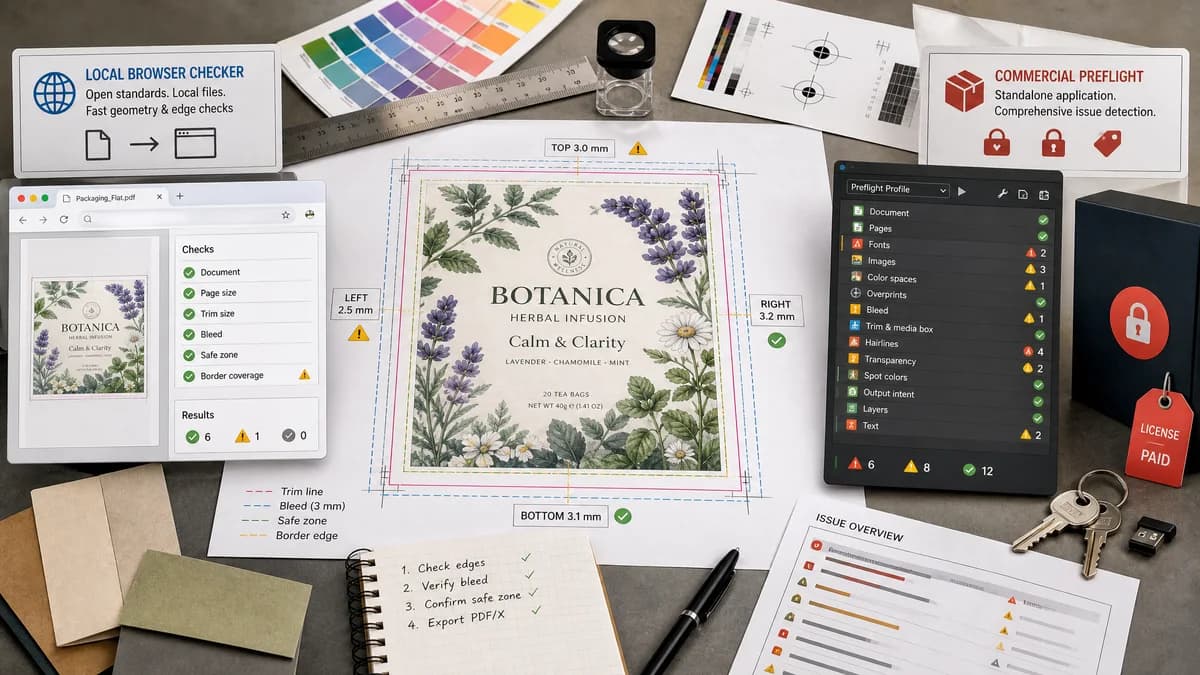
Print Bleed Border Checker is a browser-based alternative for users who need this focused result without installing a proprietary desktop app or entering a larger hosted workflow.
This research compares that workflow with Markzware FlightCheck while keeping the outbound source link at the bottom after the analysis.
Why Print Bleed Border Checker fits
TextFaker can provide a compact print-prep check focused on geometry and edge coverage. It does return exact side measurements and warnings that users can understand before sending files to a printer.
What Markzware FlightCheck offers
Markzware FlightCheck is a commercial preflight application for finding print-file problems such as missing fonts, images, colors, bleed, hairlines, and other production issues.
Open alternative signals
Runs locally in browser
Print Bleed Border CheckerYes, no-upload workflow for supported formats.
Markzware FlightCheckCommercial installed application.
Format scope
Print Bleed Border CheckerImages and PDF pages for print geometry checks.
Markzware FlightCheckBroader DTP and PDF preflight workflows.
Output
Print Bleed Border CheckerMeasurements, validation messages, crop boxes, and annotated downloadable file.
Markzware FlightCheckPreflight inventory, warnings, and reports.
User goal
Print Bleed Border CheckerAvoid white edges, unsafe content, and uneven borders.
Markzware FlightCheckAvoid a wide range of print production errors.
Decision guide
People who only need to know whether an exported artwork file has enough bleed and safe margin.
Print professionals checking many production details across PDF and desktop publishing documents.
Side-by-side open source alternative comparison
| Decision point | Print Bleed Border Checker | Markzware FlightCheck | Takeaway |
|---|---|---|---|
| Problem focus | Our workflowBleed, trim, safe-zone, and border consistency. | Proprietary workflowBroad preflight checks across many document assets. | Narrow scope makes TextFaker easier for non-experts. |
| Input model | Our workflowDrag in a final exported file and choose a preset. | Proprietary workflowPreflight document packages and production files. | TextFaker should be optimized for final-file sanity checks. |
| Determinism | Our workflowExact dimensions and side-specific pass/fail results. | Proprietary workflowPreflight reports based on configured checks. | A deterministic report should be central to the tool. |
| Border analysis | Our workflowCan measure visible border thickness per side after proposed trim shifts. | Proprietary workflowBroader print checks may warn about hairlines and layout issues. | Border-risk messaging is a useful differentiator for cards and invitations. |
| Accessibility | Our workflowRuns in a web browser and should be mobile-friendly. | Proprietary workflowDesktop software workflow. | A web checker can serve casual users before they buy or install tools. |
| Repair | Our workflowSimple downloadable annotated or padded outputs only. | Proprietary workflowProfessional correction and packaging workflows. | Avoid overstating repair capabilities. |
Detailed research
Demand Signals
Many user problems are not full prepress problems; they are last-mile confidence checks: is my file the right size, does the background reach the bleed, and will my border look even after cutting? Public threads show those questions across design and print-order contexts.
- Business card users ask whether safe-area indicators are cut lines.
- Design users ask how bleed and safe-zone margins differ.
- Print customers worry about white edges and rejected files.
Implementation Fit
A practical engine can sample edge strips for transparency or background gaps, compute trim-to-content distances, and simulate trim shifts within a tolerance to estimate border risk.
- Allow user-set trim tolerance such as 1 mm, 2 mm, or 0.125 inch.
- Report minimum edge coverage inside required bleed.
- Report worst-case border thickness after trim shift.
Validation Path
The deterministic report should be the source of truth for UI and tests.
- border.topPx, border.rightPx, border.bottomPx, border.leftPx
- bleedStatus per side
- safeZoneViolations count and coordinates when detectable
Content Angle
Comparison content should emphasize speed, privacy, and focused print geometry over enterprise preflight coverage.
Research notes
- Official Markzware pages describe FlightCheck as print quality control software for warning about production issues.
- Markzware educational material lists bleed, trim, margin, and print requirements as items to check before press.
- Public print forums discuss checking submitted files for size and bleed before providing proofs, reinforcing demand for earlier self-checks.
Official source
The proprietary product link is included once here for source checking after the alternative analysis.
Official Markzware FlightCheck source