
Open Source Alternatives to PressPDF
Print Bleed Border Checker is a browser-based alternative for users who need this focused result without installing a proprietary desktop app or entering a larger hosted workflow.
This research compares that workflow with PressPDF while keeping the outbound source link at the bottom after the analysis.
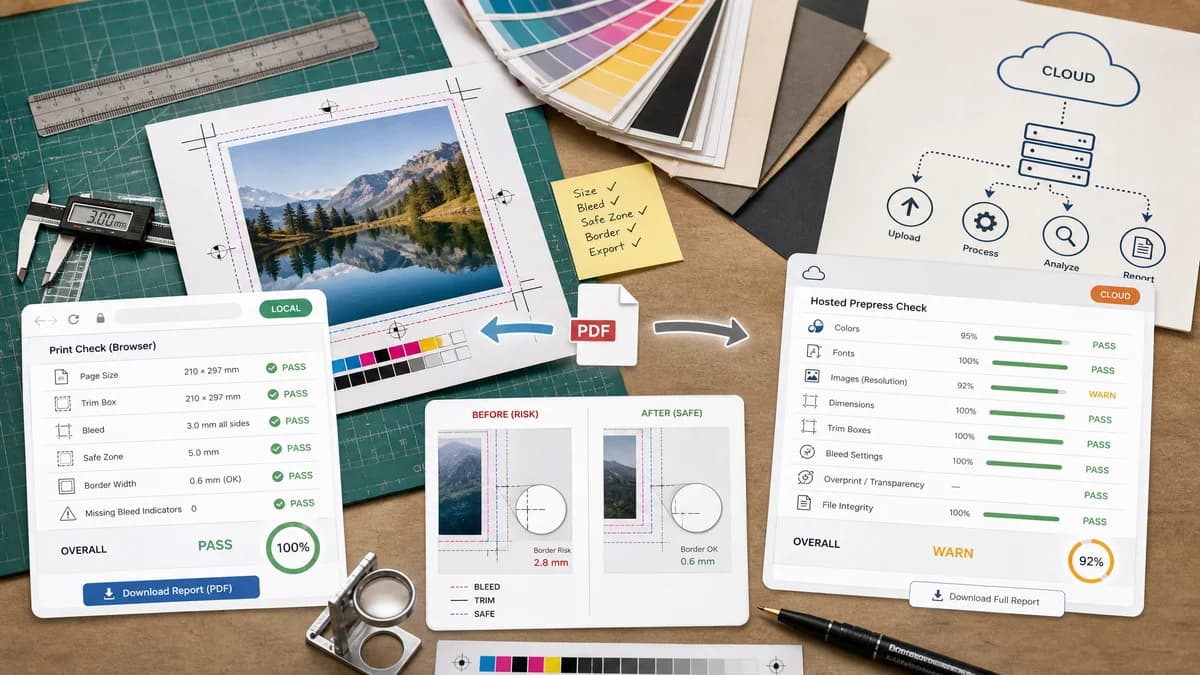
Why Print Bleed Border Checker fits
TextFaker can handle the most common front-end PressPDF-like checks locally: page size, trim and bleed geometry, missing bleed indicators, unsafe content zones, and border width risk. The user gets a measurable report without sending the file to a server.
What PressPDF offers
PressPDF is a proprietary online service for checking, correcting, and converting printable PDFs. Its prepress workflow page says it verifies colors, bleed, fonts, resolution, dimensions, trim boxes, and bleed settings.
Open alternative signals
Runs locally in browser
Print Bleed Border CheckerYes, core checks should happen on-device.
PressPDFHosted server-side PDF service.
Main output
Print Bleed Border CheckerDimensions, crop boxes, bleed status, safe-zone status, border sizes, annotated downloads.
PressPDFHosted checklist, correction, and converted PDF workflow.
Privacy
Print Bleed Border CheckerNo upload required for supported files.
PressPDFPDF is uploaded for hosted processing.
Scope
Print Bleed Border CheckerFocused print geometry and edge validation.
PressPDFBroader prepress PDF check and correction.
Decision guide
Privacy-sensitive users and casual print customers who need a quick geometry and edge-coverage check.
Users who want hosted prepress inspection, correction, conversion, and broader PDF print preparation.
Side-by-side open source alternative comparison
| Decision point | Print Bleed Border Checker | PressPDF | Takeaway |
|---|---|---|---|
| Processing location | Our workflowBrowser-local. | Proprietary workflowHosted cloud service. | Local processing is a direct alternative for sensitive artwork. |
| Plain-language guidance | Our workflowSpecific side-by-side messages such as top bleed is 12 px short. | Proprietary workflowPrepress checklist and correction workflow. | TextFaker should make every warning actionable. |
| Correction | Our workflowOffer annotated proof and simple crop/pad outputs. | Proprietary workflowChecks, corrects, and converts printable PDFs. | Keep TextFaker correction bounded to deterministic transformations. |
| Images | Our workflowCan support common image files as first-class inputs. | Proprietary workflowPDF-centered service. | Image support expands usefulness for photos, invitations, and marketplace uploads. |
| Testability | Our workflowValidation result can be asserted in automated tests. | Proprietary workflowHosted checklist output may be less controlled. | Deterministic local logic is a product requirement. |
| Audience | Our workflowGeneral users, creators, and small businesses. | Proprietary workflowNon-experts plus print professionals needing hosted PDF prep. | Comparison content should speak to general users first. |
Detailed research
Demand Signals
Hosted services advertise prepress checks because bleed and trim mistakes cause real print defects. Public threads show users asking the same questions before they know which professional tool to use.
- Wrong trim boxes can lead to wrong final size.
- No bleed can produce white edges.
- Unsafe content can be cut or folded.
Implementation Fit
The tool should provide a wizard-like flow: upload, choose expected finished size, set bleed and safe zone, then inspect or download results.
- Default bleed presets: 0.125 inch, 3 mm, 0.25 inch, and custom.
- Default safe zone presets: 0.125 inch, 0.25 inch, 2 mm, 3 mm, and custom.
- Border tolerance presets: 1 px, 1 mm, 2 mm, and custom.
Validation Outputs
Tests should operate against structured output, not screenshots.
- expectedWidthPx and expectedHeightPx
- actualWidthPx and actualHeightPx
- ruleResults with stable IDs and messages
Positioning
Call the tool browser-based and open-source-powered. Do not describe TextFaker itself as open source without public licensing evidence.
Research notes
- Official PressPDF pages describe checking bleed, colors, fonts, resolution, dimensions, and trim boxes.
- PressPDF positions the workflow for non-experts and professionals, which aligns with the broad demand for plain-language print checks.
- Public Reddit and Adobe support threads show that users still need simple explanations and validation of crop marks, bleed, trim, and safe areas.
Official source
The proprietary product link is included once here for source checking after the alternative analysis.
Official PressPDF source