
Scan Border Cropper vs Adobe Acrobat Crop PDF
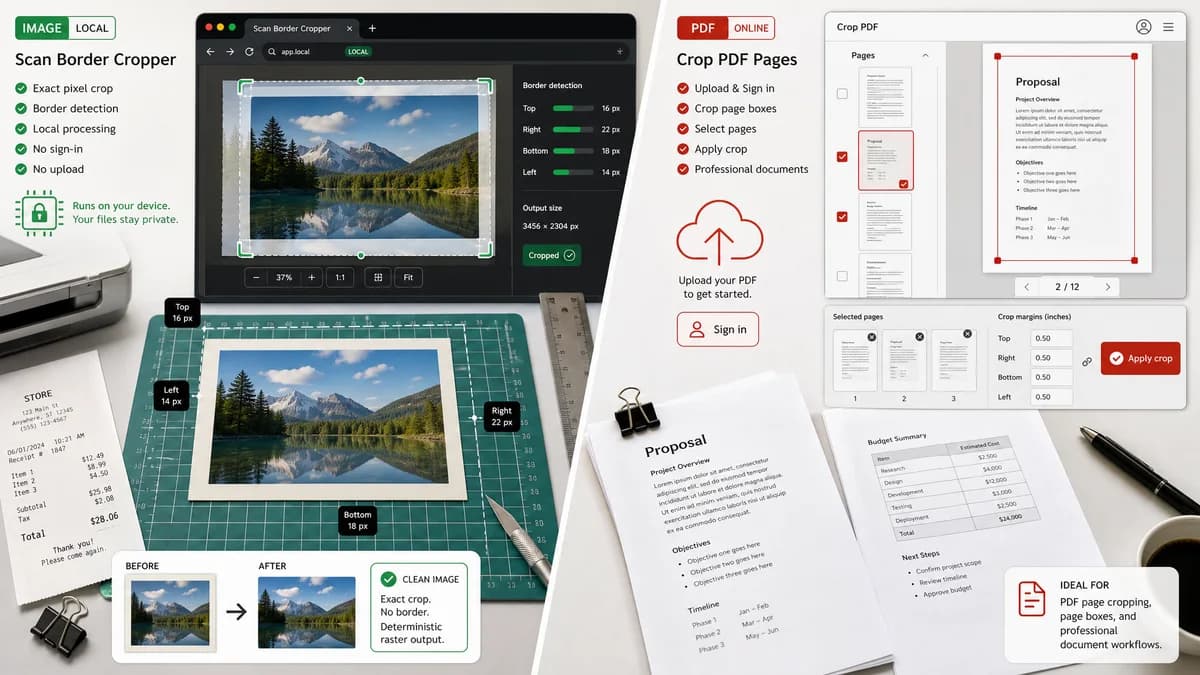
Scan Border Cropper is the baseline in this comparison: Auto-detect scanner borders, review exact crop dimensions, and download a clean cropped copy from your browser.
Adobe Acrobat Crop PDF lets users upload PDFs, adjust a crop border, and apply cropping to selected pages.
Quick verdict
Acrobat is better for PDF page boxes and document workflows; TextFaker should be better for local image border detection and deterministic raster outputs.
How Scan Border Cropper fits
Scan Border Cropper should focus on image files and browser-local processing, with exact pixel-level crop and border metrics. It can be adjacent to PDF workflows but should avoid requiring sign-in or upload for image cleanup.
How Adobe Acrobat Crop PDF fits
Adobe Acrobat Crop PDF targets PDF page cropping and document professionalism. The official page describes uploading a PDF, signing in, adjusting a rectangular border, and applying the crop.
Side-by-side comparison
| Decision point | Scan Border Cropper | Adobe Acrobat Crop PDF | Takeaway |
|---|---|---|---|
| File type | Our workflowRaster image files decoded in the browser. | Competitor workflowPDF documents uploaded to Acrobat online. | The tools serve adjacent but distinct input formats. |
| Privacy model | Our workflowShould process locally without uploading the file. | Competitor workflowOfficial workflow says users upload the PDF and sign in to crop. | TextFaker can appeal to privacy-conscious image users. |
| Auto detection | Our workflowDetects image borders automatically and reports exact crop boxes. | Competitor workflowAutomatically outlines the first PDF page with a rectangular cropping border, then users resize it. | TextFaker should emphasize image-edge detection rather than PDF page-box editing. |
| Output | Our workflowCropped image download with verified MIME type, dimensions, and file size. | Competitor workflowCropped PDF output. | Choose based on whether the source is an image or PDF. |
| Deterministic metrics | Our workflowReports top, right, bottom, left border sizes and final dimensions. | Competitor workflowThe public page emphasizes visual crop handles and PDF saving. | TextFaker should make numeric auditability clear. |
| Mobile use | Our workflowMobile-friendly image upload and result metrics. | Competitor workflowOnline Acrobat tools work in the browser but are oriented around Adobe account workflows. | TextFaker can be faster for a single phone image. |
Use Scan Border Cropper when
- JPG, PNG, WebP, and similar image scan cleanup
- Users who need no-upload local browser processing
- Pixel-level crop reports and downloadable raster outputs
Use Adobe Acrobat Crop PDF when
- Cropping existing PDFs
- Applying a selected page crop across PDF page ranges
- Users already working in Adobe document tools
Detailed comparison
Demand Signal
PDF users complain about bad scans, dark edges, and unwanted margins. This overlaps with image users because many PDFs start as scanned images.
- ADF scanners can create dark margins.
- PDF users often ask whether automatic removal is possible.
Boundary
A first version should not promise PDF page-box editing unless PDF rasterization and export are implemented. The image-first scope is safer and easier to test.
- Mention image inputs clearly.
- Consider PDF input later via page rendering and per-page crop reports.
Implementation Notes
Use browser image decoding and canvas export. Keep PDF references in comparison copy only unless the tool actually supports PDF files.
- Generate output Blob and verify MIME.
- Report original and final dimensions.
- Provide validation warnings for low confidence.
Testing Path
Use raster fixtures exported from scanned PDFs to test border removal without adding PDF complexity.
- Assert exact crop boxes.
- Assert output image dimensions.
- Assert no upload occurs in unit-level logic.
Research notes
- Official competitor source used: Adobe Acrobat Crop PDF page.
- Demand source used: PDF-XChange forum dark-edge thread and Adobe Community scan-border discussions.
- User problem summary: document users need to remove unwanted scan margins, but PDF tools often use upload and visual crop workflows.
Official source
The only outbound competitor link on this page is placed here for source checking after the comparison.
Official Adobe Acrobat Crop PDF source