
Scan Border Cropper vs AutoCropper
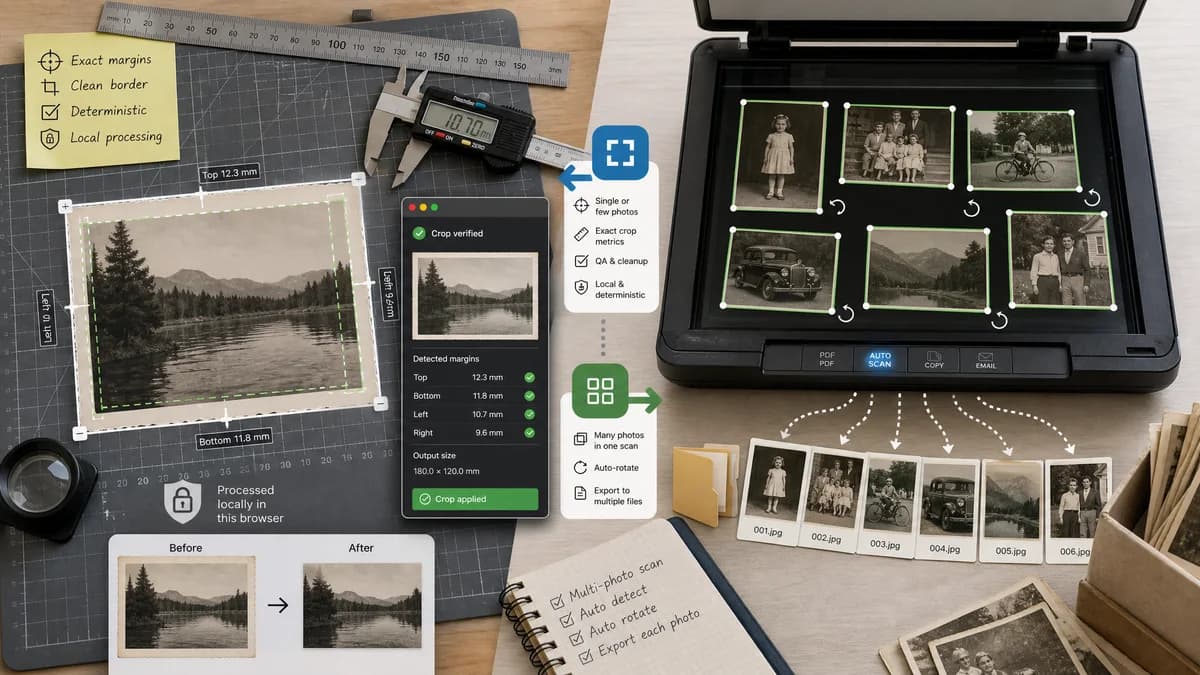
Scan Border Cropper is the baseline in this comparison: Auto-detect scanner borders, review exact crop dimensions, and download a clean cropped copy from your browser.
AutoCropper detects multiple photos within scanned images, crops and straightens them, and exports the separated photos.
Quick verdict
AutoCropper is a strong specialized competitor for multi-photo scans; TextFaker should win when the task is border measurement, scan cleanup QA, and browser-local deterministic cropping.
How Scan Border Cropper fits
Scan Border Cropper should not try to replace a full multi-photo extraction workflow at launch. It should focus on single image or small-batch border cleanup with exact crop metrics, local processing, and deterministic validation.
How AutoCropper fits
AutoCropper is purpose-built for family photo digitization and multi-photo flatbed scans. Its strengths are detecting several items in one scan, rotating them, and exporting separate files.
Side-by-side comparison
| Decision point | Scan Border Cropper | AutoCropper | Takeaway |
|---|---|---|---|
| Scope | Our workflowBorder cropper for one image at a time or modest batches, centered on measurable border removal. | Competitor workflowScan splitter that can detect multiple photos inside one scanned image. | The products overlap, but AutoCropper is broader for photo extraction. |
| Local processing | Our workflowShould process locally in the browser and expose local Blob checks. | Competitor workflowOfficial copy says it works in the browser and emphasizes secure/private use. | TextFaker should document exactly which processing happens client-side. |
| Output diagnostics | Our workflowShows crop box, dimensions, removed border sizes, and validation messages. | Competitor workflowEmphasizes automatically cropped individual photos and quality preservation. | Diagnostics are a sharper TextFaker differentiator than photo-management features. |
| Rotation handling | Our workflowCan optionally limit to rectangular border crop; deskew can be a future enhancement. | Competitor workflowAdvertises automatic rotation detection and correction. | AutoCropper is better for crooked photo prints. |
| Batch behavior | Our workflowSmall batch should report per-file status and allow ZIP download if implemented. | Competitor workflowDesigned around uploading and cropping multiple scans at once. | TextFaker needs clear limits to avoid overpromising bulk archive workflows. |
| Testability | Our workflowFixture-based tests can assert each detected crop box and output size. | Competitor workflowAI-style detection is useful but may be less transparent to users comparing exact pixels. | TextFaker should be the measurable option. |
Use Scan Border Cropper when
- Cropping one scanned page, screenshot, artwork, or photo border with exact measurements
- Users who need a predictable crop report more than automatic multi-photo separation
- Print or document workflows where safe-zone and output dimensions matter
Use AutoCropper when
- Family photo archiving with multiple prints per scan
- Users who need automatic splitting into several separate images
- People digitizing large boxes of photos with rotation correction
Detailed comparison
Demand Signal
Forum and Reddit discussions repeatedly describe users scanning many old family photos at once and wanting software to crop them automatically rather than crop each print manually.
- A common scenario is two to four photos per flatbed scan.
- Users value batch workflows because scanning each photo separately is slow.
Positioning
TextFaker should avoid claiming to be a full photo album digitizer unless it supports multi-region detection. The initial promise should be border cropping around one main scan area.
- Use phrases like scan border removal, margin crop, and measurable crop box.
- Avoid implying automatic separation of multiple photos unless implemented.
Implementation Notes
A deterministic border cropper can scan inward from edges until rows or columns exceed a content threshold. For multiple objects, connected-component analysis would be needed and should be treated as a future feature.
- Start with single crop rectangle.
- Allow preserve-padding values after detection.
- Expose a rejected status for ambiguous multi-object scans.
Testing Path
Use fixtures with one centered photo and known borders, then add a fixture with two separated photos and assert that the tool warns about multiple content islands instead of silently choosing a bad crop.
- Assert output dimensions.
- Assert warning text for ambiguous scans.
- Assert download MIME type and filename.
Research notes
- Official competitor source used: AutoCropper home and about pages.
- Community demand source used: Reddit DataHoarder and Photo StackExchange threads about automatic scan cropping.
- User problem summary: people digitizing family photos want to scan faster and avoid repetitive crop operations.
Official source
The only outbound competitor link on this page is placed here for source checking after the comparison.
Official AutoCropper source