
Scan Border Cropper vs Genius Scan
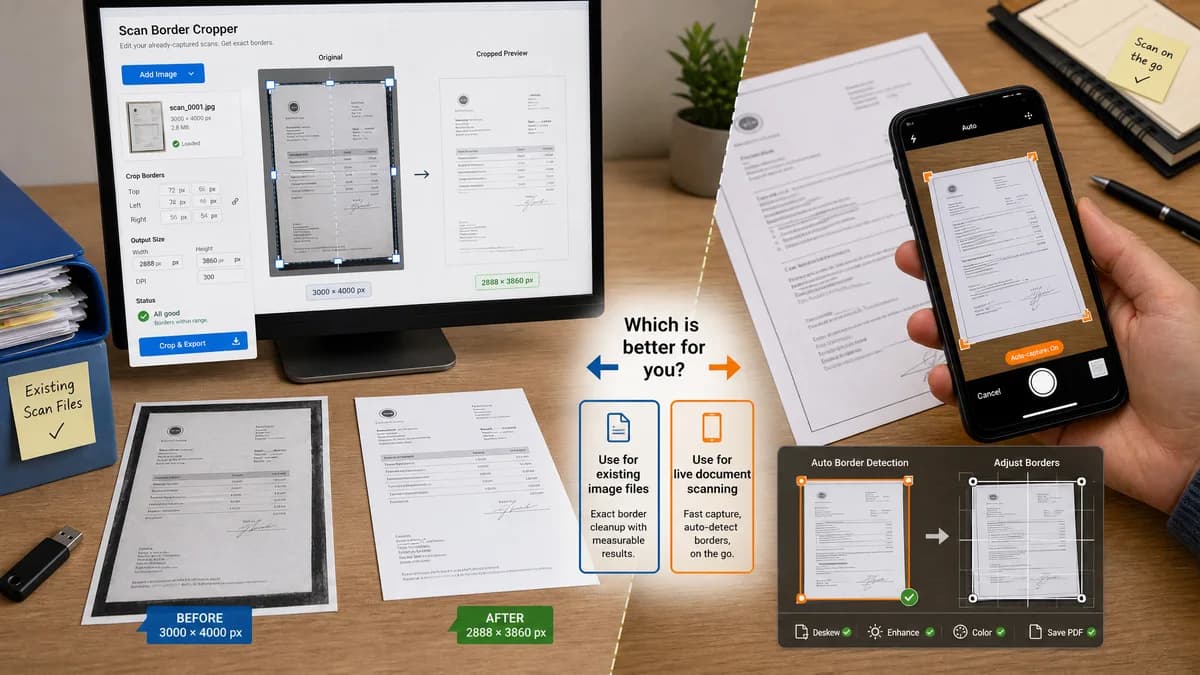
Scan Border Cropper is the baseline in this comparison: Auto-detect scanner borders, review exact crop dimensions, and download a clean cropped copy from your browser.
Genius Scan detects document borders so users do not have to crop and straighten scans themselves, while allowing manual frame adjustment.
Quick verdict
Genius Scan is stronger for live document scanning; TextFaker should serve existing image files and measurable border cleanup without requiring a scanner app workflow.
How Scan Border Cropper fits
Scan Border Cropper should provide an app-free browser workflow for already-captured scans, with exact crop boxes, border sizes, output dimensions, and validation messages that can be tested automatically.
How Genius Scan fits
Genius Scan is a mature mobile scanner app. Its documentation describes automatic document border detection and manual crop-frame adjustment during or after scanning.
Side-by-side comparison
| Decision point | Scan Border Cropper | Genius Scan | Takeaway |
|---|---|---|---|
| Timing | Our workflowPost-capture uploaded image cleanup. | Competitor workflowDuring-capture and after-capture scan adjustment inside a mobile app. | TextFaker is source-agnostic after the scan exists. |
| Border detection | Our workflowDetects rectangular border crop and exposes exact metrics. | Competitor workflowDetects document borders to avoid manual crop and straighten work. | Genius Scan optimizes capture; TextFaker optimizes measurable output. |
| Manual adjustment | Our workflowNumeric crop fields and tolerance controls should support deterministic overrides. | Competitor workflowManual frame adjustment is available in app UI. | TextFaker should favor numbers plus preview. |
| File management | Our workflowNo library; download the resulting image file. | Competitor workflowScanner app manages documents and multi-page exports. | TextFaker is simpler for one-off cleanup. |
| Privacy model | Our workflowLocal browser processing should be explicit. | Competitor workflowGenius Scan materials emphasize app-side scanning and related processing features. | Both can appeal to privacy, but TextFaker should keep files out of accounts and uploads. |
| Validation | Our workflowPass/fail messages for no border, low confidence, too much removed, or safe-zone risk. | Competitor workflowApp documentation focuses on crop editing rather than machine-readable validation. | Validation makes TextFaker more suitable for deterministic tests and print QA. |
Use Scan Border Cropper when
- Users with existing scan images from any source
- Browser-local cleanup where exact measurements matter
- Testing and support workflows that need copyable crop details
Use Genius Scan when
- Scanning documents directly from a phone
- Automatic border detection during capture
- Multi-page scan management and scanner-app workflows
Detailed comparison
Demand Signal
Users ask scanner-app communities about auto-crop controls and limitations, including how to avoid manual adjustment or apply quality steps after scans already exist.
- Auto-crop is expected in scanner apps.
- Post-scan correction remains a need when auto-crop is wrong or unavailable.
Product Gap
A standalone web tool can accept images from any scanner app, printer app, or flatbed scanner and show a transparent crop decision.
- No vendor lock-in.
- No document-library migration.
- No camera permissions required unless the browser upload uses camera capture.
Implementation Notes
Implement deterministic border detection first, with optional perspective correction only if it can return testable corner coordinates and output dimensions.
- Core output: crop rectangle.
- Optional output: detected corner points for future perspective mode.
- Validation: confidence and crop percentage thresholds.
Testing Path
Use fixtures with known rectangular document borders and expected crop coordinates. Add a rotated fixture only if perspective or deskew is implemented.
- Assert metrics in the DOM.
- Assert downloadable output dimensions.
- Assert warnings when the document touches image edges.
Research notes
- Official competitor source used: Genius Scan help documentation.
- Demand sources used: Adobe Scan Community and Reddit Genius Scan discussion about post-scan processing limitations.
- User problem summary: scanner-app users value automatic crop but still need transparent correction and post-capture control.
Official source
The only outbound competitor link on this page is placed here for source checking after the comparison.
Official Genius Scan source