
Scan Border Cropper vs Media Tools Auto Crop Image
Scan Border Cropper is the baseline in this comparison: Auto-detect scanner borders, review exact crop dimensions, and download a clean cropped copy from your browser.
Media Tools Auto Crop Image removes white, black, or transparent borders from images such as screenshots, scanned documents, and photos.
Quick verdict
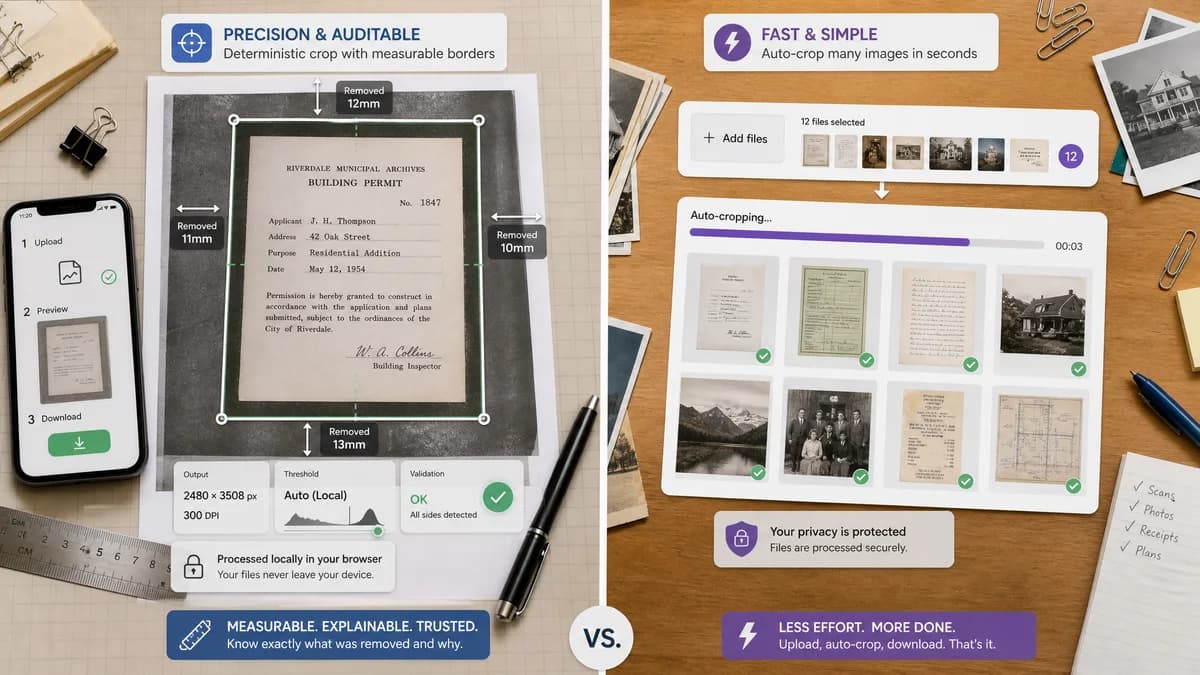
TextFaker can differentiate by being less of a black-box cropper and more of a measurable scan-border QA tool that still produces a downloadable cropped image.
How Scan Border Cropper fits
Scan Border Cropper should compete by making the crop decision auditable: show the exact crop rectangle, removed border sizes, output dimensions, threshold settings, and validation status before download. It should run locally in the browser and keep mobile upload, preview, and download flows simple.
How Media Tools Auto Crop Image fits
Media Tools offers a direct auto-crop workflow with privacy messaging and batch selection. Its public page emphasizes quick border removal but does not expose detailed deterministic crop diagnostics in the search-visible copy.
Side-by-side comparison
| Decision point | Scan Border Cropper | Media Tools Auto Crop Image | Takeaway |
|---|---|---|---|
| Primary workflow | Our workflowUpload image, detect border, inspect crop box, adjust tolerance, download cropped output. | Competitor workflowUpload images and automatically remove borders from screenshots, scans, or photos. | TextFaker should make the detection result explainable, not just automatic. |
| Deterministic results | Our workflowReports x, y, width, height, top, right, bottom, left border sizes, and output dimensions. | Competitor workflowPublic page focuses on the output image rather than numeric crop reporting. | Numeric outputs make TextFaker easier to validate in automated tests. |
| Privacy model | Our workflowDesigned for local browser processing with no upload requirement. | Competitor workflowThe page says processing happens privately on the user's device. | Privacy parity is necessary; diagnostics are the stronger differentiator. |
| Mobile friendliness | Our workflowShould support camera-roll uploads, responsive previews, and large tap targets. | Competitor workflowPage claims support across phones, tablets, Android, iOS, Windows, Mac, and Linux. | TextFaker must match cross-device expectations. |
| Scan-specific options | Our workflowCan include white, black, transparent, sampled-corner, and tolerance-based border modes. | Competitor workflowLists white, black, and transparent border removal. | Sampled-corner and validation modes would help with off-white scanner beds. |
| Validation path | Our workflowAutomated tests can load fixtures and assert crop boxes, border counts, and blob dimensions. | Competitor workflowThe visible product promise is outcome-oriented and less test-instrumented. | A testable crop report is the main product requirement. |
Use Scan Border Cropper when
- Users who need exact pixel crop boxes and border measurements
- Print or scan cleanup where a testable pass/fail status matters
- Privacy-conscious users who want local browser processing and copy-ready results
Use Media Tools Auto Crop Image when
- Users who want a minimal free auto-crop page
- Fast removal of obvious white, black, or transparent image borders
- Batch-style cleanup without needing detailed diagnostics
Detailed comparison
Demand Signal
Public support threads show people asking how to avoid manually cropping large numbers of scans. The Adobe Community example mentions more than 1000 scans with white borders, while scanner and photo communities mention ADF dark margins, slide borders, and variable-width scan borders.
- The user problem is repetitive manual cleanup after scanning.
- The common failure modes are white scanner-bed margins, black slide borders, gray ADF edges, and transparent padding.
Product Gap
Many auto-crop tools optimize for speed but do not expose enough detail for users who need predictable print or archive outputs.
- Show the computed crop rectangle.
- Show removed pixels by side.
- Warn when the crop would remove too much content or leave a border above tolerance.
Implementation Notes
Use canvas pixel sampling, corner color estimation, alpha detection, luminance thresholds, and connected edge scanning. Keep the algorithm deterministic and settings-driven.
- Inputs: PNG, JPEG, WebP, AVIF, BMP when browser-decodable.
- Outputs: PNG or original-compatible raster export with verified dimensions.
- Settings: tolerance, minimum content area, preserve padding, and border color mode.
Testing Path
Create fixtures with known 10 px, 25 px, asymmetric, off-white, black, and transparent borders. Assert crop boxes and output dimensions exactly or within a documented tolerance.
- Test no-border images return unchanged status.
- Test very small content areas trigger validation warnings.
- Test mobile viewport controls do not hide result metrics.
Research notes
- Official competitor source used: Media Tools Auto Crop Image.
- Demand sources used: Adobe Community, PDF-XChange forum, Canon Community, Capture One Community, Reddit DataHoarder.
- User problem summary: people want automated border removal for many scans because manual crop tools are slow and hard to repeat consistently.
Official source
The only outbound competitor link on this page is placed here for source checking after the comparison.
Official Media Tools Auto Crop Image source