
Scan Border Cropper vs Online PNG Tools Remove PNG Border
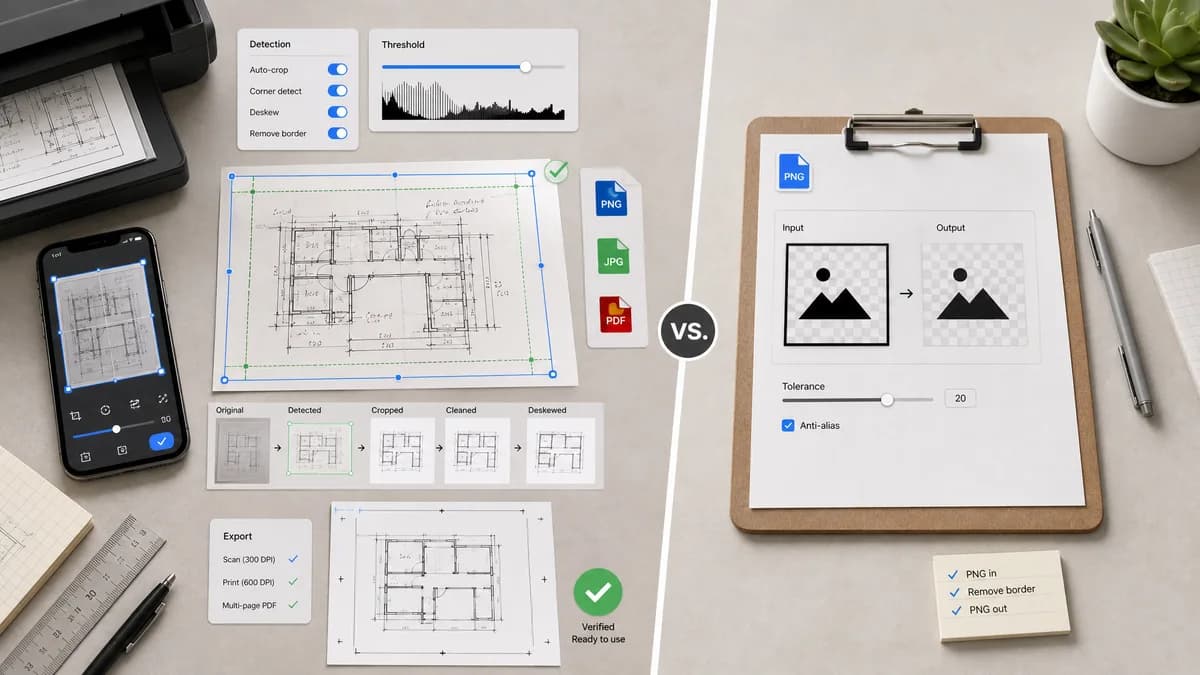
Scan Border Cropper is the baseline in this comparison: Auto-detect scanner borders, review exact crop dimensions, and download a clean cropped copy from your browser.
Online PNG Tools Remove PNG Border imports a PNG and returns a PNG with the border removed.
Quick verdict
Online PNG Tools is simpler for PNG-only border removal; TextFaker should be broader, more scan-aware, and more measurable.
How Scan Border Cropper fits
Scan Border Cropper should support more than PNG and should expose crop diagnostics, threshold controls, mobile layout, and downloadable verified outputs for scan and print use cases.
How Online PNG Tools Remove PNG Border fits
Online PNG Tools offers a very simple PNG-specific border remover with an input and output editor pattern. It is useful for quick PNG tasks but narrower than a scan-focused cropper.
Side-by-side comparison
| Decision point | Scan Border Cropper | Online PNG Tools Remove PNG Border | Takeaway |
|---|---|---|---|
| Format support | Our workflowShould support common browser-decodable image formats, not just PNG. | Competitor workflowFocused on PNG border removal. | TextFaker can cover scanner JPGs and phone photos. |
| Scan awareness | Our workflowDesigned for scans, photos, screenshots, and print borders. | Competitor workflowGeneric PNG border removal utility. | TextFaker can use scan-specific terminology and validations. |
| Diagnostics | Our workflowReports crop rectangle, border sizes, and output dimensions. | Competitor workflowEmphasizes getting a border-removed PNG output. | Metrics are a clear differentiator. |
| Tolerance controls | Our workflowCan expose light/dark/transparent/auto-sampled modes and tolerance values. | Competitor workflowPublic page does not foreground scan-specific tolerance reporting. | Tolerance is important for off-white scans and JPEG noise. |
| Mobile flow | Our workflowShould handle phone uploads and previews with responsive controls. | Competitor workflowOnline editor-style tool may work in browser but is not specifically scan-mobile positioned. | Mobile-friendly scan cleanup is part of TextFaker's requirement. |
| Validation | Our workflowShows validation messages such as no border found, ambiguous content, or output too small. | Competitor workflowSimple transformation result. | Validation messages make TextFaker safer for print and archive use. |
Use Scan Border Cropper when
- JPG, PNG, WebP, and other browser-decodable scan images
- Users who need crop metrics and validation messages
- Print/photo workflows with white, black, gray, or transparent border handling
Use Online PNG Tools Remove PNG Border when
- Quick PNG-only border removal
- Users already using Browserling-style online PNG utilities
- Simple import-output workflows without scan diagnostics
Detailed comparison
Demand Signal
Public discussion sources describe JPEG scans, scanned documents, slides, and PDFs, not only PNG files. A broader image cropper better matches real scan sources.
- Scanners often output JPEG or TIFF-like workflows.
- Screenshots and design exports often use PNG with transparent or solid padding.
Product Gap
Single-format utilities are fast, but scan users need support for noisy colors, asymmetric margins, and output measurements.
- Support sampled border color.
- Support transparent borders.
- Support dark edges and off-white paper backgrounds.
Implementation Notes
Decode images into canvas and normalize the analysis to RGBA pixels. Export to PNG by default when preserving exact pixels or to JPEG/WebP when user chooses lossy output.
- Warn when source format cannot be decoded by the browser.
- Verify output MIME and dimensions.
- Provide a JSON-copy result summary.
Testing Path
Use PNG, JPEG, and WebP fixtures with the same known border geometry. Assert equivalent crop boxes across formats where compression noise permits.
- Test transparent PNG crop.
- Test JPEG tolerance behavior.
- Test output filename extension.
Research notes
- Official competitor source used: Online PNG Tools Remove PNG Border page.
- Demand sources used: Adobe Community and Capture One Community scanned-image border threads.
- User problem summary: users need border removal across real scan formats, not only ideal PNG files.
Official source
The only outbound competitor link on this page is placed here for source checking after the comparison.
Official Online PNG Tools Remove PNG Border source