
Scan Border Cropper vs PDFResizer Crop PDF
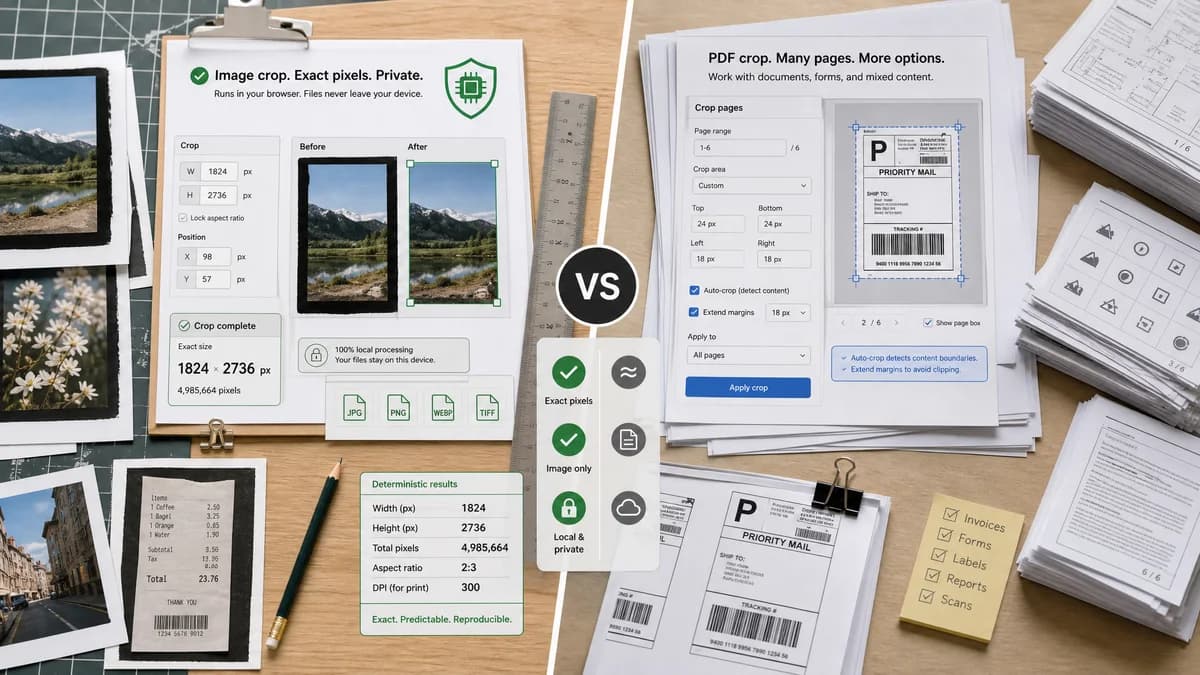
Scan Border Cropper is the baseline in this comparison: Auto-detect scanner borders, review exact crop dimensions, and download a clean cropped copy from your browser.
PDFResizer Crop PDF offers visual PDF cropping, margin extension, and an auto-crop option intended to remove margins automatically.
Quick verdict
PDFResizer is a practical adjacent tool for PDFs; TextFaker should be the image-native equivalent with stronger privacy and deterministic validation.
How Scan Border Cropper fits
Scan Border Cropper should bring the auto-crop idea to image files with browser-local processing and exact pixel reports, while leaving PDF page manipulation to PDF-specific tools.
How PDFResizer Crop PDF fits
PDFResizer provides PDF crop functions for scans, labels, logos, and other PDFs, including selected-area cropping, auto-crop, and extending margins.
Side-by-side comparison
| Decision point | Scan Border Cropper | PDFResizer Crop PDF | Takeaway |
|---|---|---|---|
| Auto-crop target | Our workflowImage pixel borders around a main content area. | Competitor workflowPDF margins and visible page regions. | Both solve border cleanup, but at different file levels. |
| Output type | Our workflowCropped PNG, JPEG, WebP, or another browser-supported image output. | Competitor workflowModified PDF. | Users should choose based on source and destination format. |
| Local browser processing | Our workflowCore requirement: no server upload for image processing. | Competitor workflowOnline PDF workflow implies server-side PDF handling. | Privacy-sensitive users may prefer TextFaker for images. |
| Measurement | Our workflowDisplays exact crop box and border sizes in pixels. | Competitor workflowPublic copy emphasizes visual crop and auto-crop options. | TextFaker can be more auditable. |
| Margin extension | Our workflowCan support preserve padding or add-back padding after crop. | Competitor workflowOffers extend margins for extra annotation space. | Padding controls are useful for print and annotation workflows. |
| Testing | Our workflowDeterministic synthetic image fixtures are easy to automate. | Competitor workflowPDF auto-crop tests would require PDF rendering and page-box checks. | Image-first implementation is lower-risk for TextFaker tests. |
Use Scan Border Cropper when
- Image scans, screenshots, and artwork with unwanted borders
- Users who need local browser computation
- Developers and QA testers who need predictable crop values
Use PDFResizer Crop PDF when
- Cropping PDF scans or labels
- Adding or removing PDF margins
- Users who need PDF output rather than image output
Detailed comparison
Demand Signal
PDFResizer's auto-crop option confirms that automatic margin removal is a recognized user need. Public scanner forums show the same need from the source-image side.
- PDFs made from scans inherit image border problems.
- Labels and logos also suffer from unwanted canvas margins.
Product Gap
A local image cropper can produce transparent pixel-level data before a user converts images to PDF or sends them to print.
- Report output dimensions before download.
- Warn if crop would affect expected print size.
- Offer optional padding.
Implementation Notes
Detect the bounding rectangle of non-border pixels, then apply optional padding and clamp to image bounds. Keep the original image unchanged unless the user downloads the output.
- Use off-white tolerance for scanner beds.
- Use alpha threshold for transparent PNG padding.
- Use dark-border mode for overscan and slide frames.
Testing Path
Create image fixtures that mimic labels, scans, and logos with margins. Assert crop boxes and final dimensions.
- Test padding extension.
- Test transparent border removal.
- Test dark edge removal.
Research notes
- Official competitor source used: PDFResizer Crop PDF page.
- Demand source used: PDF-XChange forum and Canon Community scanner border discussion.
- User problem summary: automatic margin removal is useful before or after content becomes a PDF, but image-level cleanup can be simpler and more private.
Official source
The only outbound competitor link on this page is placed here for source checking after the comparison.
Official PDFResizer Crop PDF source