
Scan Border Cropper vs ScanSpeeder
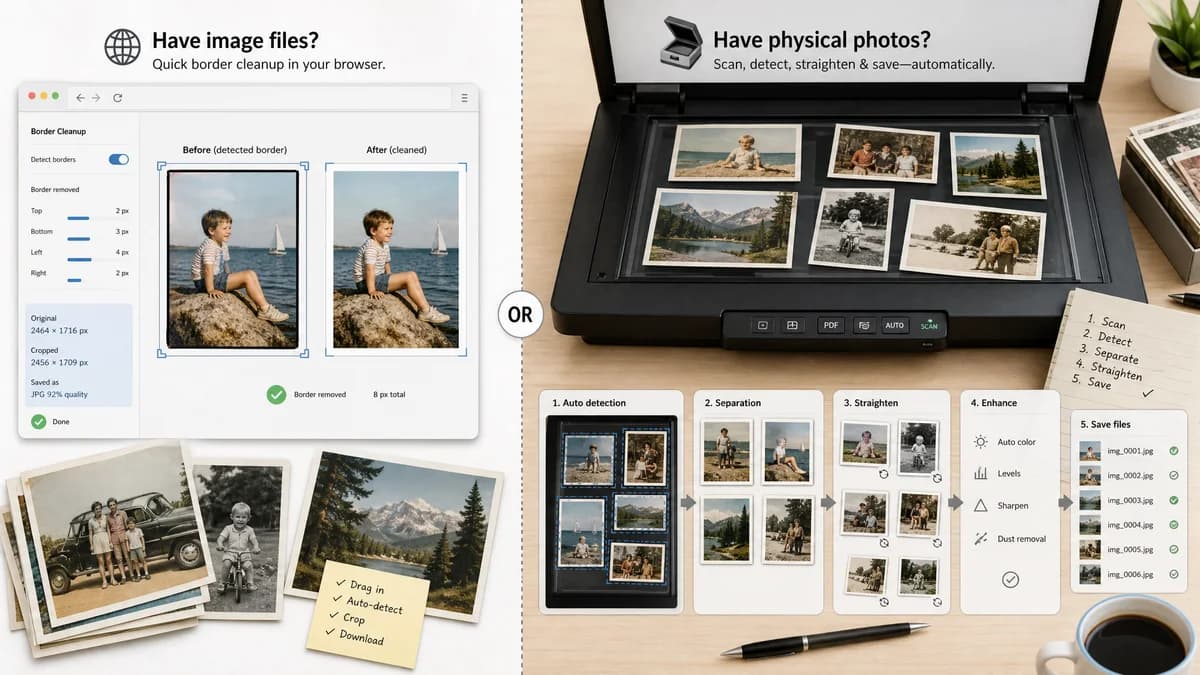
Scan Border Cropper is the baseline in this comparison: Auto-detect scanner borders, review exact crop dimensions, and download a clean cropped copy from your browser.
ScanSpeeder helps users scan multiple photos at once and automatically crop and straighten them into separate image files.
Quick verdict
ScanSpeeder is better for scanning physical photo collections from a flatbed; TextFaker is better for quick browser-local border cleanup of existing image files.
How Scan Border Cropper fits
Scan Border Cropper should be narrower and web-based: it should clean already-created images by detecting unwanted borders, then report measurable crop and output details without needing scanner integration.
How ScanSpeeder fits
ScanSpeeder is a full photo-scanning workflow with scanner integration, photo detection, automatic separation, straightening, naming, and enhancement features.
Side-by-side comparison
| Decision point | Scan Border Cropper | ScanSpeeder | Takeaway |
|---|---|---|---|
| Input source | Our workflowAccepts existing browser-decodable image files from disk or camera roll. | Competitor workflowWorks as photo-scanning software tied to scanning and importing workflows. | TextFaker is simpler for already-scanned images. |
| Main object count | Our workflowOptimized for one main image or document bounded by a border. | Competitor workflowOptimized for detecting multiple photos on a scanner bed. | ScanSpeeder is more capable for multi-print scans. |
| Straightening | Our workflowInitial version can provide rectangular crop; deskew can be optional future work. | Competitor workflowAdvertises automatic crop and straighten into separate image files. | TextFaker should be explicit about whether it crops only or also straightens. |
| Enhancement | Our workflowShould avoid subjective filters and keep deterministic output validation. | Competitor workflowIncludes photo enhancement features such as a magic-wand style workflow. | TextFaker should stay utility-focused and testable. |
| Installation | Our workflowNo installation beyond a browser. | Competitor workflowDesktop software installation is required. | Browser access lowers friction for occasional users. |
| Result report | Our workflowShows crop boxes, dimensions, border widths, and validation messages. | Competitor workflowEmphasizes saved separated photos and workflow speed. | TextFaker should be the measurable cleanup option. |
Use Scan Border Cropper when
- Users with existing scan files who only need border removal
- People working on phones, tablets, or browsers without scanner drivers
- Cases where exact output dimensions and crop measurements are needed
Use ScanSpeeder when
- Flatbed scanning sessions with multiple physical photos
- Users who want scanner capture plus cropping in one app
- Photo archiving with automatic naming and enhancement
Detailed comparison
Demand Signal
Photo scanning discussions show users looking for ways to scan multiple family photos efficiently and avoid repetitive manual crops.
- Users often scan album pages or several prints at once.
- They care about time saved across hundreds of photos.
Scope Boundary
A scan border cropper is not a scanner controller. It should work after the scan exists and avoid promising TWAIN, scanner-driver, or album workflow features.
- Good scope: uploaded image in, cropped image out.
- Out of scope: controlling flatbed scanner hardware.
Implementation Notes
Offer a plain deterministic crop algorithm and optional batch queue. Use canvas and Web Workers for large files to keep the interface responsive.
- Show per-file progress.
- Cap maximum megapixels or downsample preview while preserving full-resolution output when possible.
- Warn on browser memory limits.
Testing Path
Fixture tests should verify that the same uploaded scan always returns the same crop box under the same tolerance and padding settings.
- Test download filename suffix.
- Test output image dimensions.
- Test validation warning for ambiguous multiple-photo layouts.
Research notes
- Official competitor source used: ScanSpeeder home page and automatic detection material.
- Demand source used: Reddit and Photo StackExchange discussions about scanning many family photos.
- User problem summary: photo archivists want scanner workflows to save time, but many only need post-scan border cleanup.
Official source
The only outbound competitor link on this page is placed here for source checking after the comparison.
Official ScanSpeeder source