
Scan Border Cropper vs ScanTailor Advanced
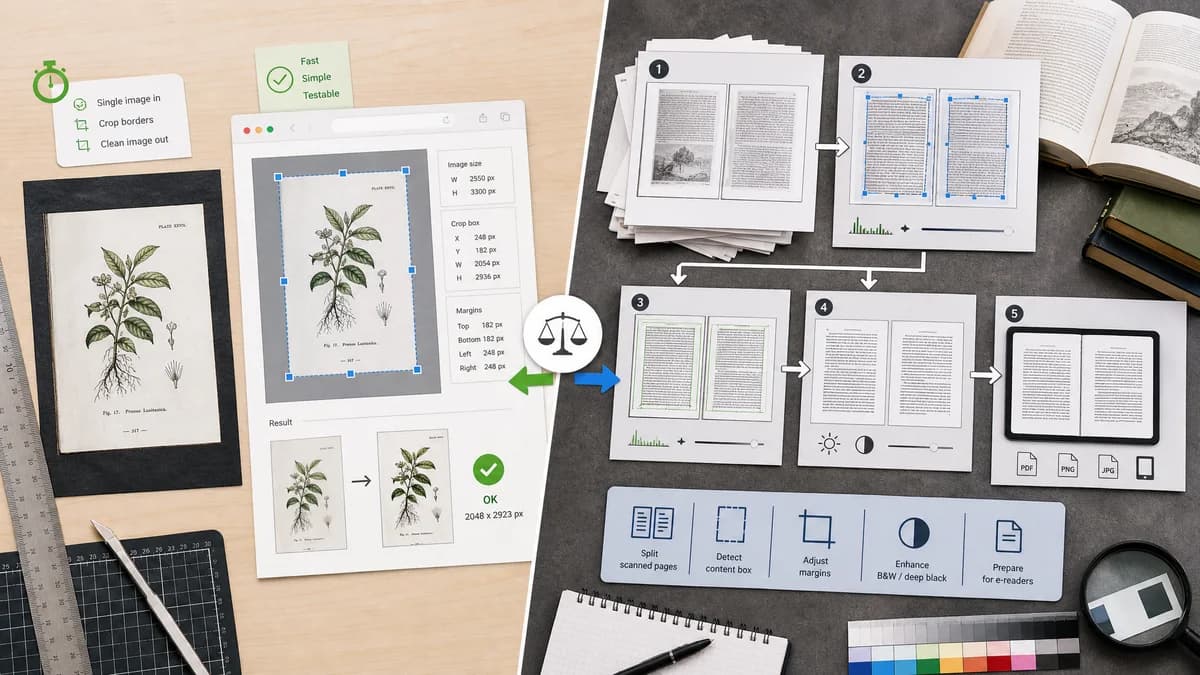
Scan Border Cropper is the baseline in this comparison: Auto-detect scanner borders, review exact crop dimensions, and download a clean cropped copy from your browser.
ScanTailor Advanced is a post-processing tool for scanned book pages with content detection, page layout, margins, and output preparation features.
Quick verdict
ScanTailor Advanced is stronger for multi-step book post-processing; TextFaker should win for quick single-image border removal and testable crop reporting in the browser.
How Scan Border Cropper fits
Scan Border Cropper should provide a much simpler browser-local crop utility for individual scans, screenshots, and print images, with deterministic output metrics rather than a full book-scanning pipeline.
How ScanTailor Advanced fits
ScanTailor Advanced serves book scanning and e-reader preparation workflows, including page layout, content detection, margins, and deep-black output tuning.
Side-by-side comparison
| Decision point | Scan Border Cropper | ScanTailor Advanced | Takeaway |
|---|---|---|---|
| Workflow complexity | Our workflowSingle-purpose border cropper with direct metrics and download. | Competitor workflowMulti-stage book scan post-processing workflow. | TextFaker should be faster for simple border removal. |
| Document type | Our workflowImages, scans, screenshots, and print artwork. | Competitor workflowPrimarily scanned pages and book workflows. | TextFaker can cover broader casual image cleanup. |
| Margins | Our workflowDetects and removes unwanted borders while optionally preserving padding. | Competitor workflowOffers page layout and margin handling for reading and output preparation. | ScanTailor is more advanced for page layout. |
| Installation | Our workflowRuns in a browser. | Competitor workflowDesktop application or downloaded package. | TextFaker reduces setup friction. |
| Deterministic output | Our workflowShows exact crop rectangle, border widths, output pixel dimensions, and validation status. | Competitor workflowDesigned around visual page-processing stages and batch output. | TextFaker should make numeric results central. |
| Automated tests | Our workflowCan use simple image fixtures and assert JSON-like report values. | Competitor workflowFull desktop workflows are harder to exercise in site tests. | TextFaker fits the project requirement for deterministic browser validation. |
Use Scan Border Cropper when
- One-off scan border cleanup
- Users who need output dimensions and crop boxes without learning a book-scan pipeline
- Mobile and casual browser workflows
Use ScanTailor Advanced when
- Book scanning projects
- Deskew, page layout, margins, and batch page preparation
- Users comfortable with desktop open-source scanning tools
Detailed comparison
Demand Signal
Book scanning communities discuss margins, crop consistency, and page preparation as repeated pain points. General scan-border discussions show similar needs at a smaller scale.
- Book scans often need consistent visible content and margins.
- Casual users often need only the first crop step.
Product Gap
A web utility can serve people who do not want a full post-processing app but still need a reliable crop result.
- Keep controls compact.
- Report exact dimensions after crop.
- Offer padding restoration for safe margins.
Implementation Notes
Use a deterministic content-bound detection approach. Avoid OCR or subjective page enhancement for the first version.
- Handle white pages on gray scanner beds.
- Handle dark borders from overscan.
- Keep all computation in browser canvas or Web Worker.
Testing Path
Use synthetic book-page fixtures with off-white paper, gray border, black gutter, and known margin widths. Assert crop and warning outcomes.
- Test content touching gutter does not overcrop.
- Test preserve-padding changes output dimensions predictably.
- Test no human visual review is required.
Research notes
- Official competitor source used: ScanTailor Advanced site.
- Demand source used: DIY Book Scanner and PDF-XChange forum discussions.
- User problem summary: scanned pages need border and margin cleanup, but many users need a simpler tool than a book pipeline.
Official source
The only outbound competitor link on this page is placed here for source checking after the comparison.
Official ScanTailor Advanced source