
Scan Border Cropper vs Smallpdf Crop PDF
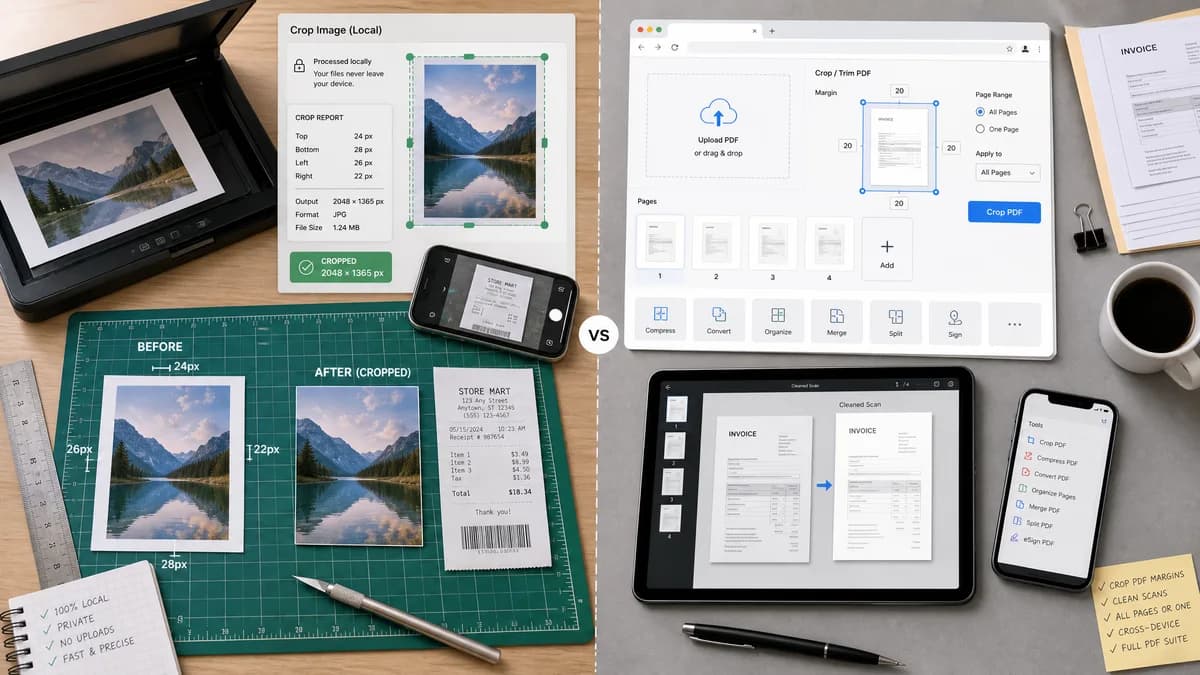
Scan Border Cropper is the baseline in this comparison: Auto-detect scanner borders, review exact crop dimensions, and download a clean cropped copy from your browser.
Smallpdf Crop PDF trims unwanted margins from PDFs, including bad scans, with one-page or all-page cropping controls.
Quick verdict
Smallpdf is a better fit for PDF margin trimming; TextFaker can be the privacy-preserving image-border cropper with exact output metrics.
How Scan Border Cropper fits
Scan Border Cropper should target raster image borders locally in the browser and provide a transparent crop report that Smallpdf-style PDF tools do not emphasize.
How Smallpdf Crop PDF fits
Smallpdf positions its tool around uploading PDFs, trimming margins, cleaning bad scans, and working across devices with a larger PDF tool suite.
Side-by-side comparison
| Decision point | Scan Border Cropper | Smallpdf Crop PDF | Takeaway |
|---|---|---|---|
| Input format | Our workflowBrowser-readable image files. | Competitor workflowPDF documents. | TextFaker should stay clear about image-first support. |
| Processing location | Our workflowLocal browser processing should be a core promise. | Competitor workflowSmallpdf's workflow starts by uploading a PDF. | Local processing is a key user-facing difference. |
| Margin problem | Our workflowDetects borders from pixel data and reports removed pixels. | Competitor workflowTargets unwanted PDF margins and bad scans through a crop interface. | Both address scan cleanup, but at different document layers. |
| Output metrics | Our workflowExact crop rectangle, border sizes, output dimensions, file size, and status. | Competitor workflowEmphasizes final PDF download and ease of use. | TextFaker should provide more measurable feedback. |
| Batch use | Our workflowCould support multiple images with per-file reports and ZIP export. | Competitor workflowSupports applying crop to one page or all pages in a PDF workflow. | Batch semantics differ: image list versus PDF page range. |
| Automated testing | Our workflowSynthetic pixel fixtures make deterministic crop tests straightforward. | Competitor workflowPDF visual crop tools are harder to validate without document rendering assumptions. | TextFaker aligns well with automated QA requirements. |
Use Scan Border Cropper when
- Users starting from image files rather than PDFs
- Local browser workflows where upload is undesirable
- Automated verification of crop boxes and output dimensions
Use Smallpdf Crop PDF when
- PDF users who need to crop one or many pages
- People already using a PDF toolkit for additional edits
- Manual visual trimming of PDF margins
Detailed comparison
Demand Signal
Smallpdf's own positioning around bad scans and unwanted margins reflects a common document cleanup need. Public forums add that users want automatic removal of dark or white scanner edges.
- Bad scans are a mainstream document problem.
- Users want cross-device access and fast results.
Product Gap
PDF suites are often broader than needed when the source is a single image. A focused image tool can be faster and more transparent.
- No account needed for core local processing.
- No visual-only result dependency.
- Downloadable raster output.
Implementation Notes
Expose the same deterministic report for both single and batch modes. Avoid page-range terminology unless PDF support is added.
- Per-file result rows.
- Failure reasons for unsupported or undecodable files.
- Result copy button for crop box and dimensions.
Testing Path
Use browser tests that upload known border images and assert visible values for crop box, output size, and validation status.
- Test mobile viewport layout.
- Test image download can be decoded.
- Test unchanged images are reported as unchanged.
Research notes
- Official competitor source used: Smallpdf Crop PDF page.
- Demand sources used: PDF-XChange forum and Canon Community scanner auto-crop thread.
- User problem summary: users with scanned documents want margin cleanup that is faster than manual PDF cropping.
Official source
The only outbound competitor link on this page is placed here for source checking after the comparison.
Official Smallpdf Crop PDF source