
Open Source Alternatives to ABBYY FineReader PDF
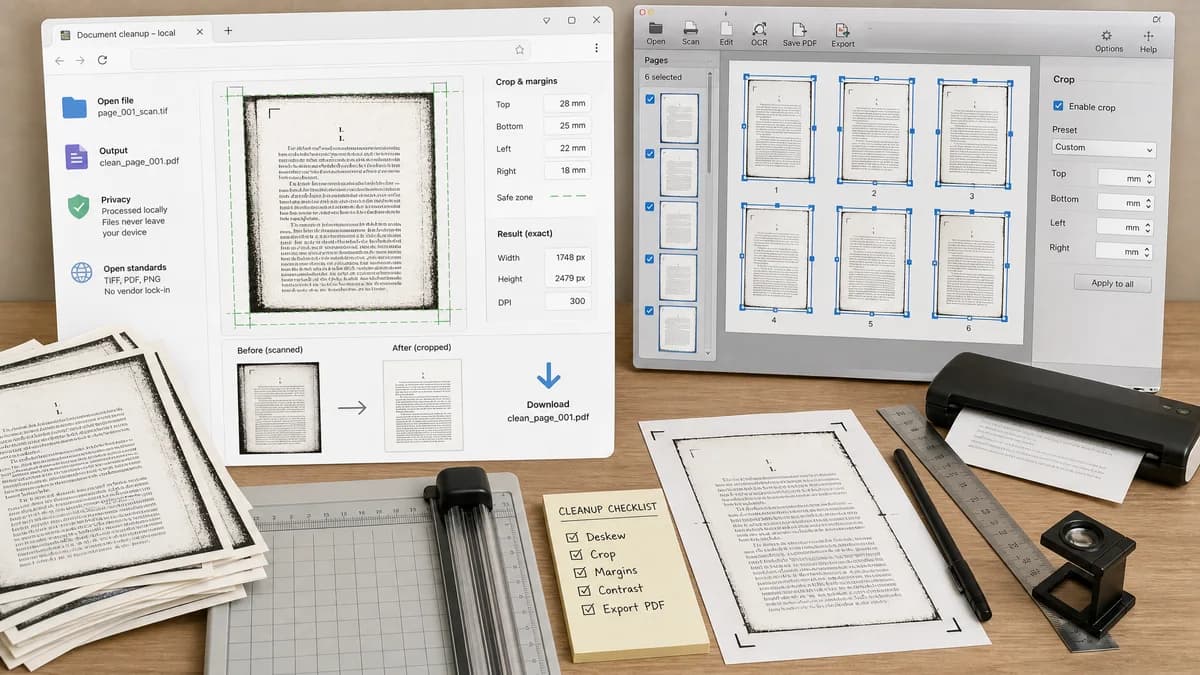
Scan Border Cropper is a browser-based alternative for users who need this focused result without installing a proprietary desktop app or entering a larger hosted workflow.
This research compares that workflow with ABBYY FineReader PDF while keeping the outbound source link at the bottom after the analysis.
Why Scan Border Cropper fits
TextFaker can serve the narrow, practical crop-cleanup task for users who have scan images and need deterministic margins, safe zones, and downloads without desktop OCR software.
What ABBYY FineReader PDF offers
ABBYY FineReader PDF is a commercial OCR and PDF product with image editor tools that include cropping document pages and applying crop frames to selected pages.
Open alternative signals
OCR scope
Scan Border CropperNo OCR required for border crop; image cleanup only.
ABBYY FineReader PDFFull OCR and PDF editing suite.
Crop consistency
Scan Border CropperCan show whether all outputs share the same dimensions and flag mismatches.
ABBYY FineReader PDFCan apply the same crop frame across pages in desktop workflows.
Processing model
Scan Border CropperBrowser-local for images.
ABBYY FineReader PDFInstalled commercial software.
Output audit
Scan Border CropperDownloadable crop report with dimensions and border values.
ABBYY FineReader PDFDocument edited inside OCR/PDF workflow.
Decision guide
Best for quick local border cropping, pre-OCR cleanup, and verifiable image outputs.
Best for OCR, PDF editing, conversion, and document comparison workflows beyond cropping.
Side-by-side open source alternative comparison
| Decision point | Scan Border Cropper | ABBYY FineReader PDF | Takeaway |
|---|---|---|---|
| Core capability | Our workflowDetect and crop scan borders from images, then validate the resulting file. | Proprietary workflowOCR, PDF editing, conversion, and page image cropping. | TextFaker is a simpler pre-OCR cleanup tool. |
| Consistent page size | Our workflowCan provide same-crop mode and dimension mismatch warnings across files. | Proprietary workflowSupports cropping selected pages and applying crop frames. | Consistency checks are important for scanned documents. |
| Installation | Our workflowNo install for browser-supported image files. | Proprietary workflowDesktop product installation and licensing. | TextFaker is better for occasional cleanup. |
| Advanced document work | Our workflowShould not claim OCR, layout recognition, or PDF conversion unless separate tools handle it. | Proprietary workflowStrong advanced document processing features. | Honest scope prevents poor-fit traffic. |
| Testing | Our workflowDeterministic fixtures can check crop boxes and output dimensions. | Proprietary workflowDesktop OCR workflows are broader and less relevant to web tests. | The TextFaker tool can be reliable with a small test surface. |
| Privacy | Our workflowLocal browser processing after page load. | Proprietary workflowLocal desktop software for many workflows. | Both can satisfy privacy needs; TextFaker wins on accessibility. |
Detailed research
Product Angle
ABBYY comparison users may be preparing scans for OCR. A Scan Border Cropper can help by removing noisy borders that hurt OCR quality, while leaving text recognition to dedicated tools.
- Mention pre-OCR cleanup carefully.
- Report margin and dimension consistency.
- Support batch outputs for scanned page sets.
Demand Evidence
ABBYY support and community content confirms that page cropping and post-crop page size are user-visible concerns in scanned document workflows.
- Users want crop frames applied across pages.
- Users care about consistent dimensions after cropping.
- OCR-adjacent cleanup is a practical use case.
Implementation Notes
Add an apply-to-all crop option and a per-file auto-detect option. Show when final dimensions differ from the selected target.
- Status values: matchesTarget, dimensionMismatch, cropAdjusted, noCropNeeded.
- Allow numeric crop entry for exact repeatability.
- Export a crop settings JSON for reuse.
SEO Fit
Use alternative copy around ABBYY FineReader PDF alternative for cropping scan borders, with clear disclaimers that TextFaker is not an OCR suite.
Research notes
- ABBYY support documents show users can crop one or multiple pages in the OCR Editor or PDF Editor.
- ABBYY community posts about page size after cropping show that users care about consistent page dimensions after scan cleanup.
- TextFaker should expose final dimensions and allow applying one crop box to multiple files when consistency matters.
Official source
The proprietary product link is included once here for source checking after the alternative analysis.
Official ABBYY FineReader PDF source