
Open Source Alternatives to Adobe Acrobat
Scan Border Cropper is a browser-based alternative for users who need this focused result without installing a proprietary desktop app or entering a larger hosted workflow.
This research compares that workflow with Adobe Acrobat while keeping the outbound source link at the bottom after the analysis.
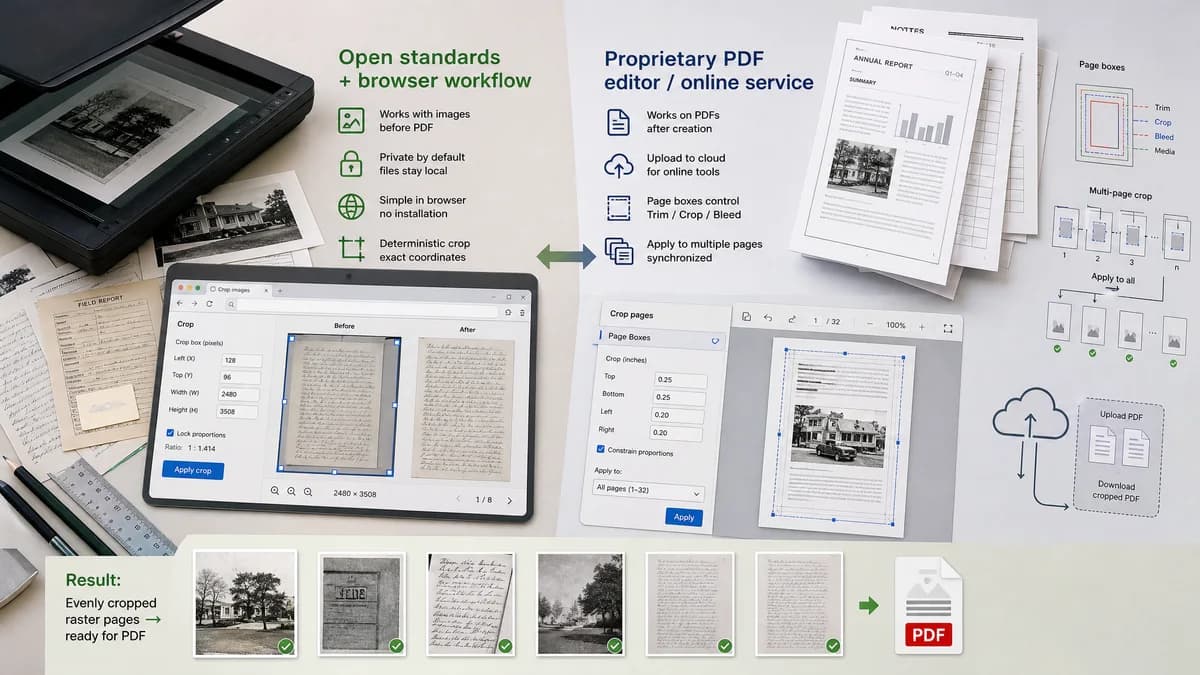
Why Scan Border Cropper fits
TextFaker can compete on privacy, simplicity, and deterministic raster cropping for scanned images before they become PDFs or after pages are exported as images.
What Adobe Acrobat offers
Adobe Acrobat provides PDF page cropping online and on desktop, with page box controls and workflows for trimming margins or applying crops across pages.
Open alternative signals
File model
Scan Border CropperRaster image crop with output dimensions that prove removed pixels are gone.
Adobe AcrobatPDF page crop and page box workflow.
Content removal
Scan Border CropperCropped image output discards pixels outside the crop rectangle.
Adobe AcrobatPDF cropping may adjust visible page area depending on workflow.
Best input
Scan Border CropperJPG, PNG, WebP, AVIF, and other browser-decodable scans.
Adobe AcrobatPDF documents.
Validation
Scan Border CropperPixel dimensions and border measurements are first-class results.
Adobe AcrobatPDF page boxes and visual crop previews.
Decision guide
Best for image-based scan border cleanup, exact pixel dimensions, and irreversible raster output before sharing or PDF assembly.
Best for PDF-native page boxes, multi-page PDF editing, Acrobat Pro workflows, and document review features.
Side-by-side open source alternative comparison
| Decision point | Scan Border Cropper | Adobe Acrobat | Takeaway |
|---|---|---|---|
| Primary format | Our workflowImage scans and raster outputs. | Proprietary workflowPDF pages and PDF documents. | TextFaker should not pretend to be a full PDF editor. |
| Varying borders | Our workflowCan calculate a unique crop box per image or page render. | Proprietary workflowCan apply crop settings across selected pages in PDF workflows. | Per-page detection matters for hand-scanned books and bound documents. |
| Removed content | Our workflowOutput dimensions verify that border pixels are excluded from the generated image. | Proprietary workflowPDF crop may hide rather than delete content unless additional PDF cleanup is performed. | Irreversible raster crop is simpler for privacy and sharing. |
| Automation | Our workflowThreshold-based crop detection and status messages can run locally. | Proprietary workflowPDF crop tools provide manual and page-range workflows. | TextFaker can own automatic border detection for raster scans. |
| Advanced print boxes | Our workflowCan report bleed and safe-zone status in pixels or converted print units. | Proprietary workflowAcrobat Pro supports advanced page box settings such as TrimBox and BleedBox. | Print-safe status is useful, but PDF box editing belongs to Acrobat. |
| Testing | Our workflowAutomated tests can assert exact image output width and height. | Proprietary workflowPDF page-box behavior requires PDF-specific validation. | Keep image crop tests simple and deterministic. |
Detailed research
Product Angle
Adobe Acrobat is the comparison for users thinking in PDFs. TextFaker should address scanned page images and explain that clean raster crops can be useful before creating or sharing a PDF.
- Use phrases like crop scanned page image and remove black PDF scan edges from exported pages.
- Avoid implying full Acrobat replacement.
- Consider a future PDF-page rendering mode only if it can stay local and testable.
Demand Evidence
The Adobe Community thread about 800 scanned pages with variable black edges is strong demand evidence for automatic per-page crop detection, especially when uniform PDF cropping is insufficient.
- Bound-document scans produce varying edge shadows.
- Uniform cropping can cut content or leave bars.
- Per-page crop metadata is valuable for auditability.
Implementation Notes
For image inputs, use local decode, edge analysis, and Canvas export. For future PDF support, render each page to canvas and reuse the same crop engine.
- Expose pageIndex when processing multipage inputs.
- Report whether crop is uniform or per-page.
- Keep output file dimensions verifiable.
SEO Fit
The comparison page can target users searching for Acrobat alternatives for scan border cleanup while making the narrower TextFaker scope explicit.
Research notes
- Adobe Acrobat documentation notes PDF crop features and advanced page box settings; classic documentation notes that some cropping hides content rather than reducing file content.
- Adobe Community demand includes an 800-page scanned PDF with varying black edge areas where a simple uniform crop was not enough.
- TextFaker should be clear if it processes images only; if PDF input is later added, each rendered page should expose crop coordinates and final page dimensions.
Official source
The proprietary product link is included once here for source checking after the alternative analysis.
Official Adobe Acrobat source