
Open Source Alternatives to AutoSplitter
Scan Border Cropper is a browser-based alternative for users who need this focused result without installing a proprietary desktop app or entering a larger hosted workflow.
This research compares that workflow with AutoSplitter while keeping the outbound source link at the bottom after the analysis.
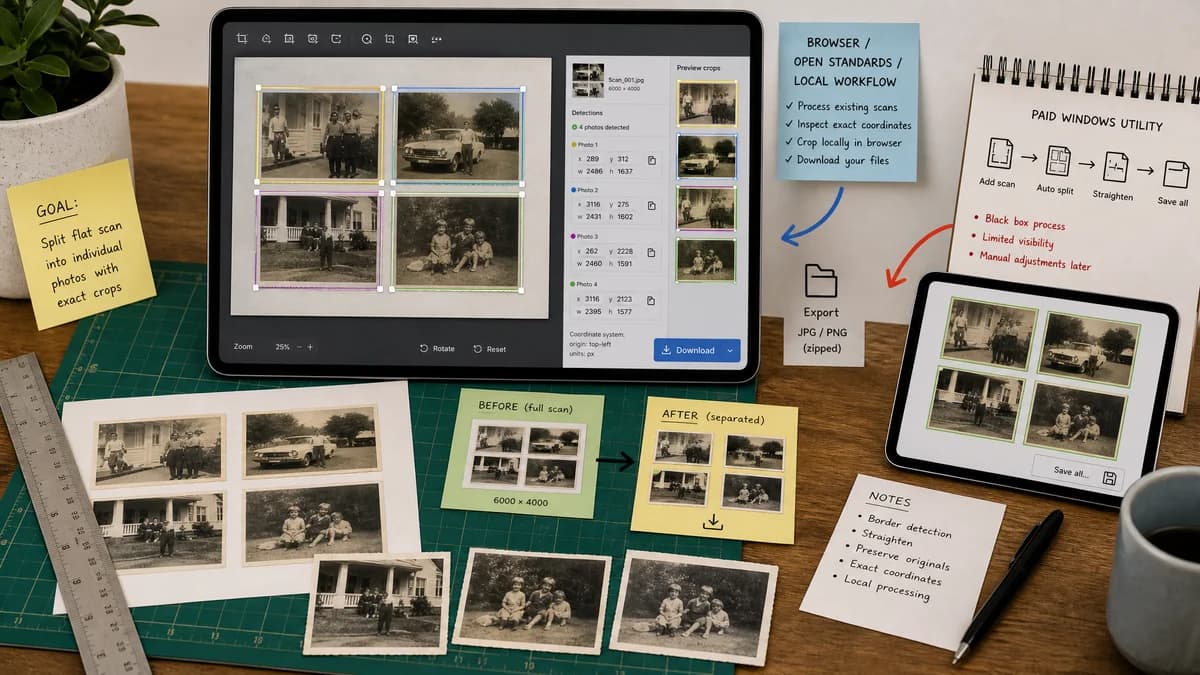
Why Scan Border Cropper fits
TextFaker can be an open-source-powered alternative for users who want to process existing scans locally in the browser and inspect exact crop coordinates before downloading.
What AutoSplitter offers
AutoSplitter is Windows software for scanning multiple photos at once, automatically detecting, cropping, straightening, and saving them as separate image files.
Open alternative signals
Platform
Scan Border CropperModern browser across desktop and mobile where image decoding is supported.
AutoSplitterWindows utility.
Scope
Scan Border CropperScan border crop, margin measurement, optional multi-photo region detection, and export validation.
AutoSplitterFull photo scanning workflow with automatic detection and straightening.
Transparency
Scan Border CropperUser can see and copy exact crop boxes and border thresholds.
AutoSplitterDetection is product-managed, with user correction through the app.
Install friction
Scan Border CropperNo desktop install.
AutoSplitterRequires installing a Windows application.
Decision guide
Best for quick post-scan cleanup, privacy-sensitive files, and deterministic validation without Windows-only software.
Best for Windows users who want a dedicated scanning utility that combines scanner workflow, photo detection, straightening, and saving.
Side-by-side open source alternative comparison
| Decision point | Scan Border Cropper | AutoSplitter | Takeaway |
|---|---|---|---|
| Multi-photo detection | Our workflowCould detect connected content regions and list each output crop with dimensions. | Proprietary workflowAutomatically detects individual photos on a scan and saves them separately. | If TextFaker includes multi-region mode, it becomes much more relevant to AutoSplitter searchers. |
| Border cleanup | Our workflowStrong fit for black bars, white margins, scanner bed backgrounds, and uneven scan edges. | Proprietary workflowFocused on extracting and straightening photos from scanner layouts. | TextFaker can cover document border cleanup more explicitly. |
| Data export | Our workflowJSON and CSV crop reports can document every generated crop. | Proprietary workflowPrimary output is cropped image files. | Crop metadata is a high-value addition for repeatable workflows. |
| Offline or local behavior | Our workflowLocal browser processing after the page loads. | Proprietary workflowLocal desktop processing. | Both address privacy; TextFaker reduces OS and installation constraints. |
| Mobile support | Our workflowCamera input and touch crop handles can support phones. | Proprietary workflowDesktop Windows scanning workflow. | Mobile capture cleanup is a useful secondary differentiator. |
| Automated testing | Our workflowSynthetic scans can verify detected crop regions and final file dimensions. | Proprietary workflowExternal desktop app behavior is harder to test from a web suite. | Build TextFaker around deterministic state and accessible output labels. |
Detailed research
Product Angle
AutoSplitter is a close competitor for batch scanned photo extraction. TextFaker should compete on zero-install access, local browser operation, visible crop math, and usefulness for both documents and photos.
- Name the modes clearly: border crop and split scanned photos.
- Show per-output status rows.
- Let users download all cropped outputs together when feasible.
Implementation Notes
Use a threshold and flood-fill or contour pass to find rectangular content islands against a scanner-bed background. For single-document mode, find the largest non-border region and crop to it.
- Expose tolerance in pixels and color distance.
- Require minimum region size to suppress dust specks.
- Show rejected regions count for testability.
Demand Evidence
The recurring family-photo scanning questions indicate that users are actively comparing tools that split and crop multiple scans because manual cropping does not scale.
- Existing paid Windows utilities validate commercial demand.
- Forum questions validate unmet demand and edge cases.
- Browser-local processing can lower the barrier for occasional users.
Risks
Complex photo splitting can become less deterministic when backgrounds and photo borders have similar colors. Default to conservative detection and allow numeric correction.
Research notes
- AutoSplitter's official page explicitly supports pre-scanned photos and automatic batch cropping, making it directly comparable.
- Public forum demand around auto-cropping multiple scanned images shows the problem is old, recurring, and practical rather than developer-only.
- TextFaker should include a single-region border crop mode and a multi-region photo split mode if scope allows.
Official source
The proprietary product link is included once here for source checking after the alternative analysis.
Official AutoSplitter source