
Open Source Alternatives to CamScanner
Scan Border Cropper is a browser-based alternative for users who need this focused result without installing a proprietary desktop app or entering a larger hosted workflow.
This research compares that workflow with CamScanner while keeping the outbound source link at the bottom after the analysis.
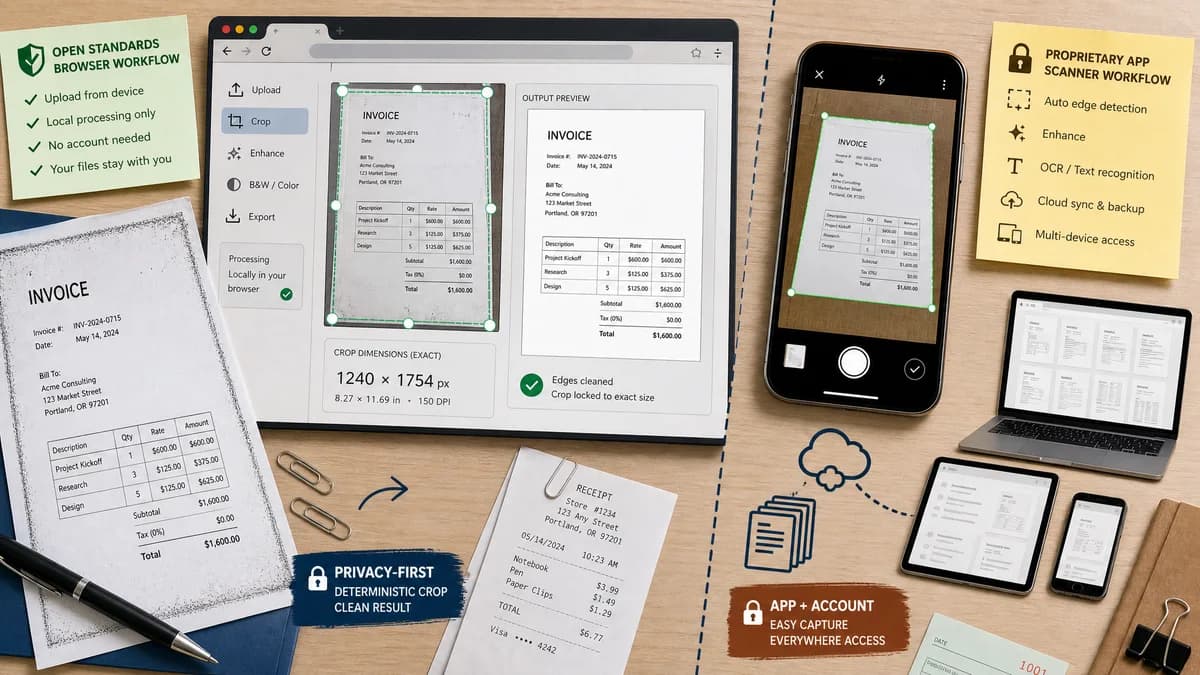
Why Scan Border Cropper fits
TextFaker can appeal to users who already have a photo or scan and need privacy-conscious edge cleanup with deterministic crop validation in the browser.
What CamScanner offers
CamScanner is a mobile scanning app that detects document edges, crops backgrounds, enhances scans, performs OCR, and manages scanned documents across devices.
Open alternative signals
Account and app model
Scan Border CropperBrowser page with local file processing for supported images.
CamScannerMobile app and document platform.
Output determinism
Scan Border CropperExact crop coordinates, dimensions, and validation messages.
CamScannerVisual scan result with app-managed crop and enhancement.
Document management
Scan Border CropperDownload cropped image and metadata; no document library.
CamScannerMulti-device document storage, sharing, OCR, and PDF workflows.
Privacy positioning
Scan Border CropperStrong because files can stay on device in the browser.
CamScannerCloud-connected product experience.
Decision guide
Best for quick cleanup of one or several existing image files with no app install, no account workflow, and visible crop math.
Best for end-to-end phone scanning, document management, OCR, sharing, and multi-device workflows.
Side-by-side open source alternative comparison
| Decision point | Scan Border Cropper | CamScanner | Takeaway |
|---|---|---|---|
| Capture workflow | Our workflowUpload or capture an image through browser input, then crop locally. | Proprietary workflowCapture, edge-detect, enhance, OCR, and manage documents in-app. | TextFaker should focus on fast cleanup, not a full scanner app. |
| Border detection | Our workflowDetects rectangular borders and reports removed pixels per side. | Proprietary workflowDetects document edges and crops off background. | Numeric border reporting differentiates TextFaker from scanner app magic. |
| Validation | Our workflowSafe-zone and bleed warnings can tell users when content is too close to the crop. | Proprietary workflowUser visually reviews the scan in the app. | Deterministic warnings are useful for print and document handoff. |
| File control | Our workflowDownload image output and crop metadata immediately. | Proprietary workflowDocument workflow may involve app library, sharing, PDF export, or cloud sync. | Direct downloads are simpler for occasional users. |
| Scope | Our workflowImages first; PDF support can be added through existing PDF tooling if available. | Proprietary workflowBroad PDF, OCR, and file management features. | Avoid overpromising OCR or cloud document features. |
| Mobile UX | Our workflowTouch handles, responsive tables, and camera input are required. | Proprietary workflowNative mobile UI optimized for capture. | Mobile polish matters for this comparison. |
Detailed research
Product Angle
CamScanner comparisons are about convenience. TextFaker should not imitate the whole app; it should solve the narrow moment when a user has a scanned image with ugly borders and wants a clean downloadable file.
- Use a single-screen mobile workflow.
- Make crop boxes easy to adjust by touch.
- Keep result labels compact and copy-ready.
Implementation Notes
For phone-captured documents, rectangular border cropping may not be enough if the image is perspective-skewed. Version one can still help with scanner borders; document perspective correction should be described only if implemented.
- Detect high-contrast page boundaries.
- Warn when the content edge is not rectangular enough for border-only crop.
- Avoid AI edge repair claims unless such a model exists.
Demand Evidence
Scanner app product pages and public support discussions show that automatic cropping is a core feature users notice, rely on, and troubleshoot.
- Users value edge detection because it removes background clutter.
- Users also need manual correction when automatic crop is wrong.
- Privacy-sensitive documents make browser-local processing compelling.
Test Strategy
Use fixture images of documents on contrasting backgrounds, scanner-bed black bars, and white page margins. Assert crop boxes and warning states.
Research notes
- CamScanner's official page describes automatic cropping, scan enhancement, and document edge detection.
- Public questions about scanner apps often focus on automatic corner detection and crop behavior, showing user demand around clean borders rather than only OCR.
- TextFaker should support mobile camera uploads but should not claim to replace full document management or OCR features.
Official source
The proprietary product link is included once here for source checking after the alternative analysis.
Official CamScanner source